Your Complete Guide to Speech to Text Technology in 2026
Discover how speech to text technology works. This guide covers top use cases, how to measure accuracy, and choosing the right solution for your needs in 2026.
tl;dr: Speech to text technology, also known as Automatic Speech Recognition (ASR), converts spoken words into written text. It works by using an acoustic model to "hear" sounds and a language model to predict the most likely words. This guide explains how it works, how it's revolutionizing industries from healthcare to content creation, and what to look for when choosing a service.
At its core, speech to text is a beautifully simple concept: it's technology that translates spoken words into written text. You might know it as Automatic Speech Recognition (ASR), and it’s the quiet engine powering everything from your phone’s voice assistant to the live captions on your video calls. Think of it as having a personal digital stenographer on standby, ready to type out everything it hears.
So, How Does It Actually Work?
It helps to think about how we, as humans, understand speech. We don't just hear a stream of noise; we recognize individual sounds, piece them together into words, and use context to figure out what someone is actually trying to say. Speech to text technology works in a surprisingly similar way. It’s like a sophisticated two-step dance between a "listener" and a "predictor."
The whole system relies on two key components: an acoustic model and a language model. The acoustic model does the listening, and the language model does the understanding. For a fantastic deep dive into the nitty-gritty, check out this professional's guide to speech to text software.
This flowchart breaks down the basic journey from a sound wave to a finished sentence.
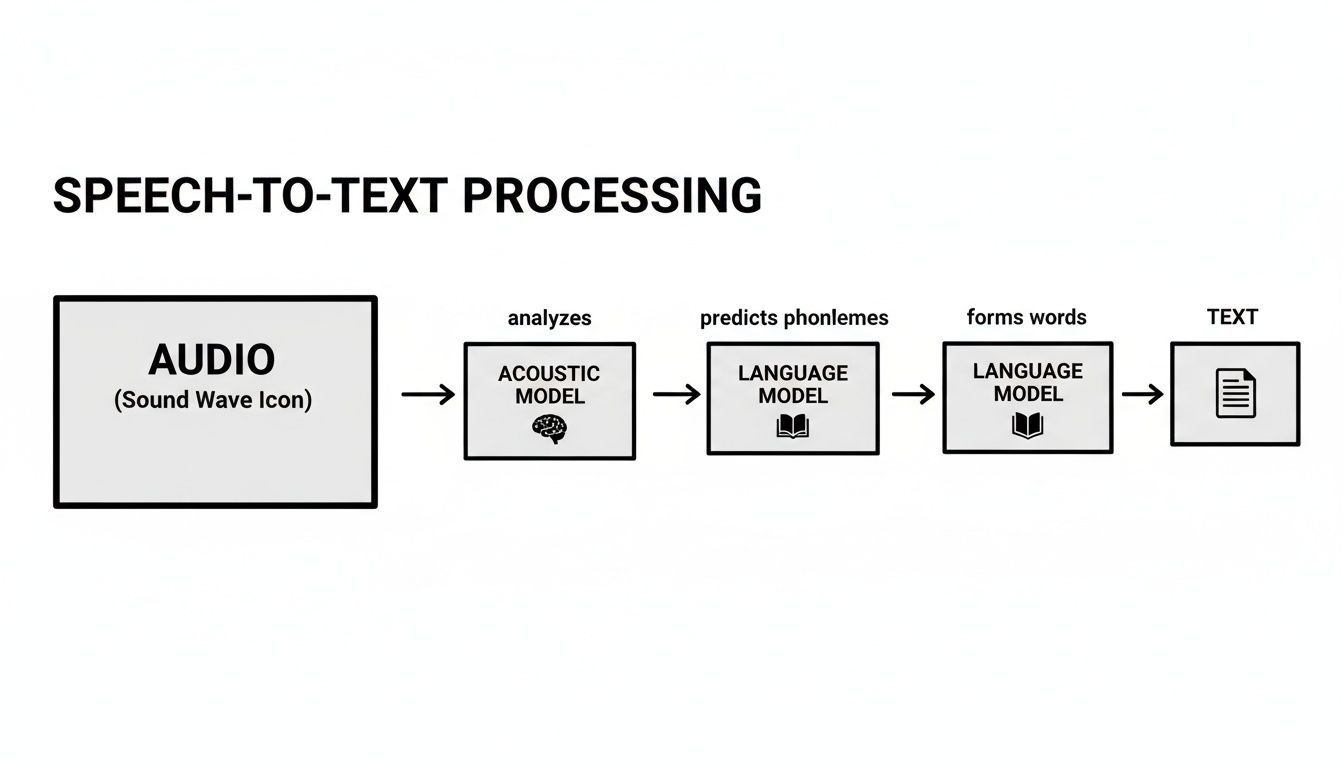
As you can see, it's a logical flow. Raw audio goes in one end, gets analyzed and interpreted in the middle, and clean, usable text comes out the other end.
To make this even clearer, let's break down the core components that make all of this possible.
The Core Components of Modern Speech to Text
| Component | What It Does for You | A Real-World Analogy |
|---|---|---|
| Acoustic Model | The "ears" of the system. It listens to the audio and breaks it down into the most basic sound units, called phonemes. | It's like a musician with perfect pitch who can identify every single note in a complex chord. |
| Language Model | The "brain." It takes those sound units and predicts the most likely sequence of words and sentences. | It's like a seasoned editor who instinctively knows which word should come next to make a sentence flow correctly. |
| Speaker Diarization | Identifies who is speaking and when. It assigns segments of text to different speakers in a conversation. | It's like watching a movie with subtitles that clearly label which character is speaking each line. |
These pieces work together in harmony to give you a transcript that’s not just accurate, but also readable and genuinely useful.
Step 1: The Acoustic Model (The Listener)
The whole process kicks off with the acoustic model. When you speak, you create vibrations—sound waves. The acoustic model’s job is to catch these waves and slice them into the smallest units of sound in a language, known as phonemes. For example, the word "cat" has three distinct phonemes: the "k" sound, the "a" sound, and the "t" sound.
To get good at this, the AI is trained on thousands upon thousands of hours of recorded human speech. It learns from people with different accents, speaking in different environments—from a dead-silent library to a bustling coffee shop. This massive training library helps it map specific sound patterns to the correct phonemes, even when there's background chatter.
Step 2: The Language Model (The Predictor)
Once the acoustic model has its list of phonemes, it hands them over to the language model. This is where the real magic happens. The language model is essentially a powerful prediction engine that figures out the most probable words and sentences those sounds could form.
It’s constantly asking itself, "Given these sounds, what is the most logical word to come next?" This is how it can tell the difference between "write," "right," and "rite." It looks at the surrounding words for context, just like our brains do.
The demand for this technology is skyrocketing. The market for real-time speech-to-text solutions was valued at $2.01 billion in 2025 and is projected to climb to $3.13 billion by 2034, growing at a steady clip of 6.7% per year. That’s a clear signal of just how essential these tools are becoming in our daily work.
How Speech-to-Text Is Changing the Way We Work

It’s one thing to understand the mechanics of how speech-to-text works, but it's another thing entirely to see what it actually does for people on the ground. The real story isn't about the technology itself, but what it unlocks by turning spoken words into structured, searchable, and usable data.
Think about a project team wrapping up a two-hour brainstorming session. In the past, someone was stuck re-listening to the entire recording or trying to decipher their own scribbled notes. Today, they can have a full transcript in minutes, complete with speaker labels, making it incredibly easy to pull out action items and key decisions.
This is where the magic really happens—moving from tedious manual work to smart, automated documentation.
For Business Teams and Researchers
For any busy professional, speech-to-text transforms messy meeting recordings into a searchable, actionable library of conversations. Instead of relying on who remembers what, anyone can find exactly who said what and when. That level of clarity and accountability makes projects run smoother and cuts down on frustrating miscommunications.
Researchers are dealing with the same challenge, but often on a much bigger scale. Manually transcribing hundreds of hours of interviews is a soul-crushing task that can put analysis on hold for weeks, if not months. With a tool like WhisperAI for AI transcription, all that rich qualitative data becomes organized and ready for analysis almost instantly.
This shift lets researchers spend their time finding patterns and insights in the data, not just typing it all out. It’s a fundamental change to the research workflow.
This isn't just about saving time; it's about making in-depth analysis practical for projects with tight deadlines and even tighter budgets.
For Content Creators and Marketers
In the content world, accessibility and SEO are everything. A podcast or a video is basically invisible to a search engine without some text to go along with it. Speech-to-text acts as the bridge, generating accurate transcripts that can be sliced, diced, and repurposed in all sorts of creative ways.
Creators use transcripts to:
- Generate Subtitles: This opens up video content to hearing-impaired audiences and the huge number of people who watch videos with the sound off.
- Create Blog Posts: A full transcript can be polished into a detailed article, capturing a whole new audience of readers.
- Produce Show Notes: Pulling out key quotes and a quick summary for episode descriptions helps listeners jump right to the good stuff.
This strategy does more than just expand your reach. It also feeds search engines like Google the keyword-rich text they need to understand your content and rank it higher.
Critical Uses in Specialized Fields
Beyond making everyday tasks easier, speech-to-text is proving essential in high-stakes fields where getting it right is non-negotiable.
In healthcare, doctors are using AI to dictate clinical notes during patient visits. This gets them out of the weeds of administrative work and lets them focus completely on the person in front of them. The legal world runs on precise documentation, and AI is delivering fast, reliable transcripts of depositions, hearings, and client meetings where every single word matters.
Contact centers have also seen a massive shift. Supervisors can now review 100% of agent calls via real-time transcripts, a huge leap from the old method of manually spot-checking just 5%. This complete visibility has led to a 20-25% jump in agent performance. Similarly, telemedicine platforms are using speech-to-text to capture clinical notes with over 95% accuracy across all kinds of accents, saving doctors 2-3 hours a day.
Whether it’s saving a team a few hours after a weekly meeting or ensuring life-saving accuracy in a medical chart, the applications are as varied as they are powerful. The core value is always the same: turning spoken language into an asset you can actually use.
Measuring Speech to Text Accuracy and Performance
Not all speech-to-text services are created equal. While most will flash impressive accuracy numbers, the only thing that really matters is how they handle your audio files in your real-world environment. Figuring out how to measure that performance is the key to picking a tool that actually saves you time instead of creating a huge editing headache.
The main benchmark everyone in the industry uses is Word Error Rate (WER). It's a straightforward way to calculate the percentage of mistakes in a transcript when compared to a perfect, human-verified version.
So, What Is Word Error Rate?
Think of WER like a golf score—the lower, the better. It simply counts up all the errors—words that were substituted, deleted, or inserted—and divides that total by the number of words in the original, correct transcript. For example, if you have a 100-word audio clip and the AI makes five mistakes, you have a WER of 5%.
This metric gives you a concrete number to compare different services. A system with a 4% WER is objectively more accurate than one with a 15% WER on the same audio file.
But be careful. A single WER score can be deceptive. A low overall rate might look great on paper but could be hiding major flaws that only show up in specific situations, like when multiple people are talking or there's a lot of background noise. If you want to dive deeper, you can learn more about AI transcription accuracy and how to properly evaluate it for your needs.
Beyond the Numbers: What Really Tanks Accuracy
It’s one thing to transcribe a perfect studio recording, but let’s be honest, that’s almost never what we’re working with. The real measure of a great speech-to-text system is how it handles the chaos of everyday audio.
A few key factors can make or break performance. It's worth knowing what they are so you can look for a solution built to handle them.
Key Factors That Impact Transcription Accuracy
| The Challenge | Why It's Hard for AI | What to Look For in a Solution |
|---|---|---|
| Background Noise | Sounds like coffee shop chatter, street traffic, or music can easily drown out spoken words, completely confusing the AI. | Look for advanced noise cancellation features and models trained on huge amounts of "messy" real-world audio. |
| Multiple Speakers | When people start talking over each other (crosstalk), the AI has a tough time separating the voices and figuring out who said what. | You need a service with strong speaker diarization that can tell voices apart and label them correctly, even when they overlap. |
| Heavy Accents | If an AI was trained mostly on one type of accent (like standard American English), it will struggle to understand different dialects and pronunciations. | The best systems are trained on a global dataset that includes a massive variety of accents and dialects from around the world. |
| Industry Jargon | Specialized terms in fields like law, medicine, or finance often aren't in a general AI's vocabulary, leading to bizarre and useless substitutions. | The solution should let you add a custom vocabulary or offer models that have been fine-tuned for specific professional fields. |
Medical dictation is a perfect real-world example of this. A standard, off-the-shelf model might hear "myocardial infarction" and write something nonsensical like "my oh cardial in park shun." In contrast, a specialized model like Google's MedASR, which is trained specifically on medical language, achieves a much lower 5.2% WER on chest X-ray dictations. The generalist model? It had a staggering 28.2% WER on the exact same audio.
This just goes to show why testing is non-negotiable. The only way to know for sure if a tool will work for you is to throw your toughest, messiest audio files at it and see what comes out the other side.
So, you’re ready to pick a speech-to-text service. With so many options out there, it’s easy to feel a bit lost. But here’s the secret: finding the right fit isn't about chasing the highest accuracy number. It’s about matching the tool's capabilities to your specific needs, your workflow, and your security standards.
Think of it like buying a car. You wouldn't just look at the top speed, right? You’d check the gas mileage, safety ratings, how much you can fit in the trunk, and whether it fits your budget. The same logic applies here. You need a solution that works for you in the real world.
Start With the Core Features
Before you get dazzled by fancy add-ons, make sure any tool you’re considering absolutely nails the basics. These are the foundational features that will determine if a service is even in the running.
- Accuracy and Language Support: How well does it actually handle your audio? The best way to know is to test it with your messiest files—the ones with background chatter, heavy accents, or industry-specific jargon. Also, double-check that it supports all the languages and dialects you work with. A tool that boasts 99% accuracy on perfect studio audio in English is useless if you're working with anything else.
- File Limits and Types: Look into the maximum file size and length you can upload. Some services choke on large files, which is a dealbreaker for researchers with multi-hour interviews or podcasters with long episodes. Make sure it accepts common formats like MP3, WAV, and M4A without a fuss.
- Export Options: A transcript is only useful if you can get it into a format you can actually work with. You'll want versatile export options like PDF for easy sharing, DOCX for editing, TXT for simplicity, and SRT for video captions.
Without these fundamentals locked down, even the most advanced platform will just end up being frustrating.
Evaluate the Advanced Time-Saving Features
Once you have a shortlist of services that cover the basics, it’s time to look at the features that separate a good tool from a great one. These are the capabilities that turn a raw wall of text into a polished, ready-to-use document with minimal manual effort.
One of the most important is speaker diarization—the AI’s ability to identify and label who is speaking and when. For anyone transcribing meetings, interviews, or panel discussions, this is an absolute must-have for creating a transcript that’s actually readable. You can learn more about the advanced features that make modern transcription so powerful.
Don't Overlook Security and Compliance
In any professional setting, security isn't just a feature; it's a fundamental requirement. You're often handing over sensitive audio from client meetings, patient consultations, or legal depositions, so you have to trust the platform you're using.
When you upload audio, you are entrusting a service with your data. Verifying its security practices is not optional; it’s a critical step in protecting yourself, your clients, and your organization.
Look for clear commitments to data protection. Here are the key indicators of a trustworthy service:
- Compliance Certifications: Does the provider adhere to major standards like GDPR (for data privacy in Europe) and SOC 2 (for data security and operational controls)? These aren't just acronyms; they're proof of a serious commitment to security.
- Data Encryption: Is your data encrypted both while it's being uploaded (in transit) and while it's stored on their servers (at rest)? The answer should always be yes.
- Clear Privacy Policies: Does the company explicitly state that they won't use your data to train their AI models without your consent? This is a huge one. Your data should remain your own.
Compare Pricing Models Carefully
Finally, let's talk about money. Speech-to-text pricing generally falls into two camps: pay-as-you-go (per-minute) billing and subscription plans.
Per-minute billing can seem cheap for a one-off task, but the costs can become unpredictable and spiral quickly if you have regular transcription needs. Subscription models, on the other hand, offer a flat fee for a set amount of usage, or even unlimited use. For most businesses and power users, that predictability is a game-changer.
This trend toward stable, scalable solutions is reshaping the market. By 2026, software components are expected to command the bulk of the market, as organizations prioritize cloud-based solutions with unlimited plans, moving away from restrictive per-minute caps. This global shift empowers businesses, creators, and researchers with tools that can handle large files up to 500MB seamlessly, turning audio chaos into structured, actionable insights. Discover more about this industry trend on MarketsandMarkets.com.
Putting Speech to Text into Your Daily Workflow
Choosing the right speech-to-text service is a huge first step, but the real magic happens when it becomes an invisible, automatic part of how you work. The goal is to move beyond manually uploading files after every meeting or interview. You want to create a seamless flow where audio is captured, transcribed, and delivered without you even thinking about it.
This is where automation comes in. A truly effective workflow makes transcription a background process that just happens, freeing you up to focus on the insights hidden in your audio, not the logistics of getting it transcribed.
Making Transcription an Invisible Process
The secret to really integrating speech to text is to kill as many manual steps as possible. You can build a surprisingly powerful system just by connecting the tools you already use to your transcription service.
For instance, many professionals now link their cloud storage—like Google Drive or Dropbox—directly to their transcription platform. When a new audio file from a Zoom call lands in a specific folder, it automatically kicks off the transcription process.
That simple connection means a full, searchable transcript is already waiting in your inbox or project management tool just minutes after a meeting ends. This is how you go from using speech to text reactively to making it a proactive part of your documentation strategy.
Tips for Content Creators Repurposing Audio
For any content creator, a single audio recording is a goldmine. An accurate transcript is the key that unlocks it all, letting you multiply your output from a single recording session. A great service like WhisperAI for AI transcription can be your starting point.
Here’s a common workflow for turning one podcast episode into a whole suite of assets:
- The Full Blog Post: Polish the raw transcript into a detailed, SEO-friendly article.
- Key Takeaway Snippets: Pull out the most powerful quotes and turn them into shareable graphics for Instagram or LinkedIn.
- Email Newsletter Content: Use a summary of the conversation to create an engaging newsletter for your subscribers.
- Video Subtitles: Export the transcript as an SRT file to add accurate captions to video clips, boosting accessibility and watch time on social media.
This approach isn't just about saving time; it's a strategic way to reach different audiences on different platforms with content tailored to how they like to consume it.
Best Practices for Researchers
For academic and market researchers, organizing and analyzing interview data is everything. An effective speech-to-text workflow is absolutely essential for keeping this process structured and efficient.
Once your transcripts are ready, the first step is to establish a consistent naming convention and folder structure. It sounds simple, but it makes finding specific interviews so much easier down the road. From there, you can import the text files into qualitative data analysis software to begin coding—highlighting themes, patterns, and important quotes.
Guaranteeing Quality at the Source
Finally, never forget that the quality of your transcript is directly tied to the quality of your audio. Modern AI can work wonders with messy recordings, but you can ensure top-tier accuracy with a few simple habits.
- Use a Decent Microphone: An external USB mic is a small investment that pays huge dividends in clarity. You don't need a professional studio setup, just something better than your laptop's built-in mic.
- Reduce Background Noise: Find a quiet space. That means getting away from echoes, open windows, or humming appliances.
- Speak Clearly: If you're running the meeting or interview, encourage speakers to talk at a natural pace and try not to talk over one another.
These small adjustments at the recording stage will dramatically improve the final output. You'll save valuable editing time and, most importantly, you'll be able to trust that your transcripts are as reliable as possible.
The Future of Voice and Language Technology
The speech-to-text tools we use today are just scratching the surface of what’s possible. The entire field is moving at an incredible speed, with systems becoming more accurate, responsive, and stitched into the very fabric of how we work and live. What started as a simple way to get words on a page is quickly becoming a bridge to much deeper AI-powered insights.
The next wave of innovation is already building. Imagine sitting in a multilingual meeting where a system doesn't just transcribe what's said, but also translates everyone's contributions in real time. This isn't science fiction; it’s where this technology is headed, and it promises to completely tear down communication barriers for global teams.
The Rise of Intelligent Audio Analysis
Looking ahead, systems will do more than just capture words—they'll understand the meaning and emotion behind them. This leap is being driven by huge strides in sentiment analysis and natural language understanding.
So what does this actually look like in the real world?
- For Customer Support: An AI could analyze a customer's tone of voice to pick up on frustration or happiness, automatically flagging calls that need a human manager to step in.
- For Business Meetings: The system could identify key decisions, action items, and even moments of tension straight from the audio, then generate a smart, actionable summary on its own.
This evolution turns speech-to-text from a passive documentation tool into an active partner that helps make sense of conversations. It also means that the text generated from speech can power other AI systems, like text to video AI, to automatically create engaging video content from nothing more than a transcript.
Preparing for Tomorrow’s Innovations
This rapid growth is fueled by serious investment. Valued at $3.19 billion in 2024, the speech-to-text API market is expected to surge to $11.4 billion by 2033, climbing at an annual growth rate of 15.2%. Cloud-based solutions are at the forefront of this expansion, particularly in high-growth regions like Asia-Pacific.
When you adopt a high-quality transcription platform today, you're doing more than just solving a current problem. You’re building a foundation for what comes next. The tools you put in place now will get your workflows ready for the next generation of audio intelligence. You can learn more by exploring our thoughts on the future of voice technology in 2025.
At the end of the day, speech-to-text is no longer just a nice-to-have feature; it's a core productivity engine. It’s the foundational technology that lets anyone who wants to work smarter, not harder, turn spoken words into usable, actionable data. And the innovations on the horizon will only make it more essential.
Frequently Asked Questions About Speech to Text
Still have a few questions? Of course you do. Whenever you’re thinking about adding a new tool to your tech stack, you need to know it can pull its weight. Here are some straightforward answers to the questions we hear all the time.
How Accurate Is Modern Speech to Text, Really?
This is always question number one. Most professional-grade services today can hit accuracy rates of 95% or higher, but that number needs context. What it means is that on clear audio, the AI gets 95 or more words right out of every 100. For most jobs, like transcribing meetings or interviews, that’s more than good enough.
But the real world is messy. The true test is how a tool performs on your audio, with all its background noise and unique quirks. A robust system is trained on a huge variety of data, which helps it stay accurate even when the recording isn't perfect. The only way to know for sure is to try it out with one of your own files.
Can These Tools Handle Multiple Speakers or Strong Accents?
Yes, and this is where today’s speech-to-text systems have made huge leaps. High-end AI uses a feature called speaker labeling (or diarization) to figure out who is talking and when. It’s what transforms a chaotic wall of text into a clean, easy-to-read script, with each person's dialogue neatly separated.
When it comes to accents, the best models have learned from thousands of hours of speech from people all over the globe. That massive training dataset makes them remarkably skilled at understanding a huge range of dialects, not just a single "standard" version of a language.
Is My Data Secure When I Upload It?
Security is a deal-breaker, especially if you’re transcribing sensitive conversations for business, legal, or medical purposes. Reputable services protect your files with 256-bit encryption, both while your file is in transit and while it's stored.
Your data should always belong to you. A transcription service you can trust will use strong encryption from the moment you hit "upload." Always look for providers who are upfront about their security measures and their compliance with standards like GDPR.
Beyond that, always check the privacy policy. Make sure it clearly states that your data won’t be used for AI training unless you explicitly agree to it. Certifications like GDPR and SOC 2 are also great signs that a company takes data security seriously.
Ready to turn your conversations into clear, actionable text? WhisperAI delivers professional-grade accuracy and enterprise-level security to help you work smarter. Explore our advanced AI transcription features and see how easy it can be.