Legal Transcription: A Complete Guide for Modern Law
Discover everything you need to know about legal transcription. This guide covers formats, AI vs. human workflows, quality standards, and tools for 2026.
Legal transcription involves turning legal audio or video into an exact written record. These days, teams are using software-first workflows because the market's booming—expected to hit USD 21.24 billion in 2024, with legal transcription software grabbing 33.2% of that. The most efficient method isn't just AI or manual typing. It's using AI for the draft, then having a human polish it to make it court-ready.
Junior associates often meet legal transcription under pressure—a long deposition, messy hearing audio, and a tight deadline for a clean transcript. It's not enough for the text to be readable; it has to be precise for legal review, filing, strategy, or court use.
Many people think legal transcription is just "speech-to-text for lawyers." It's not. Legal transcription is closer to the official record than regular business transcription. Every speaker label, interruption, filler, and nonverbal cue can matter. Formatting is more critical than you'd assume.
The modern approach is a game-changer. Legal teams no longer have to pick between speed and precision. They can use AI to move quickly and apply human judgment where it counts.
Table of Contents
- Your Introduction to Legal Transcription
- The Core Types of Legal Transcription
- The Uncompromising Standards of Legal Text
- AI vs Human Transcription The Modern Tradeoff
- A Modern Workflow for Legal Transcription
- Frequently Asked Questions About Legal Transcription
Your Introduction to Legal Transcription
A lawyer doesn't ask for a transcript because text is convenient. They need it to create a record that supports motion practice, witness prep, analysis, client reporting, or disputes over what was said.
Legal transcription means turning recordings from legal settings into text that follows legal conventions and can hold up under scrutiny. This includes depositions, hearings, interviews, attorney dictation, administrative proceedings, and case-related meetings.
The field's size shows why workflow matters. The global legal transcription market is pegged at USD 21.24 billion in 2024 and is expected to hit USD 39.88 billion by 2034, growing at a 6.5% CAGR. Legal transcription software is expected to snag 33.2% market share in 2024, according to Future Market Insights. This indicates that software is now central to processing audio at scale.
For teams modernizing without lowering standards, check out this guide for legal professionals. It frames how transcription fits into broader legal work.
Practical rule: If the transcript might be reviewed by opposing counsel, a judge, a regulator, or a client, assume scrutiny from the start.
The Core Types of Legal Transcription
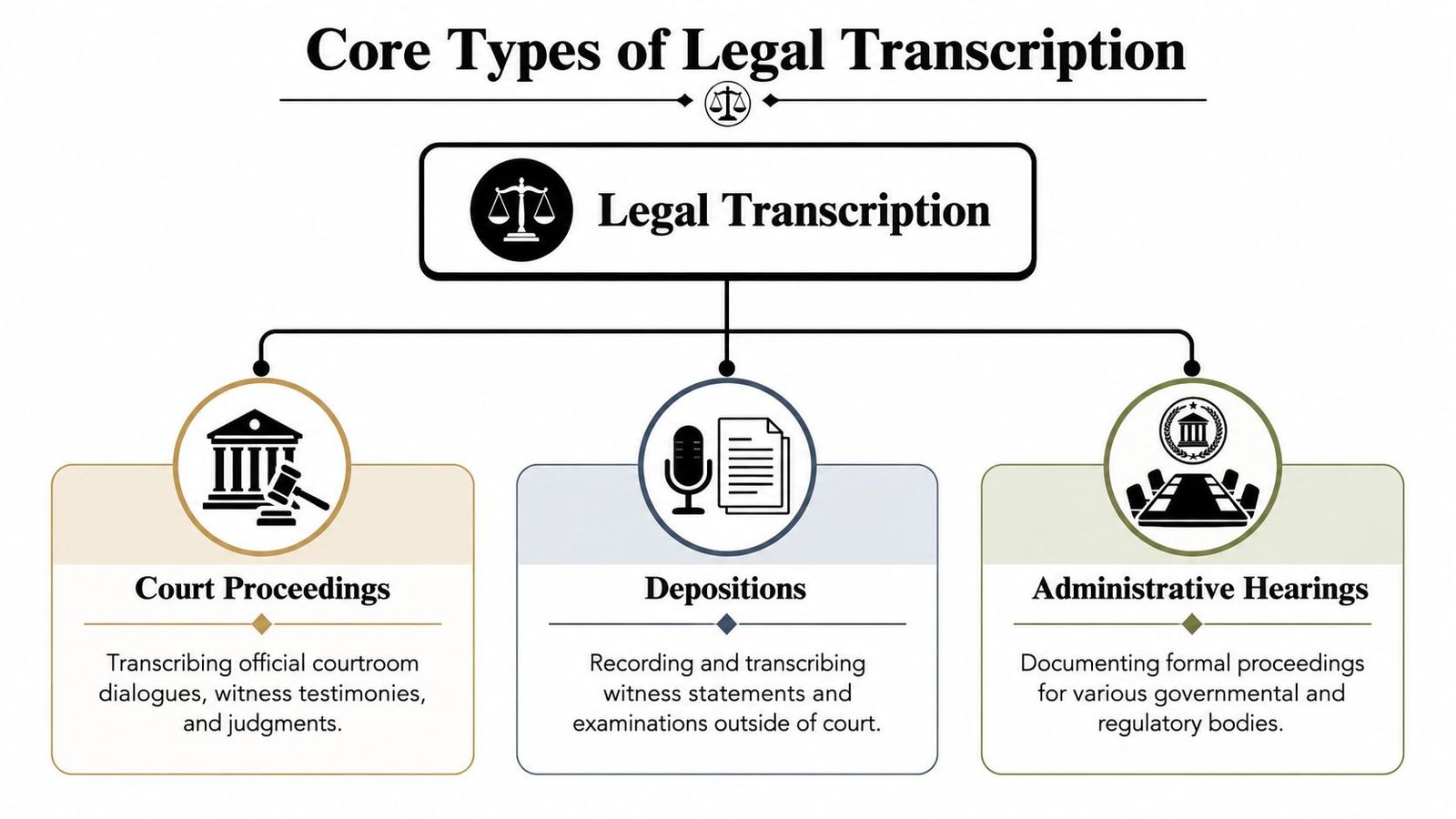
Legal transcription isn't a one-size-fits-all task. It covers various records, each with its own purpose. Treating them all the same? Recipe for errors.
Court proceedings
Court transcripts capture everything that happens in the courtroom—judicial comments, attorney arguments, witness testimony, objections, rulings, and side exchanges that belong in the record.
This type leaves no room for error. The wording must closely match the proceeding, and formatting must align with legal expectations. Mislabel a speaker, or attach a response to the wrong question, and the transcript becomes unreliable.
Depositions
Depositions may seem simpler because they're outside the courtroom, but they can be dense and speaker-heavy. Attorneys interrupt. Witnesses pause, restart, or clarify. Exhibits get referenced quickly and sometimes unclearly.
That's why deposition transcripts need tight speaker identification and a clean Q&A structure. Teams handling this work often benefit from this transcript of deposition guide to match the style to litigation use.
A deposition transcript isn't just a record of words. It's a tool lawyers use to test credibility, isolate admissions, and prepare for trial.
Administrative hearings and legal dictation
Administrative hearings fall between courtroom formality and internal documentation. They may involve agencies, boards, regulators, or other official bodies. The stakes can be high, even if the setting feels less theatrical.
Legal dictation is different. An attorney may dictate case notes, pleadings, correspondence, chronology updates, or follow-up instructions. It might not become an official record, but it still needs to be accurate because others will act on it.
A simple way to think about the difference:
| Type | Main purpose | What matters most |
|---|---|---|
| Court proceedings | Official record | Exactness and formal structure |
| Depositions | Discovery and testimony review | Speaker tracking and Q&A clarity |
| Administrative hearings | Regulatory or agency record | Precision plus procedural context |
| Dictation | Internal legal workflow | Accuracy, terminology, and turnaround |
The Uncompromising Standards of Legal Text
Legal transcription gets tricky when someone thinks "close enough" will work. It won't. The standard is usually verbatim, court-ready text that preserves colloquy, speaker IDs, and parentheticals. Because transcripts might end up in court, they must reflect the proceeding with extreme accuracy, including fillers and stutters when intelligible, as explained in TranscribeMe.
What verbatim really means
Many think "verbatim" means every word is typed. In legal work, it's more precise. The transcript may also need to capture false starts, interruptions, incomplete answers, and notations like pauses or nonverbal reactions where relevant.
This detail matters because legal meaning often lives in nuance. A hesitant "I think so" isn't the same as "yes." A witness talking over a question creates a different record than one who answers cleanly after the full question.
Formatting carries legal meaning
Formatting isn't just for looks. It shows how the exchange unfolded.
Common requirements include:
- Speaker identification: Every question and answer must be assigned to the right person.
- Parentheticals: Notes like laughter, pauses, or unintelligible speech may need to appear in a standard form.
- Colloquy preservation: Side discussion between counsel, the court, or the witness can't be casually smoothed out.
- Jurisdictional formatting: Courts, agencies, and firms often expect specific layouts, bylines, and transcript conventions.
When the transcript might become the record, style choices stop being editorial choices.
Confidentiality is part of quality
Accuracy alone isn't enough. Legal files usually contain privileged, personal, strategic, or commercially sensitive material. Sloppy handling can create risk even if the text is perfect.
That's why legal teams should pair transcription with disciplined file controls, encrypted transfer, and limited-access sharing. For those tightening these procedures, FaxZen's guide to secure document sharing is a valuable resource.
AI vs Human Transcription The Modern Tradeoff
The old debate asks which is better: AI or human transcription. But the real question is which parts of the job should software handle, and which need human review.
A professional legal transcriptionist typically works with a USB foot pedal, transcription software, and specialized headphones. Training materials often point to a target of at least 75 words per minute with few errors, according to U.S. Legal Support. That setup exists for a reason. Legal audio is messy. Overlapping speakers, accents, poor recordings, and background noise can trip up raw automated output.
Where AI helps
AI transcription excels in speed and first-pass conversion. It can quickly create a draft, help staff search recordings faster, and reduce the time a human reviewer spends starting from scratch.
That makes AI useful for:
- Initial draft creation: Quickly turning long recordings into editable text.
- Searchability: Helping staff find names, topics, and disputed exchanges faster.
- Volume handling: Processing many files without creating a large manual typing queue.
A practical option for that first draft is AI transcription for legal audio and video, especially when a team needs searchable text before the final review.
Where humans still matter
Human reviewers handle the tasks that require judgment. They identify speakers in unclear audio, correct legal terms, restore formatting, check disputed passages, and decide how to mark interruptions or inaudible sections.
This is crucial when the transcript might circulate outside the team or be used formally.
| Feature | AI Transcription | Human Transcription |
|---|---|---|
| Speed | Fast first draft generation | Slower, especially from scratch |
| Audio ambiguity | May struggle with overlap and noise | Better at resolving context |
| Formatting judgment | Limited without review | Stronger on legal conventions |
| Scalability | Good for high file volume | Limited by staffing and time |
| Final legal readiness | Usually needs checking | Better suited for final verification |
Decision test: If the transcript is for internal reference only, a light-touch review may suffice. If it could affect strategy, filing, or admissibility, human review is essential.
A Modern Workflow for Legal Transcription
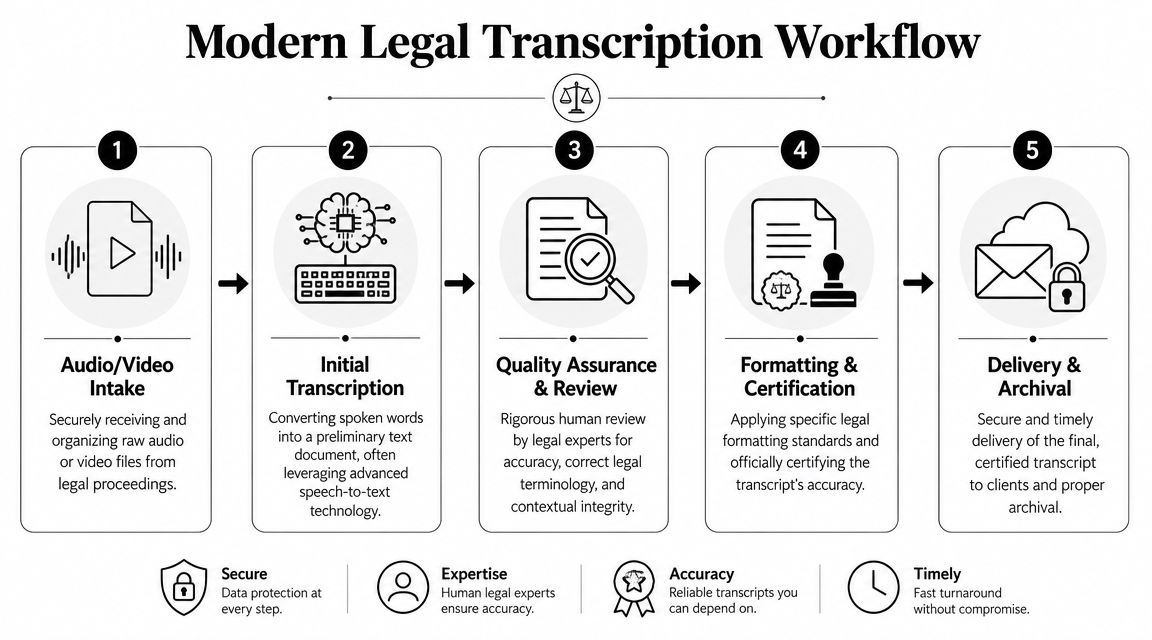
A good legal transcription process needs to do two things: move fast enough for active casework and stay controlled enough for legal standards.
Step 1 and Step 2
Start with secure intake. Recordings should be consistently named, matched to the right matter, and stored securely before editing or sharing begins.
Then create the initial draft with an AI tool. The goal isn't to call that draft final. It's to speed up the process so legal staff can focus on judgment-heavy review instead of raw typing.
For teams connecting intake systems and transcription tools, DigiParser's AssemblyAI integration shows how document and audio workflows can be automated upstream.
Step 3 through Step 5
Once the draft exists, the real legal-quality work begins:
- Human review and correction
A reviewer checks names, speaker labels, legal terms, interruptions, and unclear passages against the audio. - Formatting and certification preparation
The transcript is shaped into the required structure for the matter, court, agency, or internal standard. - Delivery and archival
The final file is exported, shared securely, and stored so the team can retrieve the authoritative version later.
A common pitfall is thinking the transcript is "done" once the words appear on screen. That's only halfway. The transcript becomes truly useful after review, formatting, and secure delivery.
Frequently Asked Questions About Legal Transcription
Can an AI-assisted transcript be used in legal work
Yes, but the key isn't whether AI was used. The real question is whether the final transcript was reviewed, corrected, and prepped to the standard required for its use. Internal notes need one level of care. A transcript for formal reliance needs much more.
Is a legal transcriptionist the same as a court reporter
No. A court reporter captures proceedings in real time, often live. A legal transcriptionist works from recorded audio or video after the event. Both support the legal record but at different stages and with different tools.
Does verbatim always mean every sound gets included
Not every sound. It usually means the transcript faithfully captures the spoken exchange, including fillers, stutters, and relevant nonverbal cues when they matter and are clear. The exact treatment depends on the transcript's purpose and required format.
What affects legal transcription cost
Pricing often depends on the recording's length, audio clarity, speaker count, formatting needs, and urgency. Tough audio and tight deadlines generally increase review work.
What should a legal team check before choosing a workflow
A short checklist helps:
- Audio complexity: More speakers and more noise usually mean more review time.
- Use case: Internal reference and court-facing use are not the same job.
- Security handling: Sensitive legal files need controlled sharing and storage.
- Review ownership: Someone must be accountable for the final text.
Teams that want a faster first draft without skipping legal review can use WhisperAI - #1 AI Transcription as part of a hybrid workflow. It's best for draft-generation, where legal staff can quickly convert recordings into searchable text, then apply human review, formatting, and compliance checks before finalizing the transcript.