Subtitles for Documentaries Done Right
A practical guide to creating professional subtitles for documentaries. Learn transcription, styling, formats, and QC for broadcast-ready results.
TL;DR: Creating subtitles for a documentary isn't just about typing out what people say. It's a structured process that starts with clean audio, uses AI for the heavy lifting of a first draft, relies on human expertise for nuance and accuracy, and ends with the right file format for broadcast and accessibility. When you get it right, you protect your story's integrity for every single viewer.
Your Blueprint for Broadcast-Ready Documentary Subtitles
If you're a filmmaker, you know that subtitles are no longer an afterthought. They're a fundamental part of your film's accessibility and global reach. But let's be honest—bad captions can completely derail the viewing experience and cheapen all of your hard work.
This guide lays out a clear, field-tested workflow for producing subtitles that feel like a natural part of your film, not a tacked-on extra. We'll walk through the entire process, from prepping your raw audio to exporting a perfectly synced, polished final file. The goal here is simple: to make sure your documentary connects with everyone, everywhere.
To give you a bird's-eye view, here's a quick breakdown of the core stages.
Documentary Subtitling Workflow At a Glance
| Phase | Primary Goal | Key Tools & Techniques |
|---|---|---|
| Audio Preparation | Create a clean, clear dialogue track to maximize transcription accuracy. | Noise reduction, audio leveling, isolating dialogue stems. |
| AI First Draft | Generate a highly accurate baseline transcript quickly. | Using a tool like WhisperAI for its speed and precision. |
| Human Editing & Styling | Refine the text for accuracy, timing, readability, and context. | Manual proofreading, speaker labeling, applying character limits. |
| Export & QC | Deliver the final subtitle file in the correct format and ensure perfect sync. | Exporting to SRT, VTT, or SCC; full playback review. |
This table maps out the journey, but as any creative knows, the real magic happens in the details of each step. Let's dive in.
The Four Pillars of Documentary Subtitling
Think of this process less as a rigid, step-by-step list and more as an interconnected system. The quality of your work in one stage directly feeds into the success of the next. Nailing each of these four pillars is what separates amateur captions from a professional, broadcast-quality product.
This visual flow shows the journey from raw sound to the final, polished subtitles that appear on screen.
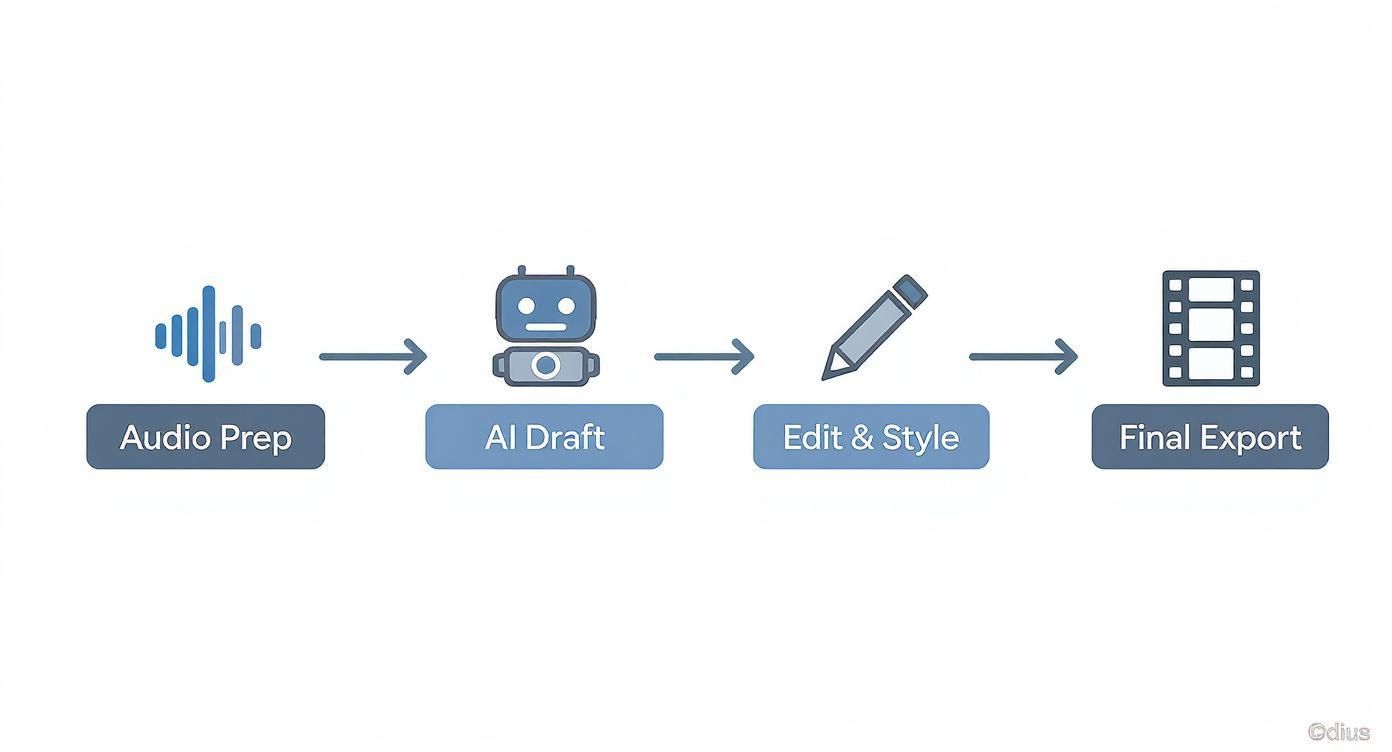
As the infographic makes clear, great subtitling begins long before you type a single word. It all starts with the sound.
Here’s what each phase really involves:
- Audio Preparation: This is your foundation. Before you even think about transcription, you need to clean up your audio mix. That means reducing background noise, balancing dialogue levels, and isolating voices as much as possible. A clean track is the single biggest factor in getting a highly accurate AI transcript right out of the gate.
- AI-Powered First Draft: Let the machine do the initial grunt work. Modern tools like WhisperAI can generate a surprisingly accurate transcript in just a few minutes, saving you dozens of hours of painstaking manual transcription. This isn't your final product, but it's a massive head start.
- Meticulous Editing and Styling: This is where a human editor's skill is irreplaceable. You'll go through the AI draft to fix any errors, assign speaker labels, and perfect the timing to match the on-screen action. It's also where you apply styling rules for readability—things like character-per-line limits and making sure the text doesn't flash by too quickly for the audience to read.
- Final Export and QC: The last step is getting the subtitles out of your editor and into the world. This means choosing the right file format, like SRT or VTT, depending on where your film will be seen. If you want to go deeper on formats, check out this detailed SRT export guide comparing WhisperAI and its competitors. Finally, a full quality check—watching the film with the captions on—is non-negotiable to catch any sync issues or typos before it goes live.
Mastering this workflow transforms subtitling from a tedious post-production chore into a powerful storytelling tool. You're not just adding text to a screen; you're preserving the nuance and intent of every spoken word for every single person watching.
Getting Your Audio Ready for Transcription
The road to great subtitles for documentaries doesn't begin with a single typed word. It starts with sound. The final quality of your captions is a direct reflection of the audio you feed into your transcription tool. It’s the classic "garbage in, garbage out" problem—a noisy, muddled audio file will inevitably spit out a messy, inaccurate transcript, leaving you with hours of painful cleanup work.
Your first job is to create a clean dialogue track. This isn’t the final sound mix for the film; think of it as a dedicated "transcription mixdown." The goal is simple and singular: make every spoken word as clear and prominent as humanly possible.
This means getting ruthless with your audio layers. Isolate the dialogue tracks and mute the music, sound effects, and anything else that isn't speech. If you're working in a non-linear editor like Premiere Pro or DaVinci Resolve, this is as simple as soloing the right tracks. A clean source file is the single biggest favor you can do for yourself and the AI.
The Art of the Transcription Mixdown
Before you even think about hitting that "transcribe" button, you need to deal with the audio gremlins that haunt every documentary project. I'm talking about wind noise, traffic rumble, the dreaded refrigerator hum—all the ambient sounds that can completely throw an AI for a loop and generate bizarre, nonsensical text.
Start with some basic audio hygiene. Most video editing software has more-than-capable tools built right in. You don't need a pro audio engineer's touch here; a light hand is all it takes to clean up the signal for the AI.
Here's a quick checklist I run through for my audio prep:
- Noise Reduction: Apply a gentle noise reduction filter to take the edge off consistent background sounds. Go easy, though. Over-processing can create weird digital artifacts and make the dialogue sound warped.
- Level Balancing: Make sure the volume is consistent. If one interview subject is practically whispering while another is booming, balance their levels. You want the AI to hear everything at a uniform volume.
- Dialogue Isolation: This is the big one. Whenever possible, work from isolated dialogue stems. Muting the score and distracting SFX gives the AI a clean, unobstructed path to the spoken word.
The time you put into a clean audio mixdown pays you back tenfold in the editing bay. A 98% accurate AI transcript is a dream to polish. An 80% accurate one is a nightmare.
This prep work is absolutely crucial for documentaries, which are often shot in less-than-ideal audio environments. You’re frequently dealing with thick accents, highly technical jargon, or multiple people talking over each other in a heated moment. A clean audio file gives a sophisticated tool like WhisperAI the best possible shot at making sense of the chaos.
Getting a Solid First Pass with AI
With your audio prepped and polished, it’s time for the AI to do the heavy lifting. This is where modern tools completely change the game. Manually transcribing a one-hour documentary can take a professional 4-6 hours. An AI can turn around a draft in just a few minutes.
The trick is to build this step right into your video editing workflow. Both DaVinci Resolve and Adobe Premiere Pro now have impressive built-in transcription features, and third-party plugins can bring even more powerful models directly into your timeline. This completely eliminates the clunky, old-school process of exporting audio, uploading it to some web service, and then trying to sync the text back up.
Here are a few pro tips for getting the best results from your AI pass:
- Pick the Right Tool: The built-in transcribers are convenient, but a dedicated, specialized service often delivers that extra bit of accuracy. To get a better feel for the options, you can learn more about AI audio transcription and see what fits your project.
- Check Your Settings: Before you start, double-check that you've selected the correct language. If your documentary has multiple speakers, find a tool that offers speaker labeling (diarization) to automatically sort out who's talking.
- Mind the Jargon: If your film is packed with specific terminology—medical, scientific, legal—get ready for a manual review pass. The AI models are getting scarily good, but they can still trip over highly specialized vocabulary.
The transcript you get back won't be perfect—let's be clear about that. You will still need a human to go through it, catch the inevitable errors, add crucial context, and fine-tune the timing. But by starting with pristine audio and a powerful AI, you’ve transformed a monumental chore into a manageable editing task. This foundation sets the stage for everything else, ensuring your subtitles tell the story just as powerfully as your visuals.
From Raw Text to a Readable Story
An AI transcript is an incredible starting point, but it's not the finish line. Think of it as a beautifully primed canvas, not the final painting. This is where your storytelling instincts and human expertise take over. The editing and styling phase is what turns a raw text file into a polished, readable narrative that actually complements your film instead of distracting from it.
This process is about so much more than fixing typos. It’s about shaping that raw text into effective subtitles for documentaries, zeroing in on the subtle details that guide the viewer’s experience. Your goal is to make the subtitles feel completely organic—an intentional part of the film itself.
The Art of Speaker Labeling
In any documentary, knowing who is speaking is everything. An AI might detect a change in voice, but it has no idea if that's "Dr. Anya Sharma" or "John, Eyewitness." This is where clean, consistent speaker labeling becomes absolutely essential.
Your first editing pass should be all about identifying every speaker and giving them a consistent label. It’s a small detail, but it’s the one that prevents your audience from getting lost, especially during rapid-fire interviews or scenes packed with different subjects.
Here are a few best practices that work well:
- Be Consistent: Pick a format and stick with it. Common choices include brackets like
[Dr. Sharma]or an all-caps name with a colon, likeDR. SHARMA:. - Prioritize Clarity: Use a person’s title if it adds context (e.g.,
[LEAD DETECTIVE]). If specific names don't matter, a simple descriptive label like[NARRATOR]or[PROTESTER]is perfect. - Handle Off-Screen Dialogue: When someone speaks from off-screen, a simple note helps orient the viewer. An italicized label like [Dr. Sharma, off-screen] does the trick instantly.
This kind of methodical labeling is the first big structural edit that starts to whip the raw text into a coherent script. If you’re juggling tons of speakers, our content creator transcription guide has more advanced strategies.
Capturing More Than Just Words
Documentaries tell stories with more than just dialogue. The sound of a creaking door, a tense musical score, the roar of a crowd—these are all vital parts of the narrative. For viewers who are deaf or hard of hearing, your subtitles need to reflect this entire auditory landscape.
This means adding non-verbal cues, usually inside brackets. The key is to be descriptive but incredibly concise.
For instance:
- Don't just write
[noise]. Use[distant siren wails]. - Instead of
[music], try[tense, orchestral music builds]. [phone rings]is okay, but[cell phone vibrates on table]is so much better if it matches the visual.
These atmospheric details aren't just for accessibility; they enrich the film for everyone. They ensure that no one misses a crucial emotional beat conveyed through sound design, making the subtitles a true part of the storytelling.
This is also where subtitles prove their commercial value. The global market for subtitles, including those for documentaries, hit USD 8.73 billion and is projected to reach USD 13.83 billion by 2033. This growth underscores just how vital subtitles are for reaching a worldwide audience—a market where North America alone represents over 40% of the revenue. You can dig into more of these trends in content globalization if you're curious.
Styling for Maximum Readability
Once your text is accurate and all the context is in place, the final step is styling it for the screen. The best subtitles are the ones you barely notice because they’re just so easy to read. This isn’t a matter of opinion; it's governed by well-established broadcast and streaming standards designed to minimize viewer fatigue.
Your primary focus here should be on timing and line breaks. A long, unbroken sentence sprawled across the screen is jarring. It pulls people out of the story. You have to break dialogue into logical, bite-sized chunks that appear and disappear in sync with the speaker's natural pacing.
Keep these key styling rules in mind:
- Characters Per Line (CPL): Aim for a limit of 37-42 characters per line. This keeps the text from hogging screen real estate and makes it easy to read at a glance.
- Lines Per Subtitle: Never, ever use more than two lines in a single subtitle block. A third line forces the viewer's eyes to scan too far down, yanking them out of the film.
- Reading Speed: Make sure each subtitle stays on screen long enough to be read comfortably. A good rule of thumb is to keep a full two-line subtitle visible for at least a few seconds.
By meticulously applying these edits—labeling speakers, adding non-verbal cues, and styling for readability—you transform that initial AI transcript. It evolves from a simple record of words into a powerful tool that makes your documentary more accessible, engaging, and professional.
With your subtitles polished and perfectly synced, it’s time to make a crucial decision: will they be closed captions (CC) or burned-in subtitles?
This isn’t just a technical detail—it’s a strategic choice that defines how your audience interacts with your documentary, impacting everything from accessibility to the visual feel of your film.
The difference is simple. Closed captions are a separate text file (like an SRT) that viewers can toggle on or off. Burned-in subtitles, also called open captions, are baked directly into the video image. They’re always on. Each has its place, and the right choice boils down to where your documentary is headed.
The Case for Closed Captions
For nearly every professional distribution channel, closed captions are the gold standard. It's not even a question.
Streaming giants like Netflix, broadcast networks, and platforms like PBS all require separate subtitle files. They need the flexibility to manage different languages and, just as importantly, to comply with accessibility laws.
Closed captions empower the viewer. Someone who is deaf or hard of hearing can turn them on, while another viewer who finds them distracting can switch them off. That control is the foundation of modern, inclusive media.
You’ll want to go with closed captions for:
- Streaming & Broadcast: It's a non-negotiable technical requirement.
- Multilingual Releases: CC makes it incredibly simple to provide a dozen language options for one video file without having to render out a dozen different versions of your film.
- Future-Proofing Your Work: Need to fix a typo or add a language? You can edit a small text file in seconds instead of re-exporting the entire high-resolution documentary.
Closed captions are the professional standard for a reason. They offer maximum flexibility and are a core component of making your documentary genuinely accessible, allowing viewers to customize their experience based on their needs.
Providing closed captions isn't just a technical step; it's a fundamental part of digital accessibility. By including them, you're widening your audience and following best practices for creating inclusive media. You can dive deeper into how these features create a better experience in our guide to accessibility features.
When Burned-In Subtitles Make Sense
If closed captions are the standard, why would anyone ever permanently burn text into their video? The answer is simple: social media.
Think about that 60-second trailer you’re posting to Instagram, TikTok, or LinkedIn. These platforms auto-play videos with the sound off. If your subtitles are in a separate CC file, they simply won't show up, and your message vanishes into the silent scroll.
Burned-in subtitles are your guarantee that every single person sees the words, whether the sound is on or off.
Burned-in is the way to go for:
- Social Media Clips: It's absolutely essential for grabbing attention on platforms where a staggering 85% of videos are watched on mute.
- Film Festival Screeners: Sometimes, a festival just wants a simple, bulletproof file that is guaranteed to play with subtitles, no technical questions asked.
- A Deliberate Artistic Choice: On rare occasions, a filmmaker might burn in subtitles as a stylistic element that is part of the film's visual language.
While the technical specs for broadcast are one thing, understanding the basics of how to learn how to add captions to video for social media is a crucial skill. The core principles of clear timing and readability are the same, even when the delivery method changes.
Understanding Common Subtitle Formats
When you export your closed captions, you'll be creating a simple text file. The two formats you’ll run into constantly are SRT and VTT.
- SRT (.srt): This is the OG. The SubRip Text format is the most basic and widely supported subtitle file on the planet. It's just a numbered list of timecodes and text. It works everywhere, from YouTube to your VLC media player.
- VTT (.vtt): The WebVTT format is the modern successor to SRT, built for the internet. It does everything SRT does but adds support for extras like bold and italic styling, text positioning, and other metadata. This makes it the top choice for HTML5 video players on the web.
Most modern NLEs, including Premiere Pro and DaVinci Resolve, can export both formats directly from your timeline. The choice usually depends on your delivery specs. If you’re ever in doubt, SRT is the safest, most universally compatible option.
Final Quality Checks and Legal Compliance
Exporting your subtitle file feels like crossing the finish line, but there's one last lap that separates the pros from the amateurs: the final quality control (QC) and legal compliance check. This is your last line of defense against mistakes that can sink your documentary’s credibility.
This isn’t about a quick spell-check. It’s a full dress rehearsal, a simulation of the actual viewing experience. A single timing error or a glaring typo can pull the audience right out of the story you’ve poured your soul into.
Your goal here is simple: make sure the subtitles for your documentary are not just technically correct, but genuinely useful. This step protects your film, your audience, and your professional reputation.
The Final Watch-Through
The most powerful QC method is also the most straightforward. Sit down and watch your entire film from beginning to end with the subtitles on. Don't just scan the words; experience it exactly as your audience will.
You’re hunting for the subtle problems that are impossible to spot when you're buried in an editing timeline. It's a holistic review of how the text, timing, and visuals all dance together.
Here’s a practical checklist for that final pass:
- Sync and Timing: Do subtitles appear and disappear in perfect rhythm with the dialogue? Watch for those dreaded "flash frames" where a caption blinks for a split second, or subtitles that hang around long after someone has stopped talking.
- Typos and Grammar: This is your last shot to catch spelling errors or punctuation mistakes that slipped by. I find that reading the lines aloud helps me catch awkward phrasing I might otherwise miss.
- Line Breaks and Readability: Are the line breaks logical? Does any single subtitle feel too dense? Make sure you’ve stuck to the two-line, 42-character-per-line guideline consistently.
- Formatting Consistency: Double-check that all your speaker labels, sound effects (like
[phone rings]), and stylistic choices are completely uniform throughout the film.
The final watch-through is non-negotiable. It’s the only way to catch the subtle sync errors and readability issues that automated tools can’t see. Treat this step with the same seriousness as your final color grade or sound mix.
This process ensures your work is polished. But the next part moves from creative polish to legal necessity, and it requires a sharp eye for detail.
Navigating Accessibility and Legal Standards
For many documentaries—especially those with public funding or destined for broadcast—accurate subtitles aren't just a courtesy. They're a legal requirement. Laws like the Americans with Disabilities Act (ADA) and guidelines like the Web Content Accessibility Guidelines (WCAG) have set the bar for digital accessibility.
Failing to provide accurate, complete captions can have real consequences. You risk excluding a huge slice of your potential audience and could even face legal challenges. Consider this: around 15% of American adults report some level of hearing difficulty, making captions an essential service, not an optional extra.
It is absolutely paramount that your documentary subtitles meet all broadcast and accessibility standards. For further insights into compliance requirements for film production, it's worth digging into resources that specialize in this area.
While legal frameworks vary by region, the core principle is universal: provide an equivalent experience for every viewer. Part of this responsibility includes using tools ethically. When working with an AI service, for example, it's good practice to understand its data policies. You can learn more by reading about the WhisperAI privacy policy.
Ultimately, this final check is about more than just dodging errors. It’s an ethical commitment to your audience, ensuring the story you’ve crafted can be fully experienced and understood by everyone.
Common Questions About Documentary Subtitles
Even with a perfect workflow in place, a few practical questions always seem to pop up when you're deep in the weeds of subtitling a documentary. Let's tackle some of the most common hurdles and stylistic choices you'll face out in the real world.
How Should I Handle Dialogue in Foreign Languages?
This comes up all the time in documentary work. You have an incredible interview, but the subject speaks a different language. What's the best way to handle it on screen?
The gold standard is to provide subtitles for both the original language and the translation. You'll almost always show the translated dialogue as the main subtitle line. Then, you add a small, non-intrusive note, usually in italics or brackets, to tell the audience what language is being spoken (e.g., [speaking German]). This approach keeps the viewing experience smooth for your primary audience while still acknowledging the speaker's native tongue.
What Is the Best Font for Subtitles?
Readability is everything. While it can be tempting to get creative, the industry has settled on simple, sans-serif fonts for a reason: they just work.
Some of the safest, most readable options you can't go wrong with include:
- Arial: The classic. It's universally available and incredibly legible on any screen.
- Helvetica: A long-time favorite in broadcast and film for its clean, neutral look.
- Roboto: A more modern sans-serif designed by Google specifically for on-screen readability.
The trick is to steer clear of heavily stylized or serif fonts. They might look great on a poster, but they can be a nightmare to read quickly on a TV or a phone. Legibility has to win out over artistic flair here.
The goal is for the font to be completely invisible. Your audience should be so absorbed in the story that they're reading the words without ever noticing the typeface. A clean, simple font gets out of the way and lets that happen.
Should I Subtitle Every Single 'Um' and 'Ah'?
This is a judgment call, but my rule of thumb is to prioritize clarity over a completely verbatim transcript. Most of the time, filler words like "um," "ah," and little false starts can be cut without changing the speaker's meaning one bit.
In fact, leaving them all in can make the subtitles feel cluttered and frantic, especially in a fast-paced conversation. The exception? If a hesitation or a stumble is absolutely crucial to understanding a person's emotional state—maybe they're uncertain, nervous, or distressed—then it's worth keeping it in to preserve that nuance. Always ask yourself: does this sound actually add meaning? If the answer is no, get rid of it.
How Much Do Professional Subtitling Services Cost?
There's no single answer here—the cost of professional services can swing pretty wildly depending on the project's specifics.
Here’s a breakdown of what really moves the price tag:
- Per-Minute Rates: Most companies charge by the minute of audio or video, and you can see rates anywhere from a few dollars to $15 or more.
- Turnaround Time: Need it back in 24 hours? You're going to pay a premium for that rush job.
- Language Complexity: A simple English-to-English subtitle job is one thing. Translating into multiple languages is a whole different beast and will increase the cost significantly.
- Technical Requirements: If you need special formatting, burned-in captions, or have to meet strict broadcast delivery standards, those technical specs can add to the final bill.
This is where a good AI tool can be a game-changer. Using it to generate a high-quality first draft can slash your costs by dramatically cutting down the manual labor you'd otherwise be paying a professional service for.
Ready to create accurate, broadcast-ready subtitles for your documentaries without the manual effort? WhisperAI provides the business-grade transcription you need, handling complex audio, technical jargon, and multiple speakers with exceptional accuracy. Streamline your workflow, save countless hours, and ensure your story reaches everyone. Get started with WhisperAI today!