AI Meeting Assistant Guide: Features and How to Start
Explore the top features of an AI meeting assistant, its benefits, and how to get started saving time in 2026.
An AI meeting assistant jumps into a call, transcribes what's said, identifies who said it, and organizes the conversation into a searchable summary with action items. This matters because over 70% of knowledge workers are already using one, saving an average of 4.2 hours per week on meeting-related tasks (AI meeting assistant adoption statistics 2026).
A tl;dr for busy teams, these tools have evolved beyond simple note-taking. They're now a workflow layer that captures discussions, identifies speakers, and integrates follow-ups into the tools where work happens. But remember, transcripts are just the start. Privacy rules still apply, and the right tool depends on whether you need simple notes, deeper automation, or stricter governance.
Table of Contents
- What an AI Meeting Assistant Actually Does
- How the Technology Works Behind the Scenes
- Core Features That Move the Needle
- Where AI Meeting Assistants Earn Their Keep
- A Practical Way to Evaluate Before You Buy
- Security, Consent, and When to Switch It Off
- Getting Started, Measuring ROI, and Common Questions
What an AI Meeting Assistant Actually Does
Many encounter these tools on a hectic Monday. The calendar's packed, notes are half-finished, and key action items are lost in chat threads, docs, and memory. An AI meeting assistant helps stop that by joining the meeting, listening, writing the transcript, labeling speakers, and turning the conversation into a structured record with decisions and follow-ups.
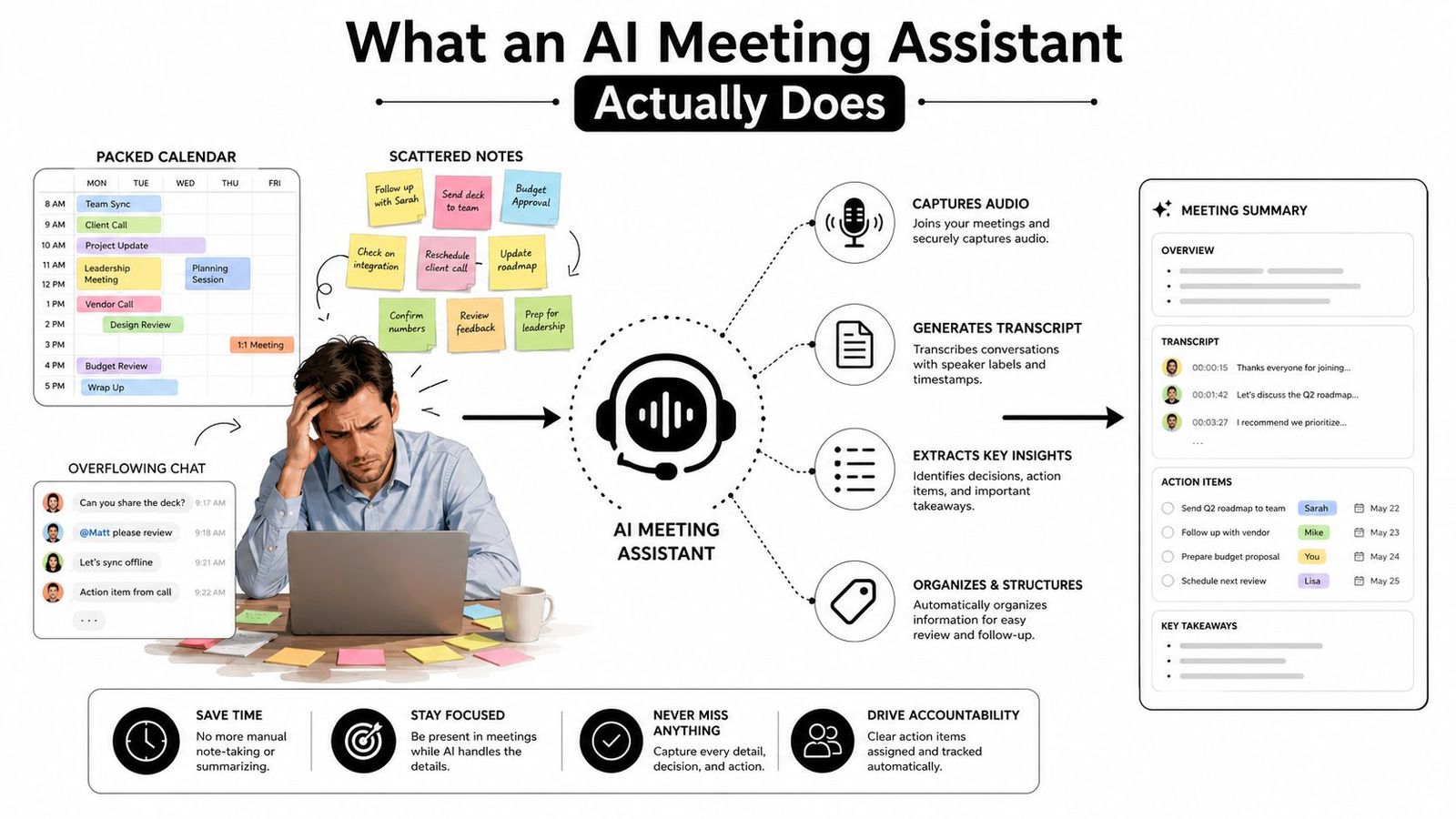
The real job is not just transcription
A plain transcript is useful, but it's just raw material. A better assistant turns that raw material into something actionable, which is why these tools are shifting from "recording helper" to "workflow tool." This shift aligns with market growth, as adoption and demand are on the rise (2026 adoption and market roundup).
Think of it this way: the assistant captures the meeting, then organizes the record so no one has to wade through a wall of text. Platforms like WhisperAI's AI transcription service fit this model, turning conversations into usable records instead of just storing audio.
Practical rule: if a tool only gives back text, it's not doing the whole job. The value shows up when the transcript becomes decisions, owners, and next steps.
For those who like analogies, think of it as a voice notebook that captures the useful parts without making someone write while talking. That's why resources like why scientists use voice notebooks make sense—the focus is on capturing first, organizing second, and cleaning up last.
How the Technology Works Behind the Scenes
The pipeline is simpler than most product pages suggest. First, there's audio capture during the meeting, followed by automatic speech recognition that turns spoken words into timestamped text. Next, speaker diarization tags who said what, and an LLM layer extracts decisions, owners, and deadlines (Webex on AI meeting assistant architecture).
Why speaker labels matter before summarization
That order matters because a summary is only as useful as its source. If the system can't differentiate speakers, it might confuse a promise with a question or assign a task to the wrong person. In multi-speaker calls, diarization and segmentation make action-item extraction more reliable, which is why good assistants don't jump straight from audio to summary.
Think of a very fast court reporter who also highlights the rulings. Transcription is the reporter part, but the highlighting makes the output useful on Monday morning. Without that second step, teams end up with clean text but still have to do the important work manually.
Some products go further by syncing outputs into CRM or project tools, making the category feel operational rather than decorative. For example, automatic follow-up emails and CRM updates show how a detailed transcript can shorten the cleanup loop after the call (AgileSoft Labs AI meeting assistant).
The hard part isn't hearing the meeting. The hard part is knowing what changed because of it.
A related educational example is Mun AI explained for delegates, which helps readers see how note capture, participant labeling, and structured summaries matter in live, multi-speaker settings.
Core Features That Move the Needle
Most tools offer the basics: live transcription, speaker labels, search, and export. These are essential, but they're just the starting point. The features worth paying for are those that reduce follow-up work, connect to downstream systems, and make past meetings easy to find when you need a decision, task, or quote.
The three jobs worth paying for
First, the assistant should capture the conversation well enough that nothing important gets lost. Second, it should organize the output so nobody has to reread a long transcript to find decisions or tasks. Third, it should push results into work systems, like CRM, task trackers, docs, or team chat, so the meeting turns into action instead of just being archived.
A sales lead wants the call logged in CRM before the next rep handoff. A project manager wants owners and dates ready for the task board. A support manager wants the recap available where the team already works, not buried in a separate tab.
| Feature | Best for | Why it matters |
|---|---|---|
| Live transcription | Fast-moving meetings | Lets teams search the conversation right away |
| Speaker labels | Multi-person calls | Makes it easier to track who agreed to what |
| Structured summaries | Managers and PMs | Cuts rereading time |
| Action items with owners and dates | Operations and delivery teams | Turns talk into assigned work |
| CRM and task-tool sync | Sales and customer teams | Removes manual copying |
| Searchable meeting memory | Teams with many recurring calls | Helps surface older decisions fast |
The focus is on workflow, not just note-taking. A product guide like meeting transcription software guidance helps buyers figure out if a tool just records conversations or if it also aids in retrieval, handoff, and the work that follows.
Where AI Meeting Assistants Earn Their Keep
The core loop is consistent across roles, but the stakes can be very different. A sales team is focused on CRM accuracy, a researcher cares about searchable archives, a legal team needs precision and privilege, and a clinician values patient privacy and documentation discipline.
Four common settings, four different priorities
In sales, the assistant needs to capture objections, next steps, and ownership cleanly to feed the pipeline. In research, it needs to index seminars, interviews, and discussions so a search later finds the right quote or topic. In legal work, it must support careful review without creating risky records. In healthcare, the bar is higher because sensitive conversations can't be treated like regular meetings.
The pattern is stable, but implementation varies. Vocabulary handling, integration targets, consent language, and retention settings all shift depending on the environment. That’s why a tool that's perfect for a startup standup can be wrong for a deposition prep call.
Content creators and podcasters use the same software for different reasons. They want long recordings converted into searchable transcripts, then clipped or repurposed without scrubbing through hours of audio. It’s still the same capture-and-summarize loop, just aimed at publishing instead of operations.
Operational shortcut: if the team already knows where the meeting output needs to land, choose the tool by integration fit before judging the summary style.
When comparing products, the key question isn't "Can it transcribe?" but "Can it handle the vocabulary, workflow, and compliance rules of this team?"
A Practical Way to Evaluate Before You Buy
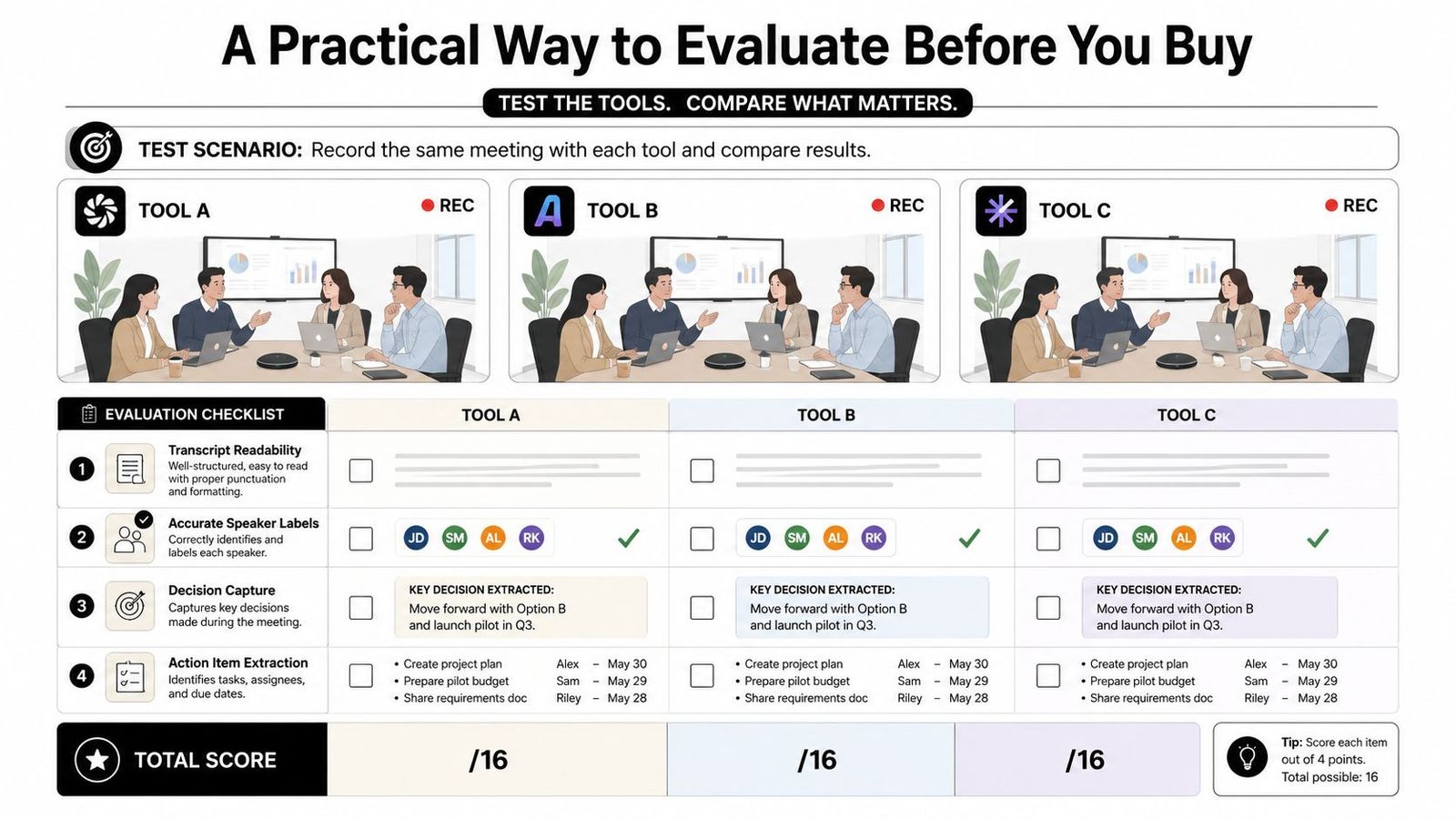
Skip polished demos. Run each candidate on the same real meeting, then score the output against the work the team does. A transcript can look good in a vendor video but still fail on speaker labels, decision capture, or export quality in a real meeting (Hinoter evaluation guidance).
Use the same test every time
Score each tool on these points, then compare them side by side:
- Transcript readability. Check punctuation, formatting, and whether the text is easy to scan.
- Accurate speaker labels. Confirm the right names are attached to the right lines.
- Decision capture. Look for the actual calls made, not just a vague recap.
- Action item extraction. Verify owners, due dates, and next steps are clearly listed.
The evidence question is simple. What was decided, who owns each follow-up, and where is that stated in the transcript or recording? If the answer is hard to find, the tool isn't ready for business use.
This is important because transcript quality and action-item quality are not the same. In one study, tools captured key data points with 85% to 96% accuracy, while action-item accuracy ranged from 62% to 87% (Kitces summary of Oasis Group study).
Copy this into a procurement note
- Run one real meeting through every finalist.
- Score the transcript, summary, and exports separately.
- Verify that owners and dates are correct.
- Check whether follow-ups land in the right downstream tool.
Security, Consent, and When to Switch It Off
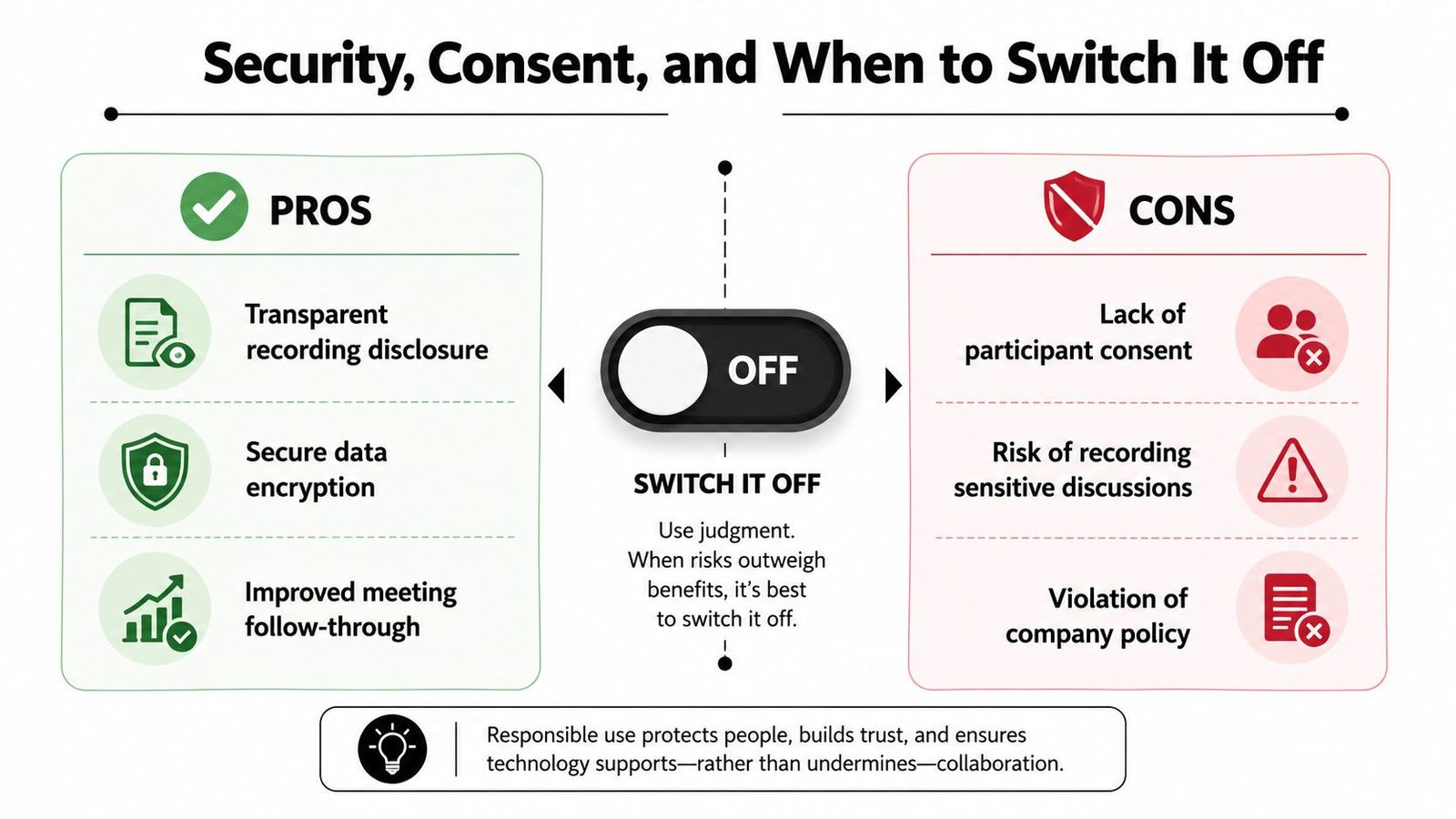
The biggest mistake is assuming every meeting should be recorded just because the software can do it. Harvard recommends informing participants and getting consent before recording or transcription starts, and advises against using AI assistants in sensitive meetings involving patient data, employee performance, privileged legal advice, or identifiable student records (Harvard AI assistant guidelines).
The do-not-record list is not theoretical
That list exists because some meetings need a human note-taker, or no record at all. Sensitive personnel discussions can be problematic if stored too widely. Privileged legal conversations require extra caution. Patient data and identifiable student records need the strictest controls.
Operational buyers also need admin policies, retention limits, encryption, and a clear privacy posture before rollout. If a tool can auto-join calls without tight controls, it can quickly cause friction, especially in teams where not everyone expects a bot in the room.
The safest rule is simple: the higher the sensitivity of the conversation, the more likely a human note-taker, or no record at all, is the better choice.
For healthcare teams comparing vendors, HIPAA-compliant transcription services is a useful reference point. It frames the question correctly—not whether a tool is clever, but whether it fits the handling rules of the work.
Getting Started, Measuring ROI, and Common Questions
A small pilot is the cleanest way to test an AI meeting assistant as a workflow tool. Start with two teams that already have regular meetings, set retention defaults before anyone records, write a consent line for calendar invites, and choose the first integrations that matter to your operation. This gives you a controlled test instead of a broad rollout that's hard to undo if the process doesn't fit.
Keep ROI simple enough to check without a spreadsheet project. Count the hours saved each week, multiply by loaded hourly cost, then subtract tool spend and any setup time the team had to absorb. For teams wanting to validate the time-saving part first, WhisperAI's AI transcription service can help test whether transcription and summaries save time in real meetings. For a broader look at note-taking tools, meeting note taker guidance is a useful reference.
The early questions are usually practical, not theoretical.
FAQ.
Does it work on mobile and live calls? Some tools handle live capture better than others, so check if your team needs mobile, desktop, or both. Test the device mix people use daily.
What happens when a meeting runs long? Tool limits vary, so run a real session that goes over time before standardizing the process.
How should hybrid rooms with poor audio be handled? Fix room audio first, then use transcription. If the microphones are weak, the transcript will reflect that.
Can it handle multiple languages? This depends on the platform and the transcription engine, so test the language mix your team uses most often before rolling it out.
For teams seeking a practical take on note capture, retention choices, and rollout habits, meeting note taker guidance can help frame the right questions to ask vendors and internal stakeholders. The goal is to confirm fit with actual work, not to buy a tool because it sounds clever.
WhisperAI allows teams to turn spoken meetings into searchable text, speaker labels, and action-ready summaries without building a separate workflow around it. If you want to test how an AI meeting assistant fits real operations before committing to a broader system, visit WhisperAI and try it on an actual meeting.