Cloud Storage Security: Guide to Protecting Your Data In
Master cloud storage security with our 2026 guide. Protect sensitive data using encryption, IAM, & compliance controls. Includes an enterprise checklist.

You finish a client call and upload the transcript. Someone shares the folder with "anyone on the team." A mobile client syncs it to a personal cloud account. Later, the audio goes to an AI for transcription, needing decryption for processing. It all seems routine. That's why cloud storage security often fails even in competent organizations.
tl;dr: Cloud storage security isn't just about encrypting files and tweaking admin settings. It's about controlling human behavior, limiting access, managing keys right, watching out for silent sync tools, and protecting data during AI processing, not just when stored. Start with a real threat model, enforce IAM and MFA, require encryption at rest and in transit with separate key management, and treat transcription pipelines as active risk zones. Teams handling sensitive transcripts also need a clean incident response process and a checklist people can realistically follow.
Table of Contents
- Why Cloud Storage Security Is a Human Problem
- Understanding Your Cloud Threat Model
- The Core Pillars of Cloud Data Protection
- Mastering Access with IAM and Least Privilege
- Secure Architecture for AI and Sensitive Workloads
- Aligning Your Incident Response and Compliance
- Your Actionable Cloud Security Checklist
Why Cloud Storage Security Is a Human Problem
Cloud storage security is often seen as an infrastructure issue. In reality, it's a behavior issue that affects infrastructure.
A legal team records witness interviews. Healthcare stores dictated notes. Operations save board meeting audio in shared folders because it's fast. Nobody means to create a security risk. But the risk grows when people prioritize speed, default settings, and convenience over security.
That's why the numbers matter. About 82% of all data breaches in 2025 involved cloud-stored data, and Gartner says 99% of cloud failures come from customer error, according to cloud security statistics compiled by Hyperconvergence. It's not just the scale; it's the cause. Most aren't losing to complex attacks. They're leaving doors open with bad permissions, weak processes, and poor configurations.
Convenience creates the wrong defaults
Teams handling transcripts often fall into risky habits:
- Broad sharing links: A folder meant for one team gets opened to an entire department.
- Mixed storage habits: Sensitive recordings sit next to low-risk documents with the same permissions.
- Unclear ownership: Nobody knows who approves access, revokes it, or reviews stale shares.
- Fast AI adoption: Staff add transcription and summarization tools before security reviews catch up.
Practical rule: If a team can't explain who should access a transcript, why they need it, and when that access should end, the storage setup isn't secure.
Think of cloud storage security simply: Every transcript has a lifecycle. It's captured, uploaded, processed, shared, edited, exported, archived, and deleted. A weakness at any point in that chain can expose the whole record.
Security has to fit real work
Security controls that make work impossible won't last. Users will bypass them. Good cloud storage security should support the workflow while minimizing damage if someone makes a mistake.
That's the goal. Not perfection. Controlled risk.
Understanding Your Cloud Threat Model
A threat model sounds technical, but it's just a way to ask three questions: What data matters most, who can access it, and how could that access go wrong?
For teams dealing with lots of transcripts, this matters more than generic "best practices." Audio files, draft transcripts, final notes, and exports don't move through the organization like source code or marketing assets. The risk pattern is different.
Start with the workflow, not the tool
A useful threat model follows the real path of a sensitive file:
| Workflow stage | Common failure |
|---|---|
| Upload | Wrong folder, wrong permissions, unmanaged device |
| Storage | Overbroad access, stale sharing, weak key controls |
| Sync | Personal app copies files outside approved storage |
| Processing | Data must be decrypted for active use |
| Export and sharing | Transcript sent to unauthorized recipients |
That table often reveals more than a checklist of vendor features.
The threats that actually matter
One overlooked issue is shadow synchronization. This is where automated cloud clients sync large, sensitive files unnoticed to personal cloud buckets, bypassing standard IAM models, as described in ITPro's analysis of cloud storage risks. It's the kind of leak that doesn't show up in a normal storage review because the main enterprise repository looks fine.
The main threat categories usually look like this:
- Misconfiguration: Public or overly broad sharing, inherited permissions, and buckets or folders that were "temporary" and never fixed.
- Accidental insider action: Staff move, sync, or export files to places security teams don't monitor.
- Credential-led access: Attackers don't need to break encryption if they can log in as a valid user.
- Third-party workflow risk: AI and SaaS integrations increase the number of systems touching raw content.
The right threat model doesn't ask if a platform is "secure." It asks where sensitive transcripts become accessible to the wrong person, device, or process.
Organizations that skip this step often overinvest in one control and overlook the path attackers or careless users take.
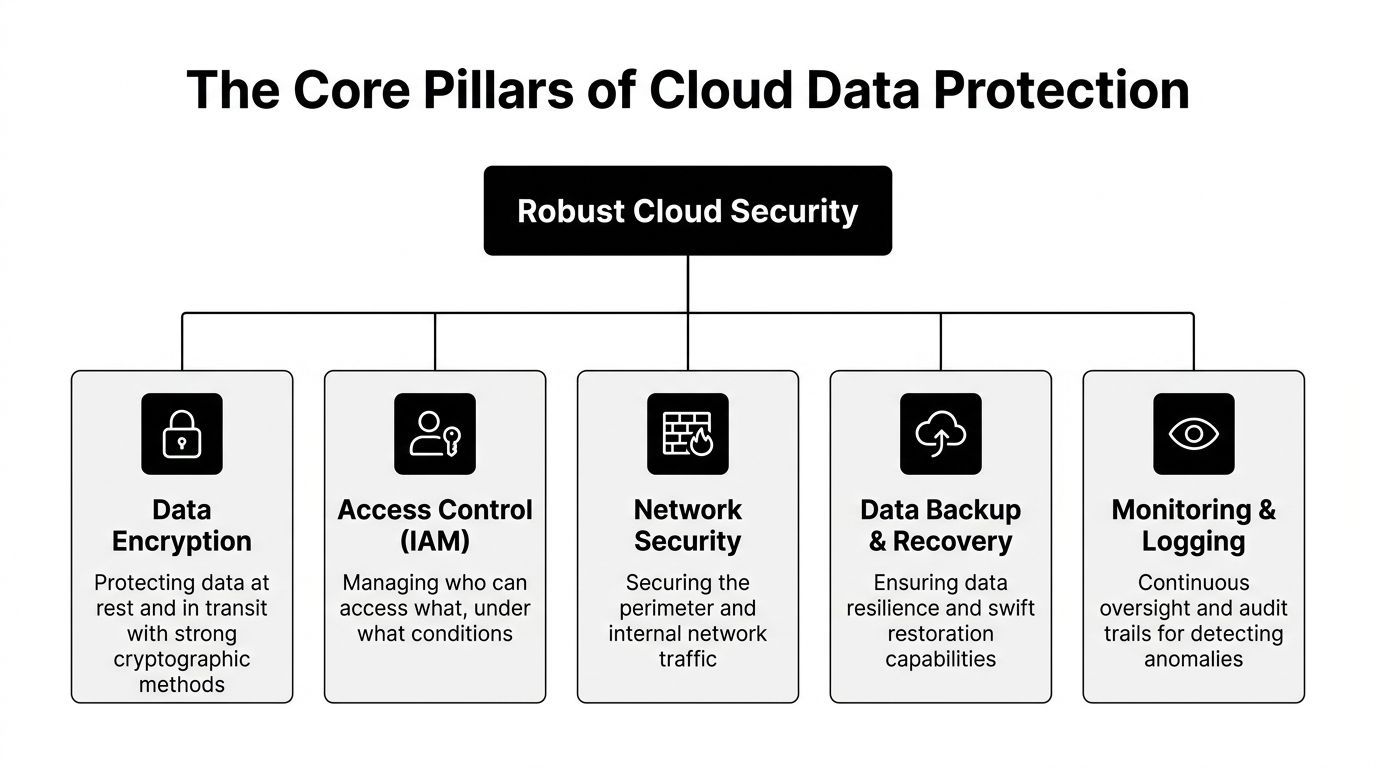
The Core Pillars of Cloud Data Protection
Most cloud storage security programs fail for a familiar reason. They buy a platform before defining the controls that matter.
The baseline isn't as glamorous as vendors make it sound. Protect the data itself, the path it travels, and the keys. Then create enough visibility to prove those controls work.
Encryption at rest and in transit
Encryption at rest is like a locked safe. Encryption in transit is like an armored car.
As a baseline, security demands encryption at rest and in transit using Commercial National Security Algorithm Suite 1.0 approved mechanisms, with connections secured via TLS 1.2 or higher, and decryption keys managed separately in a Key Management System, according to the NSA and CISA cloud data guidance PDF.
That baseline matters because teams often stop at "the vendor says data is encrypted." That's not enough. The important questions are:
- Who controls the keys
- Where keys are stored
- Which services can request decryption
- Whether encryption applies consistently to exports, backups, and replicas
Key management is where good plans break
A strong encryption statement with weak key management is just paperwork. If the same environment stores the transcript and exposes the key path, the control has little value.
A separate KMS reduces that risk. Hardware Security Modules and tighter key access policies strengthen it further. For very sensitive transcript workflows, client-side encryption can also limit trust in the storage provider, though it adds complexity and can limit search, preview, and collaboration.
Operational advice: Don't just ask if encryption exists. Ask who can decrypt, under what conditions, and how that access is logged.
Logging, disposal, and auditability
Logs are like a security camera system. They won't stop a breach, but they show what happened, which account accessed which file, and whether an access pattern was normal or suspicious.
For transcript environments, logs should cover file access, permission changes, exports, deletion events, and administrative actions. Without that record, incident response turns into guesswork.
Retention and disposal matter too. Sensitive transcripts shouldn't live forever because nobody handles cleanup. When teams review storage hygiene, NIST 800-88 compliance is a good reference for secure media sanitization and defensible disposal practices, especially when retired devices or exported archives may still hold regulated data.
Mastering Access with IAM and Least Privilege
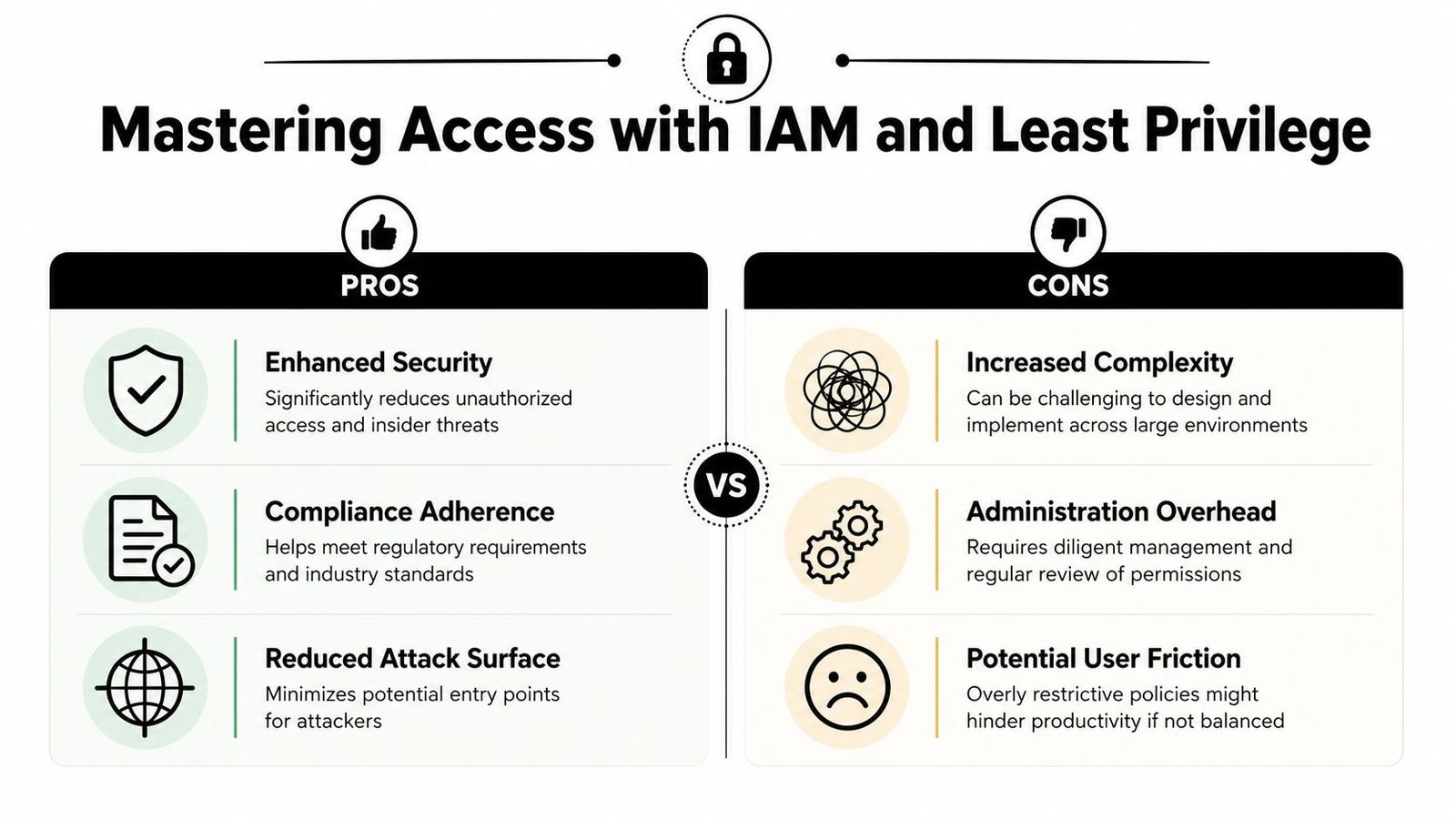
Identity is the main perimeter in cloud storage security. The old model assumed the network edge did the defensive work. That doesn't hold up when users, contractors, devices, and apps all access the same cloud repository from different locations.
Identity is the real perimeter
IAM works best when permissions are like hotel keycards. A user gets access only to the rooms needed for the job, nothing else. It sounds obvious, but many environments still do the opposite.
Credentials compromise is the top cause of cloud security breaches, responsible for over 50% of all incidents. Implementing Multi-Factor Authentication makes it much harder for attackers to access accounts even with stolen passwords, according to SentinelOne's cloud security statistics summary.
This is key for transcript systems. If an attacker logs in with a valid account, encryption at rest doesn't help much. The platform may deliver the file as designed.
A security review should confirm that WhisperAI security controls align with the organization's identity standards, especially around access handling, privacy expectations, and enterprise security posture.
What least privilege looks like in transcript workflows
Least privilege isn't just a slogan. It's a set of routine decisions.
- Separate upload from administration: Staff who submit recordings shouldn't automatically manage retention, exports, or team-wide sharing.
- Limit case or patient scope: Users should see only the matters, projects, or records relevant to their role.
- Review service accounts: Integrations often keep broad permissions long after the original need is gone.
- Expire temporary access: External counsel, contractors, and reviewers should lose access automatically when work ends.
Zero trust thinking helps here. Every access request should be evaluated on identity, context, and need, not assumed safe because it comes from inside the organization.
What doesn't work is "trusted user" logic. Good people still forward links, reuse passwords, and keep access they no longer need.
Secure Architecture for AI and Sensitive Workloads
Most cloud storage guidance stops too early. It covers data at rest. It covers data in transit. Then it assumes the problem is solved.
For AI workflows, especially transcription, that assumption breaks down.
The compliance-encryption paradox
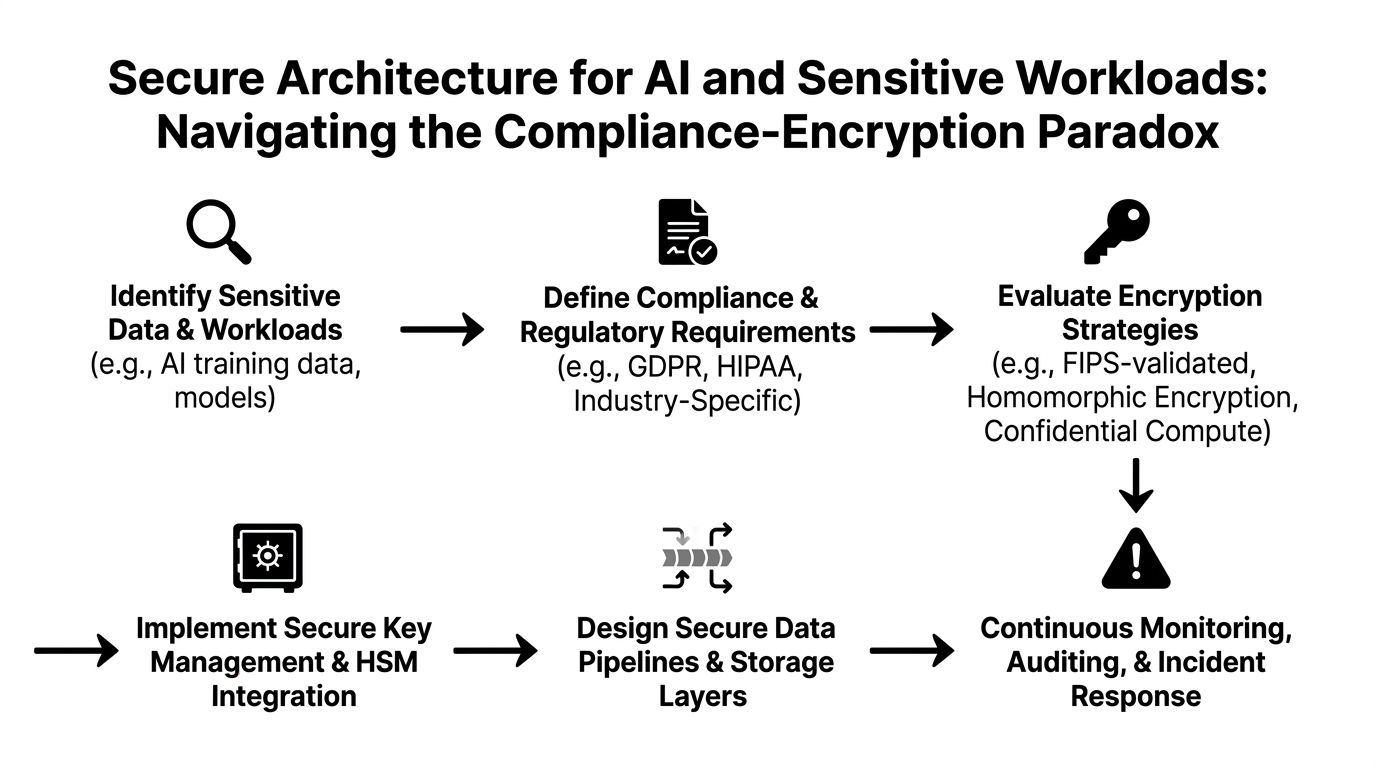
A critical security gap exists where encryption keys for AI transcription must be used, temporarily exposing unencrypted data in memory. This blind spot means standard storage encryption does not equal total workflow security, which is why it matters for GDPR and HIPAA-sensitive processing, as discussed in this analysis of secure cloud data handling for AI workflows.
That's the compliance-encryption paradox. A provider may secure the stored file properly. The transfer may also be protected. But the model still needs access to raw content during processing. If teams ignore that stage, they miss the most important question in the workflow.
What secure AI processing actually requires
For sensitive transcripts, a secure architecture should examine these decisions:
- Data-in-use exposure: Where does decryption happen, and which systems can access memory during processing?
- Temporary artifacts: Does the workflow create intermediate files, caches, or debug logs containing sensitive content?
- Segmentation: Are processing environments separated from broader workloads and admin access?
- Retention discipline: Are source audio and transcript outputs kept only as long as the use case requires?
A technical buyer should also inspect how an AI transcription workflow is designed from ingestion to output. For teams comparing implementation patterns, the OpenAI Whisper API guide is a useful reference for understanding how transcription pipelines typically handle audio and model interaction.
Storage encryption protects the parked car. It does not protect the engine while someone is driving it.
That distinction matters for legal, healthcare, and executive communications teams because the most sensitive moment may be active processing, not long-term storage. It's also why AI transcription should be evaluated as a full workflow security decision, not merely a file upload feature.
Aligning Your Incident Response and Compliance
Even mature teams get this wrong. They focus on prevention and neglect the first hour after a cloud incident.
When a transcript repository is exposed, speed matters. So does order. People who panic tend to destroy evidence, over-notify the wrong parties, or leave compromised access active while they debate next steps.
A simple response sequence
A practical incident response flow is straightforward:
- Detect suspicious access, sharing changes, odd exports, or login anomalies.
- Respond by containing the account, integration, device, or storage path involved.
- Remediate the root issue, such as bad permissions, unmanaged sync, or stale tokens.
- Report based on legal, contractual, and regulatory obligations.
Teams that need a clean framework can use the Blowfish Technology incident response guide as a practical reference for planning roles, escalation paths, and communication steps.
A good response plan names people, systems, and decisions. A bad one says "contact IT" and hopes the right person appears.
Compliance changes the clock
Compliance doesn't replace incident response. It adds deadlines and evidence requirements.
For organizations dealing with health-related transcripts and documentation, HIPAA-compliant transcription services guidance is a useful benchmark for understanding how privacy obligations affect vendor evaluation, data handling, and breach readiness.
The teams that handle incidents best usually prepare three things in advance:
- A contact map: Legal, security, operations, privacy, and executive owners.
- A logging map: Which systems hold the evidence needed for scoping.
- A decision map: What gets disabled immediately, what needs approval, and who handles notifications.
Without those basics, a small cloud storage event turns into a larger governance failure.
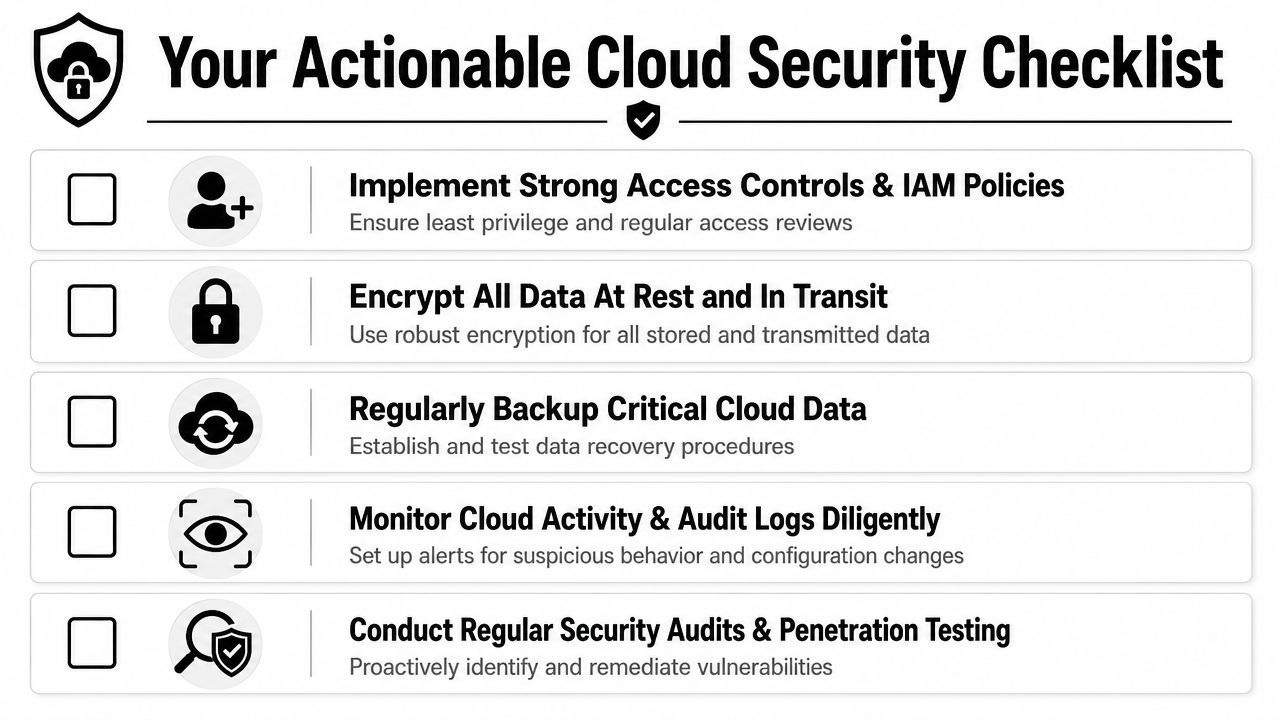
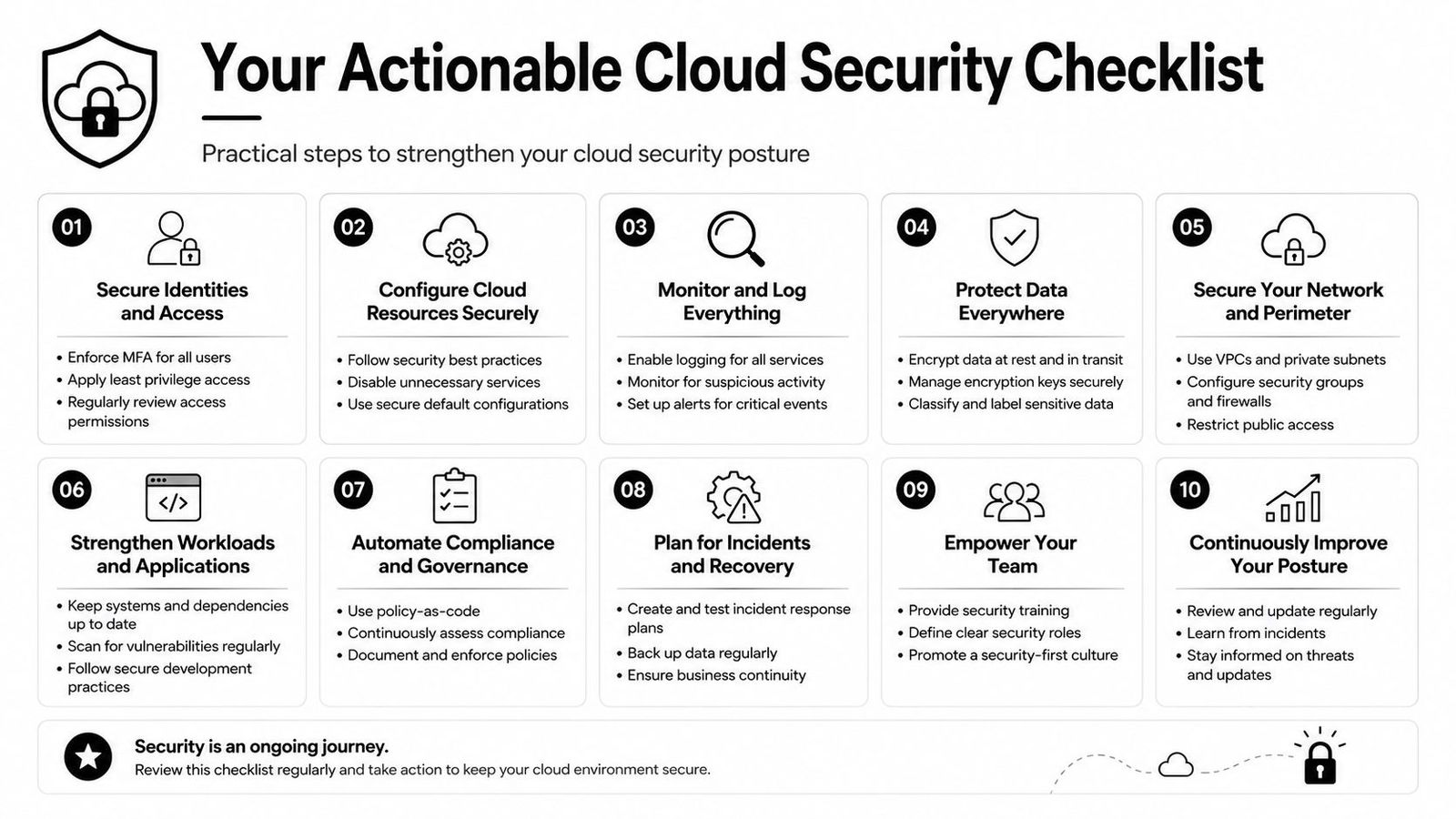
Your Actionable Cloud Security Checklist
A workable checklist beats a polished policy document nobody follows.
For all team members
- Use approved storage only: Don't move recordings or transcripts into personal cloud accounts or unmanaged sync folders.
- Treat links like access grants: Before sharing, confirm the exact recipients and whether access should expire.
- Report odd behavior early: Unexpected sync prompts, missing files, or strange login alerts should be escalated immediately.
For team leaders
- Review who can access sensitive transcript folders: Focus on active need, not historical convenience.
- Separate sensitive workflows: Legal, healthcare, HR, and executive records shouldn't sit in broad shared repositories.
- Verify vendor fit for regulated work: Ask how the provider handles data at rest, in transit, and during processing.
For IT and security admins
- Enforce MFA everywhere: No exceptions for admins, contractors, or service owners.
- Apply least privilege consistently: Remove inherited permissions and stale access before adding new tools.
- Monitor for shadow sync behavior: Unmanaged desktop and mobile clients need policy controls and visibility.
- Log file access and permission changes: Without audit trails, response quality drops fast.
- Test the incident process: Run a tabletop exercise around a leaked transcript folder or compromised account.
Cloud storage security improves when these actions become routine, not when they appear once in an annual training deck.
Sensitive transcripts deserve more than basic file storage. WhisperAI - #1 AI Transcription gives teams a professional transcription workflow built for real conversations, strong privacy expectations, and enterprise-grade handling of audio and transcript data. For organizations that need accurate transcription without treating security as an afterthought, it's a strong place to start.