Mastering OpenAI Whisper API: Your Complete Guide
Master the OpenAI Whisper API with our guide. Learn setup, multi-language transcription, large file handling, cost optimization, & secure integration.
Audio is piling up faster than many organizations can process it. Sales calls, project meetings, lectures, interviews, webinars, support recordings. The problem usually isn’t capturing audio. It’s turning that audio into text people can search, quote, review, and act on.
That’s where the openai whisper api becomes useful. Not as a demo. Not as a side project. As infrastructure.
TL;DR: If you want production-grade transcription, start simple with whisper-1, then focus on workflow design. Split long files before upload, preserve context between chunks, use prompts for names and jargon, choose the lightest output format that fits your use case, and keep your API key server-side. The model is priced at $0.006 per minute in the OpenAI whisper-1 model docs, and the practical wins come from how you handle long-form audio, multilingual input, and secure integration.
Why the Whisper API is a Game-Changer for Business Audio
A common business scenario looks like this. Sales calls are recorded, support conversations are archived, training sessions are stored, and none of that audio is useful until it becomes text that people can search, route, and review. Teams dealing with audio backlogs usually do not need experimental speech research. They need transcripts that hold up in CRMs, QA workflows, compliance reviews, and knowledge bases.
Whisper is useful because it performs well under the conditions that usually break cheaper transcription systems: overlapping speakers, inconsistent microphones, background noise, accented speech, and company-specific terminology. Accuracy matters, but reliability matters more in production. If transcripts fail on messy real recordings, staff stop trusting them and the workflow falls apart.
That difference is what makes the openai whisper api practical for business systems. It gives engineering teams a hosted speech-to-text layer they can build around without training their own model or operating a specialized inference stack. For a walkthrough of the API basics before you design the larger pipeline, see this guide to transcribing audio with the Whisper API.
What businesses actually gain
A well-designed transcription workflow creates value in three places:
- Operational records: Calls, meetings, hearings, and interviews become searchable records instead of audio files nobody revisits.
- Faster retrieval: Teams can find objections, decisions, names, and action items without replaying an hour of audio.
- System handoff: Transcripts can feed CRMs, ticketing systems, internal search, captioning, and downstream summarization.
The business win is not the transcript alone. The win is what the transcript enables after ingestion.
In practice, the strongest use cases are recurring and high-volume. Weekly customer calls, podcast libraries, compliance archives, research interviews, multilingual support queues. Those workloads expose the gaps that basic tutorials skip over, especially long-form file handling, retry logic, auditability, and cost control.
If you are wiring call flows or telephony into the same stack, SnapDial’s guide on how to configure speech-to-text is a useful reference because it focuses on the integration layer, not just the model request.
For teams that want a hosted business workflow instead of stitching storage, retries, chunking, and review tools together themselves, platforms like WhisperAI’s transcription workflow build on the API to provide a more complete operational setup.
Your First Transcription in Minutes
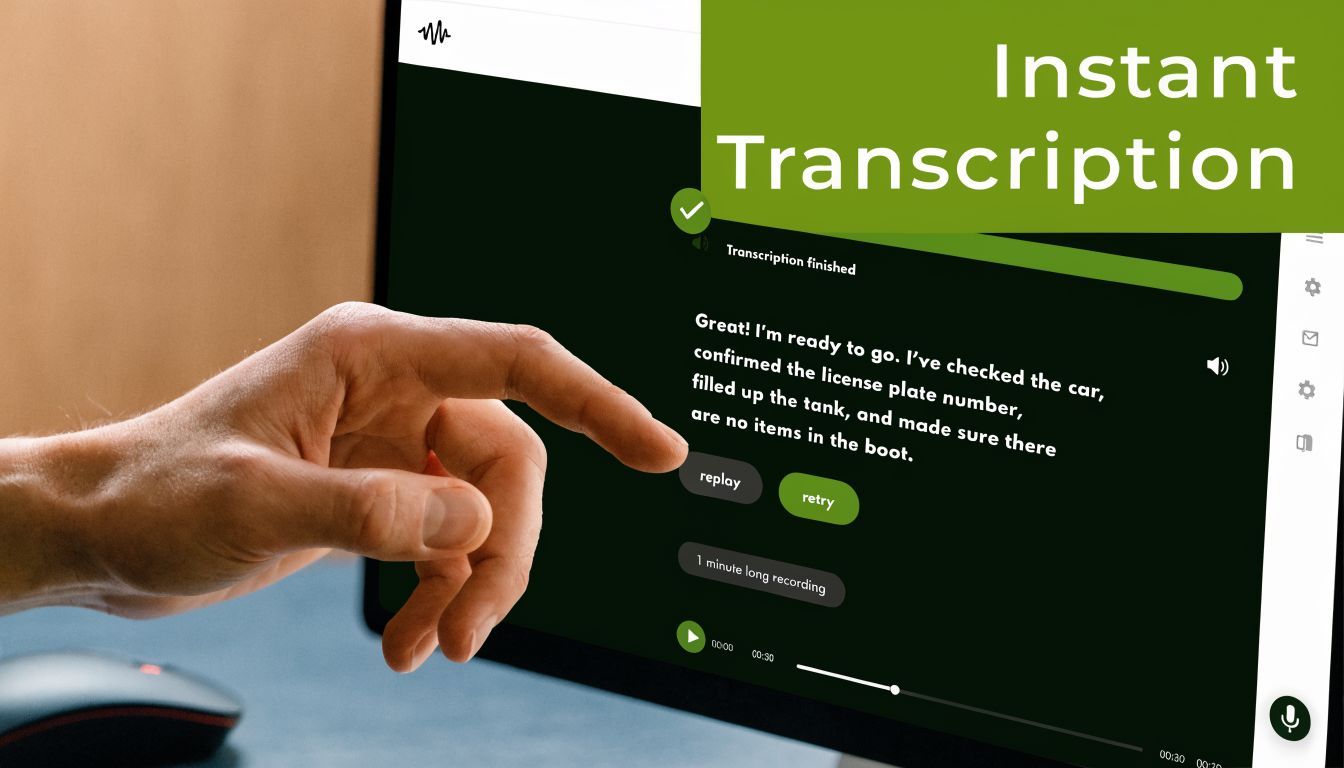
The fastest way to understand the openai whisper api is to get a transcript back from a real file. Keep the first pass boring. One audio file, one API call, one plain-text result.
What to prepare
You need:
- An OpenAI API key
- Python installed
- A short audio file in a common format such as MP3, WAV, or M4A
- A clean project folder
If you’re also wiring telephony or call workflows into your stack, SnapDial’s guide on how to configure speech-to-text is a useful companion because it frames the integration side, not just the model call.
A minimal Python example
Install the SDK first.
- Create a virtual environment: Keeps dependencies isolated.
- Install the client library:
pip install openai - Set your API key: Use an environment variable. Don’t hardcode it.
Then run a script like this:
Python example
from openai import OpenAI

client = OpenAI()

with open("sample.mp3", "rb") as audio_file:
    transcript = client.audio.transcriptions.create(
        model="whisper-1",
        file=audio_file
    )

print(transcript.text)
If that works, you’ve already crossed the hardest psychological step. The API call is straightforward. The engineering work comes later, when real audio gets messy.
What each part is doing
OpenAI()creates the client using your environment configuration.open("sample.mp3", "rb")loads the file as binary data.client.audio.transcriptions.create(...)sends the file to the transcription endpoint.model="whisper-1"selects the production model exposed through the API.transcript.textreturns the plain transcript text.
That simplicity is one reason Whisper got adopted quickly. You don’t need to manage acoustic preprocessing yourself to get a useful result.
Under the hood, the model pipeline standardizes audio by resampling it to 16,000 Hz and converting it into an 80-channel log-magnitude Mel spectrogram, which is part of why it handles mixed source quality consistently according to the Whisper speech recognition system overview).
A few first-run mistakes to avoid
The first broken transcription usually comes from setup, not the model.
- Exposed API key: Keep it on the server side or in local environment variables. Never ship it in frontend code.
- Huge test files: Start with a small file you can inspect manually.
- Wrong success criteria: Don’t ask if the transcript is perfect. Ask whether it’s usable enough for your workflow.
- No language hint when you know the language: Auto-detection is convenient, but explicit configuration is often cleaner when the input is predictable.
Practical rule: Your first transcription should prove the request path works. Don’t overbuild before you verify the file upload, authentication, and response handling.
If you want a second walkthrough focused specifically on the OpenAI path, this guide on using the Whisper API is worth bookmarking: https://whisperai.com/blog/transcribe-whisper-api
Advanced Audio Processing Techniques
Once the basic call works, the interesting features start with multilingual audio and translation, which enables the openai whisper api to become much more than an English dictation tool.
Whisper was trained on 680,000 hours of audio, with over 117,000 hours of non-English data, and that training base supports transcription in 99 languages with 57 languages achieving a word error rate below 50% according to Gladia’s Whisper overview.

Transcribing known-language audio
If you know the source language, say so. It reduces ambiguity and makes debugging easier.
from openai import OpenAI

client = OpenAI()

with open("interview-es.mp3", "rb") as audio_file:
    transcript = client.audio.transcriptions.create(
        model="whisper-1",
        file=audio_file,
        language="es"
    )

print(transcript.text)
For German, switch the language code.
with open("meeting-de.m4a", "rb") as audio_file:
    transcript = client.audio.transcriptions.create(
        model="whisper-1",
        file=audio_file,
        language="de"
    )

print(transcript.text)
The practical win is consistency. Auto-detection is fine for mixed uploads from end users. It’s less ideal in controlled business pipelines where you already know the language from metadata.
Translating speech directly into English
This is one of the most useful features for global teams. Instead of transcribing speech in the original language, you can ask for English output.
from openai import OpenAI

client = OpenAI()

with open("call-fr.wav", "rb") as audio_file:
    translation = client.audio.translations.create(
        model="whisper-1",
        file=audio_file
    )

print(translation.text)
That pattern is effective for multilingual research interviews, support escalations, and cross-border operations where the final review happens in English.
If your stakeholders read English but the source audio doesn’t start there, direct translation often shortens the workflow more than transcript-first processing.
File preparation that helps in practice
Different audio formats can work. What matters most is the quality of the source and the predictability of your preprocessing.
A few habits help:
- Prefer one preprocessing path: Don’t let every uploader send wildly different formats if you can normalize server-side.
- Keep channel behavior consistent: Mono audio is often easier to manage for standard speech transcription workflows.
- Trim obvious dead air: Long silence adds upload weight and slows handling.
- Preserve speech clarity over fidelity: Broadcast-quality audio isn’t required. Clean speech is what matters.
Multilingual content adds one more wrinkle. Code-switching, acronyms, and proper nouns can create edge cases, especially when speakers jump between languages mid-sentence.
For practical guidance on getting cleaner output from Whisper-based systems, this article is a good reference point: https://whisperai.com/blog/best-whisper-transcription
Handling Real-World Audio at Scale
Production workloads expose the parts of transcription demos that never show up in quick starts. A five-minute sample is forgiving. A two-hour customer interview, a support queue with mixed microphone quality, or a compliance archive of recorded calls is not.
OpenAI documents file limits and long-form handling earlier in the developer docs. In practice, the constraint that matters is simple: large recordings need to be processed as a workflow, not a single request.
What breaks in long-form business audio
The first version many teams ship is a loop that slices audio into fixed chunks, sends each chunk to the API, and joins the text. That is enough for clean dictation. It creates avoidable errors in meetings, sales calls, interviews, and support audio.
The failure points are predictable:
- Chunk boundaries cut through speech
- The same phrase appears twice after reassembly
- A sentence starts in one segment and finishes in the next
- Product names drift in spelling across the transcript
- Retries create mismatched ordering if metadata is weak
Those problems usually come from orchestration, not the model.
A chunking pattern that holds up in production
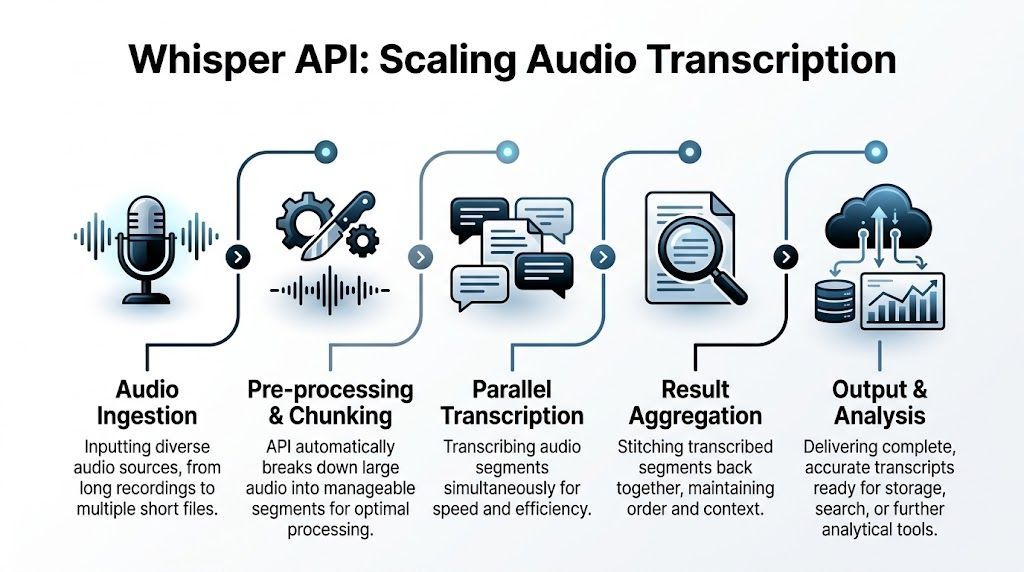
Use chunking as an operational control, not just a file-size workaround. Good pipelines keep each segment small enough to retry cheaply, but large enough to preserve context.
A practical pattern looks like this:
- Create segments with overlap Add a small overlap at the start or end of each chunk so sentence boundaries survive imperfect cuts. Then remove duplicate text during reassembly.
- Cut on pauses when possible Voice activity detection or silence-based splitting reduces mid-word and mid-sentence breaks. This matters more on conversational audio than on scripted speech.
- Pass forward limited context Prior transcript text can stabilize terminology and speaker phrasing. Keep it short and relevant. Dumping large blocks of prior text into each request adds noise and makes debugging harder.
- Persist operational metadata Store job ID, chunk index, source offset, preprocessing version, retry count, and output status. Without that trail, failed reprocessing becomes guesswork.
- Run reassembly as a separate step Treat stitching as its own job. Deduplicate overlaps, verify ordering, and flag low-confidence boundaries for review.
That design gives teams cleaner transcripts and cheaper retries. It also makes audits easier when a customer asks how a final transcript was produced.
Design for failure before you design for throughput
At scale, some uploads will fail, some chunks will time out, and some source files will be malformed. The system should absorb that without restarting the whole job.
These controls help:
- Queue transcription jobs instead of handling them in the request cycle
- Retry only failed chunks
- Write intermediate results to durable storage
- Mark jobs as partial, complete, or review-required
- Keep original timestamps so downstream search and playback still line up
This is the difference between a demo and a business workflow. Finance teams care about retry cost. Support teams care about turnaround time. Compliance teams care about traceability.
Output format should match the job
Choose the response format based on what happens next. Richer output is useful, but it also increases payload size and post-processing work.
| Format | Best For | Key Feature |
|---|---|---|
| Text | Quick reading, notes, simple exports | Plain transcript with minimal overhead |
| JSON | App integrations, search pipelines, structured storage | Easier to parse programmatically |
| SRT | Video subtitles, review workflows | Timestamped subtitle blocks |
| VTT | Web video captioning | Timestamped captions for browser-friendly playback |
| verbose_json | QA review, timing analysis, alignment checks | Richer metadata and timing detail |
For internal call notes, plain text or JSON is usually enough. For legal review, subtitle generation, or human QA, timestamped formats save time later.
Where teams usually overspend
The expensive mistake is reprocessing entire recordings because one chunk failed or one boundary was messy. Segment-level retries fix that. So does storing intermediate outputs instead of treating each run as disposable.
Another cost issue shows up in review queues. If every transcript needs a human to fix chunk transitions, the API bill will not be the limiting factor. Your ops team will be.
For very large libraries, managed wrappers can help with splitting, retries, exports, and reviewer handoff. That can be the right choice if transcription supports the business but is not the product itself.
Optimizing for Cost Speed and Accuracy
A finance team uploads a 90-minute board meeting. Sales ops sends in 400 customer call recordings the same afternoon. Support wants near real-time transcripts for QA review. At that point, the unit price matters less than the workflow. Cost overruns usually come from retranscribing files, pushing oversized audio through the pipeline, and storing more output than the business will use.
Three controls have the biggest effect in production. Audio preparation, prompt design, and output format.
Start with disciplined ingest
Standardize audio before it reaches transcription. Mixed codecs, inconsistent bitrates, and stereo channels with one quiet speaker create avoidable variance. A single ingest profile keeps latency and transcript quality more predictable, especially on long-form audio where small errors repeat for an hour.
A practical baseline looks like this:
- Normalize volume server-side
- Convert to a consistent codec and sample rate
- Downmix to mono when channel separation is not needed
- Keep source audio only for audit, compliance, or dispute review
- Split long recordings into retry-safe segments before submission
That last point saves real money. If minute 47 fails in a 60-minute file, rerunning one segment is cheaper and faster than rerunning the whole recording.
For teams building larger pipelines, our guide to OpenAI Whisper API implementation patterns covers the operational choices that matter once you move past demo workloads.
Use prompts where they help
The prompt field works best as a biasing tool, not a dumping ground for context. Give the model the terms it is likely to miss. Product names, internal acronyms, speaker names, industry vocabulary, and expected spellings all help.
Keep prompts short and specific.
Poor prompt design creates its own failure mode. If every request carries a long block of irrelevant context, transcripts drift, payload size grows, and debugging gets harder because the model is responding to noise you added.
Feed likely misheard terms, not a meeting brief.
Choose the lightest response that still supports the job
Response format affects downstream cost. A plain transcript is cheap to store and easy to ship through internal systems. Timestamped outputs are worth the extra payload when reviewers need to jump to exact moments in long recordings. Structured JSON pays off when transcripts feed search, analytics, or entity extraction.
Use the smallest format that still lets the next system do its job:
- Text for readable internal notes
- JSON for applications and search pipelines
- SRT or VTT for subtitle and review workflows
This is also where some teams benefit from external workflow support. If transcription is part of a broader automation stack, partners offering AI automation services can reduce internal engineering time around retries, routing, and post-processing.
Accuracy improves when the pipeline is boring. Clean audio in, targeted prompts, predictable segmentation, and the right output format beat clever but inconsistent setups.
Integrating Whisper Securely into Business Workflows
A transcription system becomes risky when teams treat it like a frontend widget instead of backend infrastructure.
The first rule is simple. Keep the API key on the server side. User uploads should go to your application, then your application should call the API. Direct browser calls with embedded credentials are an avoidable mistake.

What secure integration usually looks like
The teams that get this right tend to follow a familiar pattern:
- Authenticated upload path: Only approved users and systems can submit files.
- Queued background processing: Large jobs don’t block the application thread.
- Access controls on transcript output: Not every employee should see every transcript.
- Retention rules: Keep files and transcripts only as long as policy requires.
- Auditability: Log who uploaded, processed, reviewed, and exported data.
This matters most in legal, healthcare, financial, and compliance-heavy environments, but it’s a good default anywhere.
Practical workflow ideas
The openai whisper api becomes more valuable when it plugs into a larger business loop.
Examples:
- Meeting operations: Transcribe internal calls, then send summaries and action items into project management tools.
- Customer support: Turn recorded calls into searchable internal records for QA and coaching.
- Research teams: Store interview transcripts with timestamps for citation and review.
- Clinical admin workflows: Produce draft documentation that staff can review before final filing.
If you’re mapping these broader process changes, firms that specialize in AI automation services can be useful to study because the primary challenge is usually orchestration, permissions, and exception handling, not the raw transcription call.
For teams comparing implementation paths and trade-offs around OpenAI-based setups, this page adds useful context: https://whisperai.com/blog/whisper-openai
One practical option in this category is WhisperAI, which layers file handling, editing, exports, and business-oriented workflow features on top of Whisper-powered transcription for teams that don’t want to build every operational component themselves.
Frequently Asked Questions about the Whisper API
Is the openai whisper api good for meetings and interviews
Yes, especially when the audio is reasonably clear and the workflow around chunking is solid. For short files, a direct API call is often enough. For long meetings, the handling strategy matters more than the initial demo result.
Should I use auto-detection or specify the language
If your uploads come from many sources and you don’t know the language in advance, auto-detection is convenient. If your pipeline already knows the language, specifying it usually gives you a cleaner and more predictable system.
Can I use it for long recordings
Yes, but not by uploading huge files blindly. Long-form audio needs chunking, ordering, retry logic, and context carryover between segments. That’s the difference between a script that works in testing and one that works every week.
What output format should I choose
Use the simplest one that fits the job.
- Text for reading
- JSON for software
- SRT for subtitles
- VTT for web captions
- verbose_json for workflows that need richer metadata
Does better audio still matter
Absolutely. Whisper is reliable, but no speech model benefits from bad source audio. Echo, speaker overlap, clipped microphones, and heavy background noise still create transcription debt that someone has to clean up later.
Is self-hosting better than the API
It depends on your constraints. The API is easier to operationalize. Self-hosting gives more infrastructure control, but it also creates more engineering work around deployment, scaling, monitoring, and upgrades.
What’s the most overlooked feature
For business use, it’s usually the prompt parameter. A short prompt with names, acronyms, and product terminology can save a lot of editing time. Organizations often realize this too late.
What breaks first in production
Usually one of these:
- Oversized files
- Missing retry logic
- Frontend-exposed credentials
- No context handling across long audio
- No clear policy for where transcripts are stored
The openai whisper api is easy to call. It’s less easy to operationalize well. That’s normal. Treat it like a pipeline, not a toy endpoint, and it becomes much more dependable.
If you want a faster path from raw audio to editable, searchable transcripts, WhisperAI - #1 AI Transcription gives teams a practical way to work with Whisper-powered transcription without building every upload, chunking, export, and review step themselves.