A Researcher's Guide to Transcription Software for Qualitative Research
Discover the best transcription software for qualitative research. Learn about essential features, security, and how to streamline your data analysis workflow.
tl;dr: For qualitative research, AI transcription software is a game-changer. It slashes the time it takes to turn interview audio into analyzable text from hours to mere minutes. The key is finding a tool that provides high accuracy, can distinguish between different speakers, offers timestamps, and exports easily to research software like NVivo. Just as importantly, it must have top-notch security, like SOC 2 compliance and 256-bit encryption, to protect your sensitive data.
Why Modern Transcription Software Is Essential
Qualitative research is all about the words. The real insights live inside those interviews, focus groups, and field notes. But before you can start spotting themes and connecting the dots, you have to get all that spoken data out of audio files and into clean, usable text. This is where transcription software for qualitative research becomes your most valuable asset.
Not too long ago, this was the biggest bottleneck in any research project. Researchers would lose countless hours—or a significant chunk of their grant money—to the grueling process of manual transcription. It was a slow, mind-numbing task that brought the exciting work of analysis and discovery to a screeching halt.
Thankfully, AI-powered tools have completely changed the game. It's best to think of them not just as audio-to-text converters, but as dedicated research assistants that meticulously structure your data, getting it ready for analysis right out of the gate.
The Shift From Manual Labor To Smart Analysis
The single biggest win from using modern transcription software is the sheer amount of time you get back. A task that once took a researcher 8-10 hours for a single hour of audio can now be completed in just a few minutes, with remarkable accuracy. This isn't just about convenience; it's about reallocating your most valuable resource—your time—back to the critical thinking and interpretation that drives your research forward.
This leap in efficiency opens up new doors:
- Faster Turnaround: You can move from data collection to coding themes in a matter of days, not weeks.
- Increased Scope: It becomes genuinely feasible to work with larger datasets without getting completely buried in transcription.
- Deeper Engagement: Instead of just typing, you can spend your energy actively engaging with the data—re-reading transcripts while listening back to crucial moments in the audio.
By automating the most tedious part of the research process, you can finally focus on what you're actually there to do: uncover the rich stories and patterns hidden in your qualitative data.
More Than Just Words On a Page
The right software delivers much more than a simple wall of text. It organizes your data in a way that stands up to the rigors of serious academic and professional research. Advanced platforms, like the AI transcription from whisperai.com, are specifically designed to solve common research headaches, like identifying who is speaking in a chaotic focus group or correctly transcribing niche terminology.
Taking a moment to understand different researcher's use cases also highlights how these tools fit into a broader workflow. It’s clear that this technology is no longer a novelty but a core component of efficient, modern research. It’s the bridge that connects a raw conversation to a powerful, final insight.
Why AI Transcription Is a Game Changer for Researchers
AI transcription software is to qualitative research what a word processor was to the typewriter—a fundamental leap forward. It slashes the time spent converting audio to text from days to minutes, allowing you to focus on analysis, not typing. With high accuracy and features like speaker labeling, it makes handling large datasets and complex interviews not just possible, but efficient.
Think back to the idea of writing a dissertation on a manual typewriter. The clunky keys, the slow pace, the nightmare of making a simple edit. Now, picture the jump to a modern word processor. That exact leap in efficiency and power is what AI-powered transcription software offers researchers today.
This technology isn't just a fancy voice-to-text tool; it's a complete overhaul of the research workflow. At its heart, AI transcription uses sophisticated algorithms like Natural Language Processing (NLP) to listen, understand, and write down human speech with stunning accuracy.
The Power of Smart Transcription
Modern AI systems learn by processing enormous amounts of spoken language. This training allows them to grasp context, distinguish between accents, and even handle the niche, technical jargon common in academic fields. It's like having a research assistant who has already sat through thousands of hours of interviews and can effortlessly keep up with different speakers.
Even where a human transcriber might get tripped up by background noise or people talking over each other, a good AI can often isolate and identify each voice. This is a massive win for anyone trying to make sense of a lively focus group or a dynamic multi-person interview.
The market is certainly taking notice. The global AI transcription industry is booming, projected to jump from $4.5 billion in 2024 to $19.2 billion by 2034. This explosion is fueled by the real, tangible value it brings to the table, especially in research where your time and accuracy are everything.
For a PhD candidate, this technology can mean transcribing an entire dataset in a single afternoon instead of an entire semester. For a multi-national research team, it means instantly analyzing interviews from various languages without the delay and cost of manual translation services.
Manual vs. AI Transcription: A Clear Contrast
The difference between doing things the old way and using AI is night and day. Manual transcription is slow, expensive, and surprisingly prone to human error—especially when the transcriber gets tired or isn't familiar with your specific research topic.
Let's break down the key differences:
- Speed: Manually transcribing one hour of audio can take anywhere from 4 to 8 hours of focused work. An AI platform can get it done in under 10 minutes.
- Cost: Professional transcription services can get pricey, often billing by the audio minute. AI software usually works on a much more budget-friendly subscription model.
- Scalability: Facing a pile of a few dozen interview recordings is a logistical headache to transcribe manually. With AI, you can upload and process your entire dataset at once.
- Consistency: An AI follows the same set of rules for every single file, giving you a level of consistency that’s incredibly difficult for different human transcribers to maintain over a long project.
This shift frees researchers from the most tedious part of the job. Instead of spending weeks just typing, you can pour that energy into what actually matters: interpretation, insight, and analysis. For a deeper dive into the technology making this possible, explore our guide at whisperai.com/ai-transcription. To see how similar AI principles are applied in other areas, you can explore the process of building AI chatbots. This technology is a crucial step forward, making rigorous qualitative research more accessible and efficient than ever.
Essential Features for Qualitative Data Transcription
When you're sifting through transcription software, it's easy to get distracted by long feature lists. But for qualitative research, only a handful of things truly matter. Forget the bells and whistles. You need tools that directly support your analysis.
Let's cut through the marketing noise and focus on the non-negotiables: rock-solid accuracy, smart speaker labeling, clickable timestamps, and flexible export options that play nicely with software like NVivo or ATLAS.ti. These are the features that will make or break your workflow.
Accuracy Is the Bedrock of Your Analysis
In qualitative work, every word counts. A single misplaced term can warp the meaning of a participant's entire thought. This is why high accuracy isn't just a nice-to-have; it's the absolute foundation of your data’s integrity. When you're pulling verbatim quotes to build your argument, you have to be confident the text is a perfect mirror of the audio.
An accuracy rate of 95% might sound great on a spec sheet, but think about what that means. For every 1,000 words, 50 are wrong. That’s more than enough to misrepresent a key concept or bog you down in hours of tedious proofreading. Top-tier AI models, especially those built on powerful engines like OpenAI's Whisper, can now reach up to 99% accuracy. This is the level you need to preserve the nuance and validity of your data, even with tough audio filled with jargon or diverse accents.
Speaker Diarization Untangles the Conversation
A one-on-one interview is straightforward. A focus group? That's a different beast entirely. Trying to figure out who said what in a lively group discussion is a researcher's nightmare. This is precisely where speaker diarization (or speaker labeling) becomes your most valuable ally.
Think of it as an intelligent assistant that doesn't just transcribe the words but also assigns each line to the correct person. The software analyzes the unique vocal signature of each participant and neatly labels the transcript ("Speaker 1," "Speaker 2," etc.).
This feature is a game-changer for analyzing group dynamics. It allows you to trace a conversation thread, see how different participants interact, and compare responses without the mind-numbing task of manually figuring out who said what.
Without it, you're staring at a wall of text that’s nearly impossible to code. With it, your focus group recording transforms into a structured, organized dataset ready for real analysis.
Timestamps Connect Text to Tone
A transcript shows you what was said, but it often misses how it was said. Was that comment dripping with sarcasm? Was there a long, hesitant pause before an important answer? This is the rich, contextual data that timestamps bring back into the picture.
Good research-focused software provides clickable, word-level timestamps. If a phrase in the transcript feels ambiguous, you just click on it to hear that exact moment in the audio. It’s a simple function with a huge impact.
- Deeper Context: It helps you hear the emotion, tone, and emphasis that text alone strips away.
- Quick Verification: It makes spot-checking for accuracy a breeze, saving you from scrubbing through long audio files.
- Confident Quoting: You can select powerful quotes for your findings, knowing you’ve fully grasped their original delivery.
Export Options Are Your Bridge to Analysis
Let's be clear: the transcript isn't the final product. It's the raw material for your actual analysis. The best software gets this and builds a seamless bridge between the transcript and the specialized tools you rely on.
To help you evaluate your options, here’s a quick checklist of the key features we've discussed.
Feature Checklist for Transcription Software
Use this checklist to evaluate different software options based on features that are critical for qualitative data analysis.
| Feature | Basic Functionality (Good) | Advanced Functionality (Better) | Why It Is Critical |
|---|---|---|---|
| Accuracy | 90-95% accuracy on clear, single-speaker audio. | 99%+ accuracy, even with multiple speakers, accents, and background noise. | Protects the integrity of participant quotes and minimizes the time you spend on manual corrections. |
| Speaker Diarization | Identifies the number of speakers (e.g., Speaker 1, 2). | Accurately labels speakers by name (after training) and handles overlapping speech. | Essential for making sense of focus groups and multi-participant interviews, allowing for interaction analysis. |
| Timestamps | Paragraph-level or sentence-level timestamps. | Clickable, word-level timestamps that sync the text directly with the audio playback. | Allows you to quickly verify context, check for tone and emotion, and ensure you're interpreting the data correctly. |
| Export Formats | Exports to .TXT and .DOCX. | A wide range of formats, including .SRT (for video), and direct integrations with QDA software. | Ensures your transcribed data can be easily imported into analysis tools like NVivo or ATLAS.ti without reformatting. |
Ultimately, you need a tool that can export clean, well-structured transcripts with all that valuable metadata—speaker labels and timestamps—intact. Look for a range of formats to cover all your bases:
- .DOCX: Perfect for manual coding or sharing drafts in Microsoft Word.
- .TXT: A simple, universal format that works with everything.
- .SRT: A must-have if you're working with video and need captions.
This ability to move data smoothly from transcription into your qualitative data analysis (QDA) software is what truly speeds up your research. Platforms offering AI transcription services are often built around these core needs, because they understand what it takes to get from raw audio to meaningful insights.
Staying on Top of Data Security and Ethical Duties
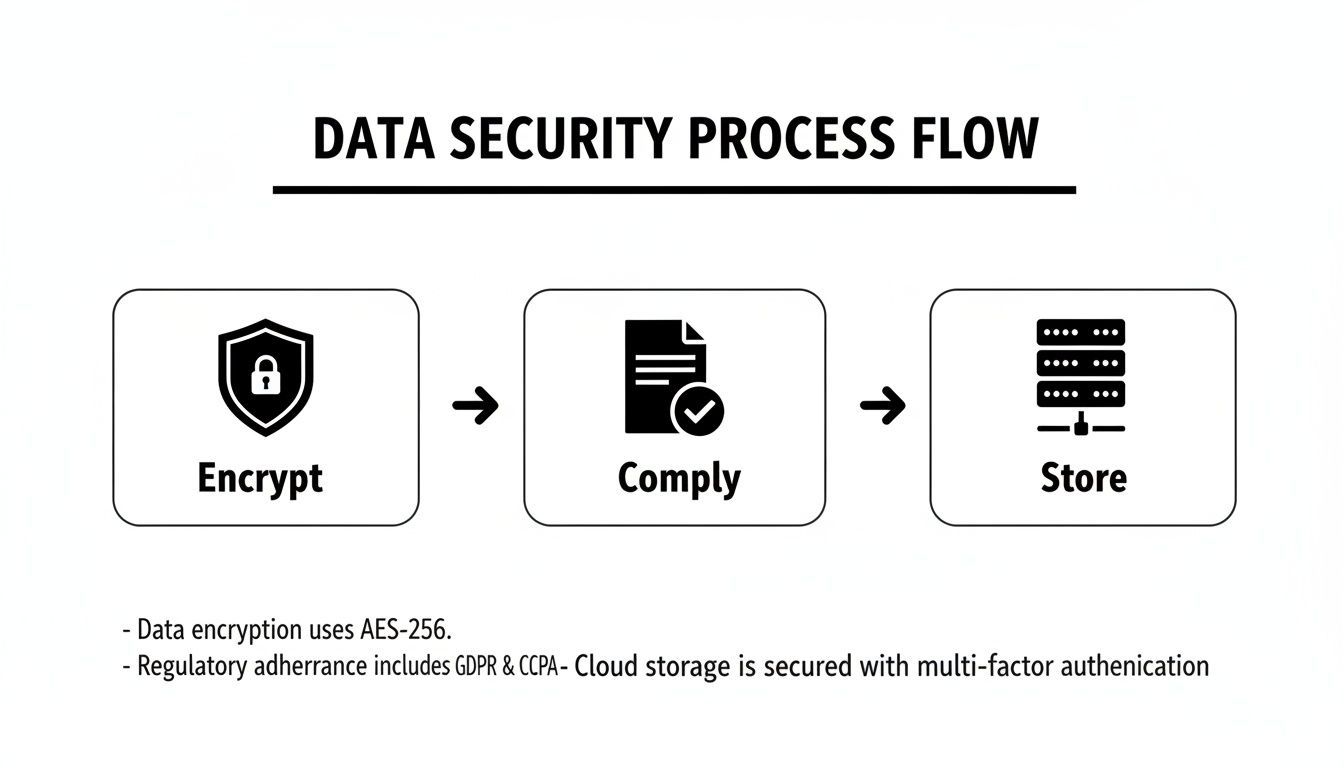
Let's be clear: when you're handling interview data, security isn't just a technical feature. It's an ethical cornerstone of your work. Your top priority should be finding a transcription service that offers 256-bit encryption, is SOC 2 compliant, and is completely transparent about how it handles your data. This isn't just about satisfying an IRB; it’s about protecting the people who trust you with their stories.
Think about it this way: the stories, opinions, and personal details shared in your interviews are given in confidence. As a researcher, the transcription software you choose is a direct reflection of how seriously you take that trust.
Using a platform with flimsy or vague security practices is like leaving your field notes on a park bench. It's a needless risk. You don't need to become a cybersecurity guru, but you absolutely need to know what to look for to make a safe, ethical choice.
What to Look for in a Secure Service
When you're reading a software provider's website, they'll throw around a few technical terms. Don't let them intimidate you. Here’s a quick translation of what actually matters for your research.
- 256-bit Encryption: This is basically the digital version of a bank vault. It scrambles your audio files and transcripts, making them unreadable to anyone who doesn't have the specific key. This needs to cover your files both while they're being uploaded (in transit) and while they're sitting on a server (at rest).
- SOC 2 Compliance: This one is a big deal. A SOC 2 report is proof that an independent auditor has thoroughly checked a company's security systems and confirmed they have robust processes for protecting customer data. If a service has this, you know they're serious.
- GDPR and HIPAA: You've probably heard of these. They are major regulations for data privacy—GDPR for people in the European Union and HIPAA for health information in the U.S. Even if your work doesn't fall directly under these rules, choosing a compliant provider is a good sign they hold themselves to a higher standard.
Choosing a transcription partner with enterprise-grade security isn't just about protecting files; it's about protecting people. Your participants have trusted you with their stories, and using a secure platform is how you honor that trust from a technical standpoint.
The Critical Questions You Need to Ask
Beyond the certifications, you have a right to know exactly what’s happening with your data. A trustworthy company will have no problem answering these questions. Before you upload a single recording, make sure you can find the answers.
Where is My Data Actually Stored?
This is all about data residency—the physical, geographic location of the servers holding your files. It’s a bigger deal than you might think. Many universities, IRBs, and funding agencies have strict rules requiring research data to stay within a specific country or region.
For instance, if you're researching a sensitive topic in Germany, your ethics board might require all data to remain within the EU. If your transcription service uses servers in the United States, you could be accidentally violating your ethical approval. Always check the provider’s policy on this.
Who Can Access My Data?
A clear, straightforward privacy policy is non-negotiable. You need to know if the company's own employees can access your files and, if so, under what circumstances. The best platforms are built on a "zero-access" foundation.
Services like WhisperAI, for example, encrypt your data in a way that makes it inaccessible even to their own staff. You can usually find these details spelled out in the company’s privacy commitments. This ensures that the only people who ever see or hear your confidential interviews are the ones on your research team. Your choice of software is an active part of your ethical research practice, so pick a partner who gets it.
How to Weave Transcription into Your Research Workflow
So, you've decided to use transcription software. That’s a great first step. But simply buying a tool isn’t enough; you need to build it into your research process in a way that feels natural and actually saves you time. Think of it less as a one-off task and more as creating a smooth pathway for your data to travel from raw audio to rich, analyzable text.
A good workflow integration means less friction and more time for the real work: thinking about your data. It’s like setting up a new kitchen. You don't just buy a fancy stove; you arrange the whole space so ingredients flow logically from the fridge to the prep counter to the stove.
Let's walk through what that process actually looks like, step-by-step.
Step 1: Prep Your Audio for the Best Results
The old saying "garbage in, garbage out" is especially true for AI transcription. While today's tools are remarkably good at filtering out background noise and understanding different accents, you’ll always get a better, more accurate result by starting with clean audio.
Before you even think about uploading, take a moment to prep your files.
- A decent microphone is a game-changer. You don't need a professional studio setup, but even a simple external mic will capture clearer audio than your laptop's built-in one.
- Find a quiet space. That humming refrigerator, ticking clock, or open window can introduce just enough noise to trip up the AI.
- Check your file format. Most platforms, including WhisperAI, are happy with standard formats like MP3, WAV, and M4A.
Spending just five minutes on audio quality upfront can save you an hour of tedious corrections later.
Step 2: Upload and Let the AI Do the Heavy Lifting
With your audio files ready, the next part is beautifully simple: upload them to your chosen platform. This is where the magic happens. The AI engine gets to work, turning hours of conversation into a full text document in just a few minutes.
This efficiency is why the transcription market is booming, hitting $30.42 billion in the U.S. in 2024. With accuracy rates now touching 99%, AI is no longer a novelty but an essential research tool. In fields like healthcare, where precise patient narratives are critical, the market is expected to grow to $8.41 billion by 2032—largely because AI can now handle complex medical terminology with surprising accuracy.
Step 3: Review and Refine in the Editor
As good as AI has become, it's not infallible. This is why the review stage is non-negotiable. The best transcription software for qualitative research will always include an interactive, in-browser editor that syncs the audio playback directly to the text.
This lets you click on any word and instantly hear the corresponding audio, making it incredibly fast to catch and fix any errors. This is your chance to clean up inaccuracies, confirm speaker labels are correct, and even add your own annotations. For instance, you might jot down a note like [participant paused, seemed emotional] to capture a crucial non-verbal cue that the text alone would miss.
The editing phase isn't just about fixing typos. It's your first real engagement with the data, a chance to re-listen to important moments and let initial analytical thoughts begin to surface.
Step 4: Export for Seamless Analysis
Once you’re satisfied with the transcript, the final step is to export it. This is the all-important bridge connecting your transcription tool to your qualitative data analysis (QDA) software, like NVivo or ATLAS.ti.
A good platform will give you a few key export options to choose from:
- DOCX: Perfect for sharing with colleagues or doing some initial coding directly in a Word document.
- TXT: A simple, universal format that’s compatible with almost any program on the planet.
- SRT: Absolutely essential if you're working with video, as this format includes the timestamps needed for subtitles and captions.
Exporting a clean, properly formatted file means you can pull it straight into your analysis software and get right to work on coding themes. No reformatting, no fuss. If you're still looking for the right tool, you can explore some great options in our guide to the best AI transcription apps. This last step closes the loop, turning raw audio into a perfectly organized, analysis-ready dataset.
Answering Your Key Questions
You're right to be asking questions. Bringing any new tool into your research workflow is a big deal, and it’s smart to get into the weeds before you commit. Let's tackle the most common questions we hear from researchers looking at transcription software for qualitative research, with direct, practical answers to help you move forward.
How Accurate Is AI Transcription for Complex Academic Topics?
Honestly, it's remarkably good these days. Modern AI transcription can often hit up to 99% accuracy, a number that holds up surprisingly well even when dealing with dense academic jargon, a mix of accents, and a bit of background noise. For qualitative work, this isn't just a number—it’s about protecting the integrity of your participants' verbatim quotes.
The technology behind this, mainly advanced Natural Language Processing (NLP), is smart enough to understand context, not just isolated words. That’s how it can correctly pick up on specialized terms from fields like medicine, sociology, or engineering. While no AI is perfect, it's gotten so good that your job shifts from manually transcribing everything to just doing a quick final review for minor tweaks.
The point of AI transcription isn't to be 100% flawless every single time. It's to be so accurate that it wipes out 95% of the manual grunt work, freeing you up to spend your time analyzing the data, not just typing it out.
Can I Use This Software for Multilingual Interviews?
Absolutely. This is one of the most powerful features you’ll find. Top platforms can automatically detect and transcribe speech in well over 100 languages and dialects. If you’re doing any cross-cultural, international, or community-based research, this is a massive advantage.
Imagine you're running an interview where the participant switches between English and Spanish. The right software can handle that on the fly, transcribing both languages in the same document. Even better, many services now offer instant translation. This means you can upload an audio file in French and get back a clean English transcript, making global research projects far more manageable.
- Automatic Language Detection: The software figures out the language being spoken on its own.
- Mixed-Language Transcription: It can easily handle interviews where multiple languages are used.
- Direct Translation: You can translate a transcript into another language—like English—so your entire team can work with it.
This capability often means you don't have to hire separate, expensive translation services, which can speed up your entire research timeline.
Is My Research Data Safe on an Online Transcription Platform?
Data security is non-negotiable, and how safe your data is depends entirely on the provider you choose. This is one area where you absolutely should not cut corners. The gold standard is a platform that offers enterprise-grade security designed specifically to protect sensitive research data.
Here’s what to insist on:
- 256-bit Encryption: This ensures your data is scrambled and unreadable both when it’s being uploaded (in transit) and when it’s stored on their servers (at rest).
- Compliance and Certifications: Look for clear adherence to major data privacy regulations like GDPR (for European data) and HIPAA (for health information). A SOC 2 Type II certification is even better—it means an independent auditor has verified their security controls.
Trustworthy providers are always upfront about their security measures because they understand the ethical responsibility that comes with handling academic and professional research. Always spend a few minutes reviewing a service's privacy policy before you upload a single audio file. Your IRB and your participants expect it.
How Does the Software Handle Multiple Speakers in a Focus Group?
This is where a feature called speaker diarization—or just speaker labeling—really shines. For anyone working with focus groups, panel discussions, or interviews with more than one person, it’s a complete game-changer. The AI listens to the audio and intelligently distinguishes between each person's unique vocal patterns.
Once it identifies the different voices, it automatically tags each chunk of speech (e.g., "Speaker 1," "Speaker 2"). This instantly organizes what would otherwise be a chaotic wall of text.
This simple process makes analysis so much easier:
- It eliminates the tedious job of manually figuring out who said what.
- It lets you trace conversational threads and see how group dynamics play out.
- Most platforms have an editor where you can quickly replace the generic labels ("Speaker 1") with participants' names or pseudonyms, leaving you with a clean, analysis-ready transcript.
With decent quality audio, the accuracy of speaker labeling is incredibly high. It turns one of the most difficult transcription scenarios into a simple, automated step and is one of the key reasons modern transcription software for qualitative research has become an indispensable tool.
Ready to transform your qualitative research workflow with fast, accurate, and secure transcription? At WhisperAI, we provide an AI-powered platform built to meet the rigorous demands of researchers. Turn hours of audio into searchable, analyzable text in minutes.
Explore how our AI transcription can accelerate your insights at whisperai.com/ai-transcription.