A Guide to French Transcription Services
Discover the best French transcription services. This guide compares AI and human transcribers to help you get accurate audio-to-text results.
tl;dr: French transcription converts spoken French into text. It's challenging due to accents, dialects, and homophones (words that sound the same). AI tools like Whisper AI offer incredible speed and affordability, making them great for most tasks, while human transcribers provide near-perfect accuracy for critical legal or medical files. For the best results, always start with high-quality audio.
What Is French Transcription and Why It Matters
At its core, French transcription is the simple act of converting spoken French—whether from an audio file or a video—into written text. Think of it as creating a blueprint for a conversation. It transforms fleeting audio waves from meetings, interviews, or podcasts into a tangible, searchable, and shareable document.
This isn't just about typing out words; it's about unlocking the value trapped in your audio and video content.
The Growing Demand for Accurate Transcripts
In a world driven by content, so much of our communication happens through audio and video. But without a text version, that content is a locked box—difficult to analyze, repurpose, or make accessible. Accurate French transcription is the key that opens it.
This need is exploding. France's IT services sector, which includes transcription services, is already the sixth-largest globally. And it's not slowing down. The market is projected to hit USD 81.21 billion by 2030, fueled by the digital shift in legal, medical, and business fields that all rely on precise documentation.
By converting spoken French to text, you make information discoverable, accessible to individuals with hearing impairments, and easier to translate for international markets. It turns a fleeting moment into a permanent asset.
Human vs. AI: Two Paths to a Perfect Transcript
When you need a French file transcribed, you have two main options: go with a professional human linguist or use an automated AI-powered service. Each path has its own strengths, and the right choice depends entirely on your project's needs for accuracy, speed, and budget.
To make it simple, here’s a quick breakdown of how they stack up.
French Transcription Methods at a Glance
| Feature | Human Transcription | AI Transcription |
|---|---|---|
| Accuracy | The gold standard (99%+), especially with difficult audio. | High (up to 95%), but can struggle with heavy accents or noise. |
| Speed | Slow. Hours of work for one hour of audio. | Extremely fast. Transcribes hours of audio in just minutes. |
| Cost | Premium. Priced per audio minute, often $1.50 - $5.00+. | Very affordable. Often a flat subscription or pennies per minute. |
| Nuance | Excellent at interpreting context, sarcasm, and emotion. | Relies on algorithms; may miss subtle conversational cues. |
| Scalability | Limited by human availability and speed. | Nearly infinite. Can process thousands of files simultaneously. |
As you can see, there’s a clear trade-off between the handcrafted precision of a human and the raw efficiency of AI.
- Human Transcription: This is your go-to for absolute precision. A human transcriber can untangle a chaotic conversation with multiple speakers, understand thick regional accents, and catch nuances that an algorithm would miss. For legal depositions or high-stakes business meetings where every single word matters, this is the safest bet.
- AI Transcription: Automated services deliver unmatched speed and cost-efficiency. Powered by sophisticated models, these tools can churn through hours of audio in the time it takes to grab a coffee. This makes them perfect for high-volume tasks like transcribing lectures, call center logs, or creating first drafts of interviews. You can dive deeper into the mechanics in our guide to AI audio transcription.
Understanding the pros and cons of each method is the first step toward building a workflow that gives you the quality you need without breaking your budget.
Understanding French Language Nuances for Transcription
The short version: French transcription is notoriously tricky. The language is packed with linguistic curveballs like homophones (words that sound the same but mean different things), critical accents (diacritics), and a wild variety of regional dialects. These nuances can easily trip up transcription software, leading to some serious mistakes. Getting a handle on these challenges is the first step toward an accurate transcript.
Transcribing French audio isn't just a simple word-for-word swap. The language is riddled with subtleties where one tiny misinterpretation can completely flip the meaning of a sentence. It’s a bit like navigating a minefield; even the most advanced tools can get lost if they don’t understand the terrain.
This is why a truly reliable French transcription needs to go beyond basic speech recognition. It requires a deep understanding of context, culture, and the subtle sounds that separate one word from another.
The Challenge of Homophones
One of the biggest traps in French is the sheer number of homophones—words that are pronounced identically but have totally different spellings and meanings. This creates a ton of ambiguity that can easily confuse automated systems that haven't mastered contextual analysis.
Take a speaker who says something that sounds like /vɛʁ/. This could be:
- Verre: (glass)
- Vers: (towards)
- Vert: (green)
- Ver: (worm)
Without the rest of the sentence, an AI might just take a guess. It could easily mistake a conversation about ecology ("vert") for a chat about parasites ("ver"). A human transcriber, or a highly sophisticated AI, uses the surrounding words to nail the correct choice every time.
Why Diacritics Are Non-Negotiable
In English, we mostly ignore accent marks. In French, they're everything. They are fundamental to a word's meaning and how it's pronounced. A missing or wrong accent isn't a simple typo—it creates a completely different word.
Accurate French transcription absolutely must capture diacritics like the accent aigu (é), accent grave (è), and cédille (ç). Getting this wrong can make a transcript confusing or just plain incorrect, tanking its professional value.
For example, "pêcher" means "to fish," but "pécher" means "to sin." A transcript for a fishing documentary that accidentally uses the wrong accent would tell a very, very different story. These tiny marks carry a whole lot of weight.
Navigating Regional Dialects and Accents
The French spoken in Paris sounds nothing like the French from Marseille, Brussels, or Montreal. Every region brings its own unique rhythm, vocabulary, and slang to the table. This is a massive headache for transcription tools trained only on a standard "Parisian" accent.
Here are just a few of the variations:
- Québécois (Canadian French): Famous for its distinct vowel sounds and unique expressions, like using "char" for a car instead of "voiture."
- Southern French (Marseille): Carries a melodic, rolling accent that can completely change the feel and cadence of sentences.
- Belgian French: Uses its own vocabulary, like saying "septante" for seventy instead of the standard "soixante-dix."
To really appreciate the depth of these challenges, it helps to understand the Natural Language Processing applications that drive modern transcription tools. For teams spread across the globe, handling these linguistic quirks is mission-critical for clear communication, a challenge we dive into in our guide on real-time translation solutions.
At the end of the day, any French transcription service worth its salt must be built to navigate this linguistic diversity. The goal is always the same: preserve the original meaning, no matter who is speaking.
Comparing Human vs AI French Transcription
Deciding between a human and an AI for your French transcription is a bit like choosing between a master watchmaker and a state-of-the-art robotic assembly line. Both can get the job done, but the process, cost, and final product are worlds apart. It all boils down to a classic trade-off: do you need perfect, nuanced accuracy, or do you need incredible speed and scale?
The short answer? A human transcriber delivers 99%+ accuracy, which is essential for complex legal or creative work, but it's slower and costs more. AI transcription, on the other hand, is lightning-fast and affordable, making it a powerhouse for high-volume tasks like meeting notes. But, it can get tripped up by heavy accents, niche jargon, or people talking over each other.
Let's dig into the details to help you pick the right tool for your project.
The Case for Human Precision
When every single word matters, nothing beats a skilled human transcriber. A professional French linguist doesn't just type what they hear; they interpret context, understand thick regional accents, and skillfully untangle conversations where multiple people are speaking at once.
Think of it this way: an AI hears the audio, but a human understands the conversation. They can correctly identify who is speaking, filter out distracting background noise, and accurately capture industry-specific terms that would completely confuse an algorithm. This level of detail is non-negotiable for:
- Legal Proceedings: Capturing a flawless record of a deposition or court hearing.
- Medical Dictation: Ensuring patient notes are absolutely precise to avoid dangerous errors.
- Market Research: Understanding the subtle sarcasm or emotional undertones in a focus group.
The price for this meticulous work is time and money. A human might take several hours to transcribe just one hour of audio, and you're paying a premium for that expert touch.
The Power of AI Speed and Scale
AI transcription is the answer to the modern business need for speed. Automated services can process hours of audio in just minutes, turning a recording into a searchable text document almost instantly. This makes AI the perfect solution for handling a large volume of transcription work without breaking the bank.
Its real advantage is its ability to scale. You can upload dozens of files at once and get fast, consistent results—a task that would require an entire team of human transcribers. AI has quickly become the go-to for:
- Internal Meeting Notes: Creating a quick, searchable log of discussions and action items.
- Academic Lectures: Converting hours of recordings into study notes and research material.
- Content Creation: Generating a rough draft transcript for a podcast or video that you can use for editing or subtitles.
Of course, AI isn't perfect. A common question is whether it has truly surpassed traditional methods. For a deeper dive into this, it's worth exploring the debate on Is AI Transcription Better Than Regular Transcription.
In-Depth Comparison of Transcription Methods
To make the decision easier, let's put both methods side-by-side. Often, the right choice comes down to how much editing you're prepared to do afterward. A human transcript is typically ready to go, while an AI transcript often needs a quick human review to catch any errors. The quality of that AI output depends on many factors, which you can learn about in our guide to AI transcription accuracy.
Here’s a clear breakdown of how they stack up:
| Factor | Human Transcription (Linguist) | AI Transcription (Software) |
|---|---|---|
| Best For | High-stakes legal, medical, or qualitative research. | High-volume meetings, lectures, and first-draft content. |
| Accuracy | 99%+, excels with poor audio and multiple speakers. | Up to 95% in ideal conditions, struggles with noise or accents. |
| Turnaround | Slow (hours to days). | Extremely fast (minutes). |
| Cost | High (per audio minute). | Low (subscription or minimal per-minute fee). |
| Contextual Understanding | Excellent at grasping sarcasm, intent, and cultural nuance. | Limited; interprets words literally without deeper meaning. |
| Scalability | Limited by human capacity. | Virtually unlimited; can process thousands of hours simultaneously. |
Ultimately, the best solution might be a hybrid approach. Use AI for its incredible speed and low cost to get a solid first draft, then have a human editor give it a final polish. This strategy gives you the best of both worlds—efficiency without sacrificing accuracy.
A Proven Workflow for Flawless Transcripts
tl;dr: Getting a high-quality transcript isn't magic—it's about having a deliberate, repeatable process. A solid workflow boils down to five stages: cleaning up your audio, running an initial transcription (usually with AI), meticulously editing the text, formatting it for its final purpose, and translating it if you need to. Following these steps takes the guesswork out of the equation and delivers a professional, accurate transcript every time.
Great transcripts don't happen by accident. They're the product of a structured, methodical approach. Whether you're working with a human service, a powerful AI, or a bit of both, a clear workflow is your blueprint for success. It transforms what can be a messy, error-prone task into a predictable system for producing flawless French transcription.
This five-step process is built to maximize both accuracy and efficiency from start to finish. By breaking the project into manageable stages, you can build in quality control at every point and dodge the frustrating cleanup that comes from a disorganized approach.
Step 1: Prepare Your Audio
The journey to a perfect transcript starts long before you hit the "transcribe" button. The quality of your original audio is the single biggest factor in the final accuracy.
Think of it like cooking. If you start with subpar ingredients, even the best chef will struggle to create a great dish.
To set your project up for success, focus on capturing the cleanest audio you possibly can:
- Use a good microphone: An external mic will always beat the one built into your laptop or phone. Always.
- Minimize background noise: Record in a quiet room, far away from echoes, street noise, or office chatter.
- Ensure clear speech: Ask speakers to talk one at a time and avoid mumbling or speaking too fast.
Spending a few extra minutes getting this right can save you hours of painful editing later. A clean recording allows any transcription method—human or AI—to do its best work.
Step 2: Run the Initial Transcription
With a clean audio file ready to go, it's time for the first pass. This is where you turn the spoken words into raw text. For most businesses and professionals today, a high-quality AI transcription service is the best tool for the job.
AI offers incredible speed, giving you a first draft in minutes, not hours or days. This is especially true for models like OpenAI's Whisper, which has been trained on massive datasets to handle different accents and technical jargon with surprising precision.
This chart from OpenAI's own research on Whisper shows just how low its word error rate is across many languages, proving how robust it is.
The data proves that advanced models can achieve incredibly low error rates, making them a reliable foundation for your French transcription workflow. This initial AI-generated text is the perfect starting point for the next critical phase.
Step 3: Edit and Refine
No AI is perfect, which is why this "human-in-the-loop" stage is absolutely non-negotiable for professional-grade results. The editing phase is where you turn a good draft into a flawless final document.
Your goal here is simple: review the AI-generated text against the original audio.
This is way more than just a spell-check. A proper review means correcting misinterpreted words, adding the right punctuation, and making sure speaker labels are assigned correctly. This human touch is what bridges the gap between 95% and 99%+ accuracy.
For content creators, this is also where you'd clean up filler words ("um," "like," "you know") or tweak sentences for better readability. You can learn more about that process in our guide to transcription for content creators.
Step 4: Format and Export
Once the text is perfect, the final step is formatting it for its intended use. The right format depends entirely on what you plan to do with the transcript. A single transcription project can actually become multiple useful assets if you format it correctly.
Some of the most common export formats include:
- DOCX or PDF: Perfect for creating polished documents for reports, meeting minutes, or legal records.
- TXT: A simple, plain-text file that's universally compatible and great for archiving or data analysis.
- SRT: The industry standard for video subtitles, complete with timestamps that sync the text to your video.
Choosing a service that gives you multiple export options provides the flexibility to repurpose your content for any channel. This final bit of polish ensures your hard work is presented professionally and is ready to be put to work immediately.
How to Improve Your Transcription Accuracy
When it comes to transcription, there’s one golden rule that trumps all others: garbage in, garbage out. The final quality of your transcript is almost entirely dictated by the quality of your source audio. Clean, clear recordings are the single best way to guarantee accuracy.
Think of it like taking a photo. You can have the best editing software in the world, but it’s nearly impossible to fix a blurry, poorly lit picture. It’s the same with audio. A crisp recording gives both AI and human transcribers the best possible raw material to work with, saving you hours of painful editing down the line.
To get those great results, start by focusing on getting a clean recording from the get-go.
Checklist for Capturing Clean Audio
Before you even press record, running through a quick audio quality checklist can make all the difference. Think of these simple steps as your first line of defense against muffled words and jumbled sentences.
- Choose the Right Microphone: Ditch the default mic on your laptop or phone. An external USB or lavalier microphone will always capture richer, clearer sound. It’s a small investment that pays huge dividends in accuracy.
- Pick a Quiet Environment: Record in a space with minimal echo and background noise. That means closing windows, turning off fans or air conditioners, and steering clear of a busy office or coffee shop.
- Manage Speaker Etiquette: This one is huge. Encourage speakers to talk one at a time. Overlapping conversations are the fastest way to confuse transcription software and turn your transcript into an unreadable mess.
- Check Mic Placement: Position the microphone close to the speaker's mouth, but not so close that it picks up every breath and "pop." A good rule of thumb is about 6-12 inches away.
Nailing these fundamentals sets a strong foundation for an accurate transcript.
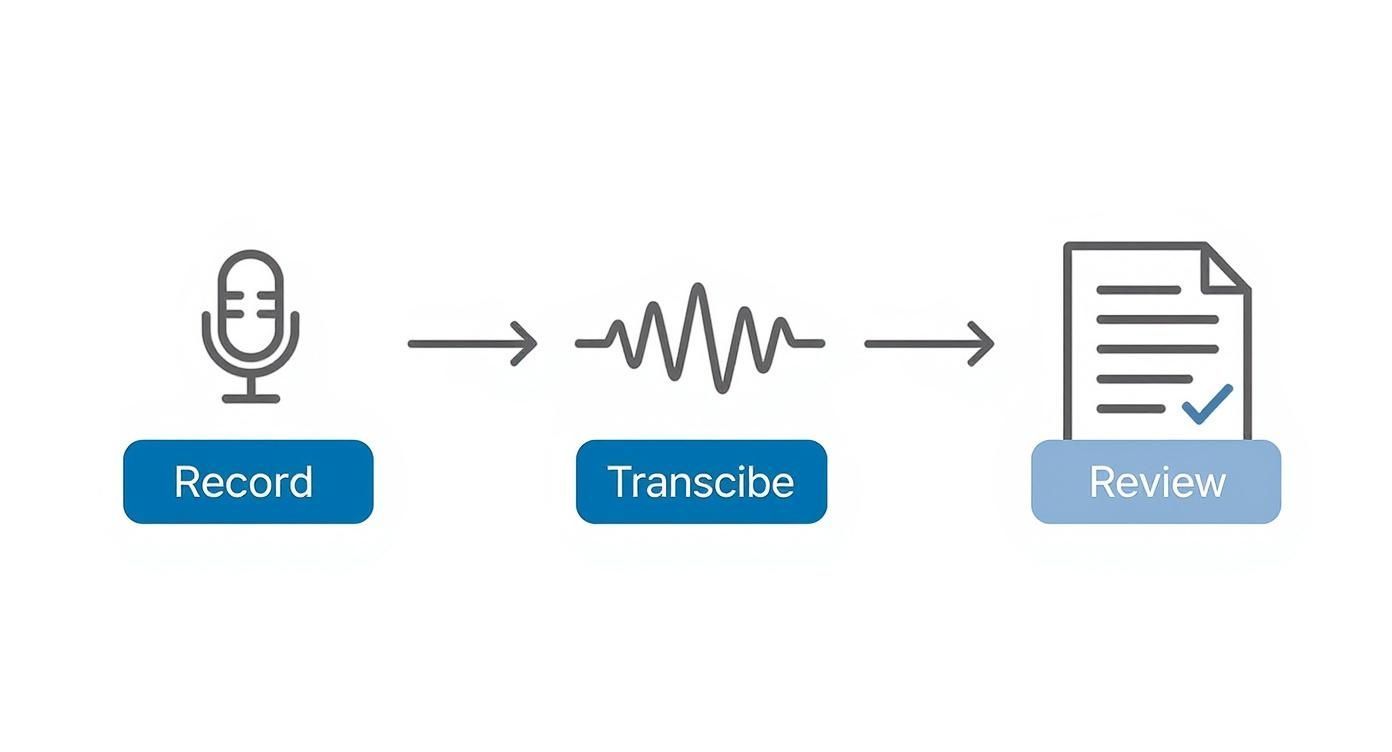
This whole process is a chain reaction—the quality of one step directly impacts the next. Starting with a great recording makes everything that follows easier and more accurate.
Boost Accuracy with a Custom Vocabulary
Beyond getting the audio right, you can give your transcription tool a serious leg up by feeding it a "cheat sheet"—a custom glossary of terms specific to your recording.
This simple step helps the transcription process correctly nail words it might not otherwise recognize.
By providing a list of unique terms, you're essentially training the system on your specific content. This helps it avoid misinterpreting a brand name as a common noun or misspelling a key person's name.
Your glossary should include:
- Speaker Names: List all participants to ensure proper identification (e.g., Stéphane Dubois, Dr. Lévesque).
- Brand and Product Names: Include company or product names that might be unfamiliar (e.g., BioSynthétique, Projet Lumière).
- Technical Jargon: Add any industry-specific acronyms or terminology (e.g., adénosine triphosphate, API RESTful).
This proactive step is incredibly valuable in specialized fields. Take the marketing transcription sector in France, for example. It's seeing steady growth, with a projected CAGR of around 5.5% from 2025 onward, largely driven by the need for precise localization. For these businesses, correctly transcribing brand names isn't just a detail—it's critical. You can dig into more data on the growth of the French transcription market. Taking a few minutes to build a custom vocabulary list directly supports this need for precision.
Why Whisper AI Is a Game-Changer for Transcription
tl;dr: OpenAI's Whisper model is a massive leap forward for AI transcription, especially for a complex language like French. It was trained on an incredibly diverse dataset, letting it nail various accents and dialects with high precision, even with background noise. For businesses, it delivers accuracy plus intelligent formatting and solid security, making it a truly professional-grade tool.
In the world of AI, few tools have landed with such an immediate and profound impact as OpenAI's Whisper model. When it comes to the tricky task of French transcription, it's a huge step up, leaving the limitations of older tech in the dust to offer business-level accuracy and reliability.
What really makes Whisper different is the insane scale and diversity of its training data. It learned from a gigantic dataset of multilingual audio scraped from the web, exposing it to a vast spectrum of languages, accents, dialects, and all sorts of acoustic conditions.
This diverse education allows it to handle the nuances of French—from a Parisian accent to Québécois slang—with a depth of understanding that previous models could only dream of.
Beyond Raw Accuracy
Whisper doesn't just blindly convert speech to text; it brings a layer of intelligence to the process. It automatically handles punctuation and capitalization, spitting out transcripts that are much closer to a finished document right from the start.
This means way less time spent on manual cleanup. Instead of getting a raw wall of text, you get a transcript that’s readable and properly structured from the get-go, a feature that dramatically speeds up workflows for any professional. To see how this powerful model works in practice, explore our comprehensive Whisper AI guide.
Whisper's knack for navigating noisy environments and understanding technical jargon makes it a powerful asset. It can effectively tune out background chatter in a chaotic meeting or correctly identify specialized vocabulary—tasks that often trip up other automated systems.
Built for Business and Security
For any organization, transcription isn't just about getting the words right; it's also about data security. Platforms built on the Whisper model prioritize protecting sensitive information, which is non-negotiable for legal, medical, and corporate work. This commitment to security is vital for maintaining client trust and staying compliant.
The growing demand for secure tools like this is obvious across many sectors. In France, the medical transcription software market is booming, pushed by a national focus on AI and NLP. The European market is expected to jump from USD 1.02 billion in 2025 to USD 3.24 billion by 2033. This growth underscores just how important tools that can securely integrate with systems like electronic health records have become. You can read more about these healthcare market trends.
This combination of accuracy, intelligence, and security makes Whisper a strategic choice for businesses. It provides a scalable, reliable, and secure foundation for turning spoken French into text you can actually use. By handling the heavy lifting of transcription with remarkable precision, it frees up valuable time for professionals to focus on analysis and action, not tedious manual corrections.
French Transcription FAQs
Getting started with French transcription often brings up a few key questions. Here are some straightforward answers to the ones we hear most often.
What Is the Difference Between Verbatim and Clean Transcription?
This is a really important distinction, as it completely changes the final transcript. It’s all about how much detail you need.
A verbatim transcription is the whole unfiltered story—every "euh," stutter, laugh, and false start is captured. Think of it as a literal, word-for-word record. This level of detail is essential for legal depositions or deep research where how someone speaks is just as critical as what they say.
A clean transcription (often called intelligent verbatim) cuts through the noise. The editor polishes the text, removing all those filler words and fixing minor grammatical slips to create a clear, readable document. This is the go-to standard for business meetings, published articles, and subtitles, where the message itself is king.
How Long Does It Take to Transcribe One Hour of French Audio?
The answer really depends on whether you go with AI or a human. The time difference is massive.
An AI transcription service can process an hour of clear French audio in just a handful of minutes. With a high-quality platform, you're often looking at under 10 minutes. That speed is tough to beat.
On the other hand, a professional human transcriber needs a lot more time. The industry average is about 4 hours of work for every 1 hour of audio. That timeline can stretch even longer if the recording quality is poor, speakers have heavy accents, or the topic is packed with technical jargon.
For projects on a tight deadline, a hybrid approach is often perfect. Let AI generate a super-fast first draft, then have a human editor quickly review and polish it. You get the best of both speed and accuracy.
Can AI Handle Different French Accents and Dialects?
Yes, and modern AI has gotten incredibly good at it. Models like OpenAI's Whisper are trained on massive, diverse datasets filled with audio from across the globe. This means they’ve been exposed to everything from Québécois French to the unique dialects you'd hear in the south of France.
While no AI is 100% perfect, today's advanced models can navigate regional variations with a high degree of accuracy—something that would have easily tripped up older software. At the end of the day, though, clear audio is still the single biggest factor for getting the best results.
What File Formats Are Best for Transcription?
For top-tier accuracy, always go with a lossless audio format. These file types keep the original audio data perfectly intact without any compression, giving the AI more information to analyze.
Your best bets are:
- WAV: An uncompressed format that delivers the absolute highest audio quality.
- FLAC: A lossless format that shrinks the file size a bit without sacrificing a single bit of audio data.
If you have to use a lossy format, an MP3 is an acceptable backup. Just make sure it has a high bitrate—at least 192 kbps, but 320 kbps is even better.
Ready to turn your French audio into accurate, searchable text in minutes? WhisperAI provides business-grade transcription powered by OpenAI's advanced model, delivering exceptional accuracy, speed, and security. Start transcribing for free today.