A Guide to Flawless Spanish Transcription
Master Spanish transcription with this end-to-end guide. Learn to handle dialects, use AI tools, ensure quality, and optimize your workflow for accuracy.
tl;dr: For fast, affordable, and highly accurate Spanish transcription, a hybrid approach is best. Use a top-tier AI tool like Whisper for the initial heavy lifting to get a solid first draft in minutes. Then, have a human expert review and polish it to catch the subtle nuances, dialects, and context that AI can still miss. This gives you the speed of a machine and the precision of a human.
Here’s a breakdown of what you need to nail your Spanish transcription project, whether you're working with a legal deposition from Madrid, a medical consultation in Mexico City, or a podcast interview from Buenos Aires.
The goal is always the same: precision and clarity.
This isn't a niche service anymore. The global business transcription market is exploding, projected to jump from $5 billion in 2025 to nearly $13 billion by 2033. That growth tells you everything you need to know about how critical this has become for businesses everywhere.
This guide will walk you through the entire process, from prepping your audio files to navigating the rich diversity of Spanish dialects and running those essential final quality checks.
The Core Pillars of a Great Transcript
Getting a flawless transcript isn’t about finding one magic tool. It’s about building a solid process from the ground up. The quality of your final document depends entirely on the strength of its foundation.
Here’s what really matters:
- Audio Quality: This is non-negotiable. Clear, crisp audio with minimal background noise is the single biggest factor for accuracy. Garbage in, garbage out.
- Dialect and Accent Awareness: Spanish isn't a monolith. Recognizing the differences between Castilian, Latin American, and other regional variants is crucial for capturing the correct meaning and nuance.
- Technical Terminology: If you're transcribing industry-specific jargon—legal terms, medical vocabulary, engineering specs—you need either specialized human knowledge or an AI advanced enough to handle it.
The biggest mistake I see people make is underestimating the prep work. A few minutes spent cleaning up audio or providing context about the speakers can literally save you hours of tedious editing on the back end.
Manual vs. AI-Powered Solutions
So, should you hire a human transcriber or use a modern AI solution? It really comes down to your project's specific needs for speed, cost, and nuance.
For video content, especially from platforms like YouTube, efficient YouTube transcript generation services can give you a massive head start by providing a strong initial draft to work from.
Today's AI audio transcription has made professional-grade results more accessible than ever before, but it's important to understand the trade-offs.
Manual vs AI Transcription Methods
Let's break down the real-world differences between going the traditional route versus using an AI-powered tool like Whisper.
| Factor | Manual Transcription | AI-Powered Transcription (e.g., Whisper) |
|---|---|---|
| Speed | Slower (hours or days) | Extremely Fast (minutes) |
| Cost | Higher (per minute/hour) | Lower (often a flat or subscription fee) |
| Accuracy | Up to 99%+ with experts | 90-98%+ with clear audio |
| Nuance | Excellent at context, slang | Can struggle with heavy accents, overlapping speech |
| Scalability | Limited by human resources | Highly scalable for large volumes |
Ultimately, AI offers incredible speed and scalability, making it a powerful tool for most modern workflows. Manual transcription, while slower and more expensive, still holds an edge when you need absolute perfection or have to decipher extremely challenging audio with lots of overlapping speakers and heavy slang. For many, the best approach is a hybrid: use AI for the heavy lifting and have a human review the final output.
Here’s the thing about transcription: your final text is only ever as good as your source audio. It's a simple truth that gets overlooked way too often.
Before you even think about hitting that "transcribe" button, taking a few minutes to prep your audio can save you hours of painful editing later. Think of it as setting the stage for the AI to do its best work.
How to Prepare Audio for Optimal Results
The secret to a flawless Spanish transcription isn't really a secret at all—it all comes down to clean, high-quality audio. Even the most powerful AI will stumble over muffled voices, background noise, and echo.
The old saying "garbage in, garbage out" has never been more true. A little prep work upfront pays off big time, turning a potential mess of errors into a clean, accurate transcript.
Control Your Recording Environment
First things first: the space you record in. Background noise is the absolute number one enemy of transcription accuracy. It forces the AI to guess, and guessing leads to mistakes.
You don't need a professional sound booth. Just find a quiet room, shut the windows to block traffic noise, and kill any humming fans or air conditioners. Soft surfaces like carpets, curtains, and even couches are your friends here—they absorb echo, or reverberation, which can otherwise make speech sound muddy and indistinct.
Choose the Right Gear and Placement
Your phone's built-in microphone can work in a pinch, but stepping up to an external mic is a total game-changer. A decent USB microphone or a simple lavalier (lapel) mic will capture your voice with much more clarity and directness.
Where you put the mic is just as crucial as what mic you use.
- Position it correctly: Aim for about 6-12 inches away from the speaker's mouth. Any closer and you get distortion; any farther and you pick up too much room noise.
- Use a pop filter: This simple screen stops those harsh "p" and "b" sounds (called plosives) from creating an annoying popping sound in the recording.
- Mic up everyone: If you have multiple speakers, give each person their own microphone or place an omnidirectional mic in the center of the group.
I once had to transcribe a two-hour focus group that was recorded on a single smartphone at the far end of a long conference table. The AI missed nearly 40% of the dialogue from the people sitting farthest away. A couple of cheap lavalier mics would have saved me an entire day of manual corrections.
File Formats and Basic Audio Editing
The file format you choose has a direct impact on quality. MP3s are popular because they're small, but they use lossy compression, which means audio data is thrown away forever to shrink the file size.
For the best Spanish transcription results, always try to work with a lossless format like WAV or FLAC. These formats are the raw, uncompressed originals, giving the AI every last bit of data to work with.
You don't have to be an audio engineer, either. Free software like Audacity can handle some simple cleanup tasks that make a huge difference:
- Normalize the volume so all speakers are at a consistent level.
- Remove background hum with a basic noise reduction filter.
- Cut out long, dead-air pauses to make the file a bit smaller and easier to process.
If you want to get deeper into the technical side of things, a good audio to text converter guide can offer more advanced tips for optimizing your files.
The Pre-Transcription Checklist
Before you upload anything, just run through this quick mental checklist. It’s a simple routine that prevents the most common headaches and ensures you get the most accurate transcript possible on the first try.
| Task | Why It Matters | Status |
|---|---|---|
| Check for background noise | Reduces ambiguity and misinterpretations. | ☐ |
| Verify speaker volume | Ensures quiet speakers are not missed by the AI. | ☐ |
| Export to WAV or FLAC | Provides the highest quality source for the AI. | ☐ |
| Name speakers (if known) | Helps the transcriber (human or AI) with speaker labeling. | ☐ |
| List technical terms/jargon | Provides context for industry-specific vocabulary. | ☐ |
Taking these steps gets your audio ready for primetime, turning that raw recording into a valuable, easy-to-read document with minimal fuss.
One of the biggest mistakes I see people make with Spanish transcription is treating the language as a monolith. It’s not. The Spanish spoken in Madrid is a world away from what you'll hear in Buenos Aires or Mexico City—not just in accent, but in everyday vocabulary, slang, and even sentence structure.
Ignoring this diversity is a surefire way to get a messy, inaccurate transcript. An AI model trained mostly on Castilian Spanish might completely fumble common Latin American phrases, leaving you with text that’s confusing at best and nonsensical at worst. Real accuracy isn't just about getting the words right; it's about capturing the local flavor.
This isn't just an academic exercise—it has serious business implications. The global language services market was valued at a massive USD 60.68 billion in 2022 and is expected to climb to USD 96.21 billion by 2032. Demand for these services, including Spanish transcription, jumped by 40% during the pandemic, proving just how critical clear communication is. The takeaway is clear: getting this right matters.
Identifying Key Spanish Variants
Before you hit "transcribe," take a moment to figure out which dialect you're working with. While there are dozens of regional flavors, most fall into a few major groups that transcription tools and professionals will recognize.
- Castilian Spanish (Spain): Famous for its distinct "th" sound for the 'c' (before e/i) and 'z', which linguists call the ceceo. You'll also hear the pronoun vosotros for the informal plural "you," a feature that’s almost entirely absent in Latin America.
- Mexican Spanish: As one of the most widely spoken variants, it’s known for a clearer, almost melodic intonation. It's also packed with a rich vocabulary of slang influenced by indigenous languages (like the ubiquitous güey).
- Rioplatense Spanish (Argentina & Uruguay): You can spot this one from a mile away thanks to its unique sheísmo pronunciation, where 'll' and 'y' sounds are pronounced like "sh." They also famously use vos instead of tú for the informal "you."
- Caribbean Spanish (Cuba, Puerto Rico, Dominican Republic): Speakers often talk very quickly and have a habit of dropping the 's' at the end of syllables. It can be a real challenge for both AI and human transcribers if they aren't prepared.
Simply knowing which variant you're dealing with gives crucial context to your transcription tool or human expert, which massively boosts your chances of getting a spot-on result.
Practical Tips for Handling Dialectal Nuances
Once you’ve pinned down the dialect, you can take a few practical steps to make sure your transcript truly reflects it. This is how you go from a simple word-for-word document to one that’s culturally fluent.
Think about the word for "car." It seems simple, right? But it changes everywhere.
- In Spain, it's a coche.
- In much of Latin America, it's a carro.
- In Argentina, you'll often hear auto.
A good AI might catch this, but a human reviewer who knows the specific dialect will nail these nuances every single time, without a second thought.
A common pitfall is assuming all Spanish speakers understand every regionalism. Handing a Spanish client a transcript full of Argentinian slang like 'che' or 'quilombo' could be just as confusing as a bad machine translation. Context is everything.
Configuring Tools and Briefing Transcribers
Modern AI tools are getting smarter about recognizing dialects, but you can usually give them a helpful nudge. If your transcription software lets you specify a region (e.g., "Spanish - Mexico"), always use that setting. It helps point the model toward the right vocabulary and phonetic patterns from the get-go.
When you're working with human transcribers, a good brief is your best friend.
- Name the Source: Tell them if the speaker is from Colombia, Chile, or Spain.
- Provide a Glossary: If you know there will be specific slang, jargon, or technical terms, list them out. This saves a ton of guesswork.
- Define the Audience: Is the transcript for an internal team, or will it be read by a global Spanish-speaking audience? This helps the transcriber decide whether to leave regional terms as-is or perhaps add a quick clarifying note.
For teams juggling projects across different languages, mastering these dynamics is essential. We cover similar principles of cross-cultural communication in our guide to real-time translation for global teams. By tackling dialects head-on, you ensure your Spanish transcription is not just accurate, but genuinely meaningful.
Using AI Tools for a Smarter Workflow
Artificial intelligence has completely reshaped how we handle Spanish transcription. What used to be a painstaking, days-long manual process can now be knocked out in minutes. Tools like OpenAI's Whisper have made near-human accuracy accessible to pretty much everyone.
But the real magic isn't about replacing humans. It's about creating a smarter, faster process. The most effective workflows use AI as a ridiculously powerful assistant, not the final decision-maker. Think of it this way: the AI generates a solid first draft, and a human editor turns it into a perfect final transcript. This hybrid approach gives you the best of both worlds—the raw speed of a machine and the subtle understanding of a human expert.
And this tech is only getting better. By 2025, it's expected that the best transcription software will be able to expertly handle regional Spanish dialects and cultural nuances, which will be a massive leap in contextual accuracy. We’re already seeing platforms hit over 95% accuracy in ideal conditions, changing how teams document everything from meetings to interviews.
Building a Hybrid AI and Human Workflow
So, what does this actually look like in practice? Let's imagine your team needs to transcribe a bunch of customer interviews conducted in Mexican Spanish.
Instead of handing the raw audio to a human transcriber and starting from zero, the first move is to run it through an AI model. This gives you an initial transcript that’s already 90-95% accurate in just a few minutes. Right off the bat, you've saved hours of tedious typing.
Now, that AI-generated text gets passed to a human editor who is a native Mexican Spanish speaker. Their job shifts from transcribing to refining.
- Listen and Correct: They'll play the original audio while reading the transcript, catching any subtle errors, misheard words, or incorrect speaker labels the AI produced.
- Fix Dialect-Specific Terms: They can easily spot and correct places where the AI might have missed local slang or colloquialisms, swapping a generic term for the precise phrase used in Mexico.
- Verify Proper Nouns: The editor confirms the spelling of names, companies, and technical terms that the AI might have guessed at phonetically.
This streamlined process absolutely slashes turnaround time and costs while keeping the quality high enough for any professional use case.
We've seen teams cut their total transcription time by up to 70% by letting AI handle the first pass. The human expert is freed up to focus on high-value tasks like ensuring nuance and accuracy, not just typing.
This infographic breaks down a simple process for identifying and managing major Spanish dialects—a crucial first step for any transcription project.
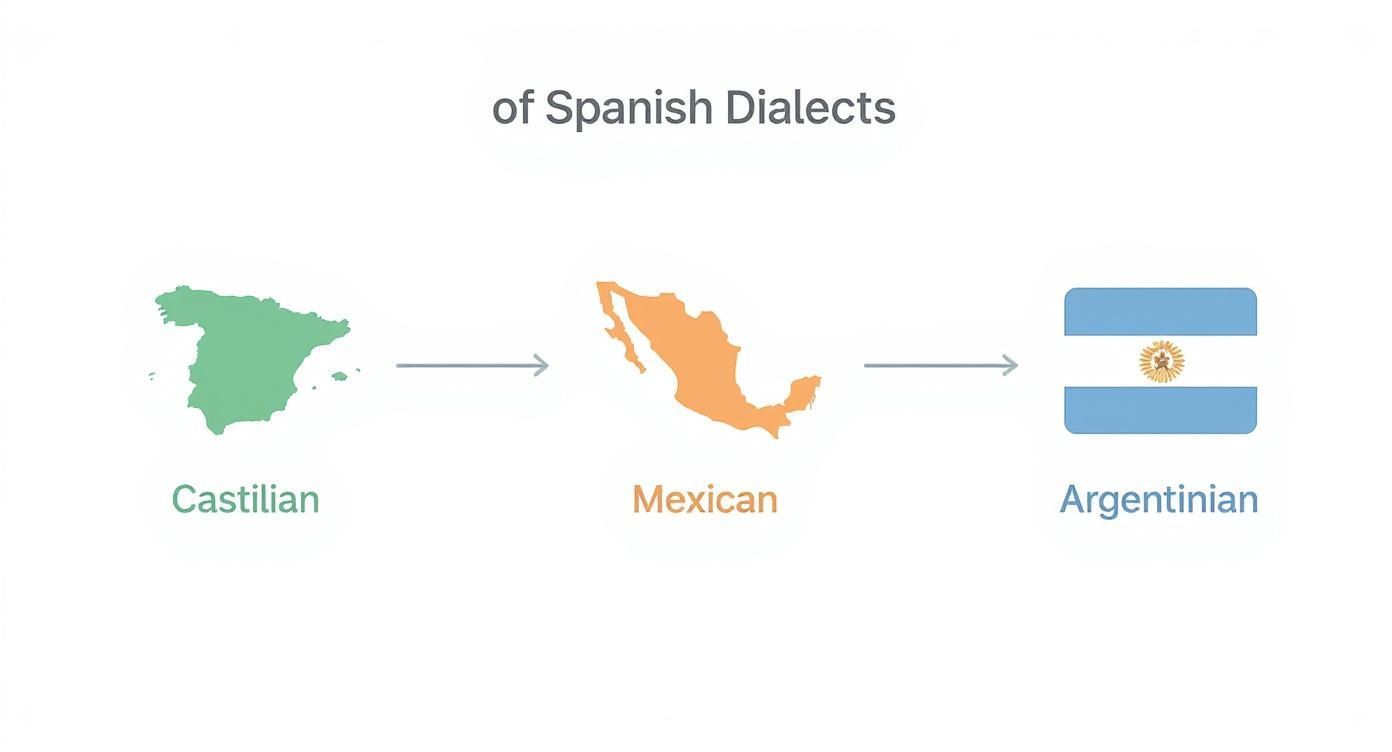
As you can see, knowing which dialect you're working with from the start helps you configure your tools—or brief your human expert—for the best possible results.
Fine-Tuning AI Settings for a Better First Draft
Getting a great result from AI isn't just about uploading a file and hitting "go." You can guide the model to produce a much cleaner initial transcript by tweaking a few settings.
A perfect example is speaker labeling (sometimes called diarization). If your tool supports it, turn it on. It will automatically differentiate between speakers (e.g., "Speaker 1," "Speaker 2"), which is a massive time-saver for interviews, podcasts, or meeting notes.
You can also give the AI a little help by providing a glossary of terms. If your audio is full of specific medical or engineering jargon, feeding the AI a list of those keywords can help it recognize them correctly instead of taking a wild phonetic guess.
Beyond just transcription, many AI tools are available to help with other parts of your content strategy. If you’re looking to improve your overall process, some of the best AI SEO tools can offer powerful automation that goes way beyond text.
AI Transcription Model Comparison for Spanish
Not all AI models are built the same, especially when it comes to the rich diversity of the Spanish language. Some are trained on broader datasets, making them more versatile, while others might have an edge with specific accents. Here’s a quick rundown of the major players.
| AI Model | Best For | Dialect Handling | Key Features |
|---|---|---|---|
| OpenAI's Whisper | General-purpose, high accuracy with clear audio | Excellent; trained on a massive and diverse dataset of web audio. | Handles multiple languages, accents, and background noise well. |
| Google Cloud Speech-to-Text | Enterprise applications and real-time transcription | Strong; offers specific models for different language variants. | Integrates well with other Google services; good for developers. |
| Amazon Transcribe | Business and media workflows | Good; includes features for custom vocabularies and dialect recognition. | Strong security features; good for medical and legal applications. |
Ultimately, picking the right tool boils down to your specific needs. Are you dealing with a niche dialect? Do you need real-time processing? By understanding what each model does best, you can build a workflow that’s both incredibly efficient and impressively accurate for all your Spanish transcription projects.
The Critical Final Steps of Quality Control
An AI-generated transcript is a fantastic head start, but let's be clear: it's never the final product. The most critical step happens after the AI does its job—the final human review.
This is where you proofread the text against the original audio to catch the classic AI slip-ups: misheard names, wonky punctuation, and confused homophones. Standardizing the formatting and making sure the text flows naturally is what turns a decent draft into a professional, reliable document.
An AI transcript gives you a massive leg up, getting you about 90% of the way to a finished document in a fraction of the time. But that last 10% is where the real quality comes from. This final stage of editing and quality assurance is what separates a rough draft from a polished, trustworthy transcript.
One of the biggest mistakes I see people make is treating the AI output as the finished version. These automated systems are incredible, but they don't have human intuition. They can't grasp context, tone, or the subtle nuances of a conversation. That's why a focused, human-led review is non-negotiable for any serious Spanish transcription project.
Proofreading Against the Original Audio
The single most important QC step is to compare the transcript and the audio side-by-side. Don't just skim the text for typos. You have to listen and read at the same time to catch the specific kinds of mistakes AI is known for.
Pay close attention to these common trouble spots:
- Proper Nouns: AI often mangles the unique spellings of names, companies, and places. It's not uncommon to see "Sergio Navarro" turn into "Sergio Nabarro."
- Homophones: Spanish is full of words that sound alike but mean completely different things (like cazar vs. casar). An AI might hear "él va a cazar" (he is going to hunt) and incorrectly write "él va a casar" (he is going to marry).
- Technical Jargon: Unless you've fed the AI a custom vocabulary list, it can easily butcher specialized terms in fields like medicine, engineering, or law.
- Punctuation and Pauses: AI doesn't always nail comma and period placement, which can completely change a sentence's meaning. It also can’t interpret the intent behind a pause—was the speaker thinking, or were they making a dramatic point?
I once reviewed an AI transcript of a legal deposition where the model missed a single, crucial word: "not." The mistake completely inverted the meaning of the deponent's testimony. That's a perfect example of why a final human check is absolutely essential.
Standardizing Formatting for Clarity
Once the words are right, the next move is to make the formatting consistent and easy to follow. A clean, well-organized document is infinitely more useful. This is where you apply that human touch to create a polished final product.
Think about these key elements:
- Consistent Speaker Labels: Make sure speakers are identified the same way every time (e.g., "Interviewer," "Ramon P.").
- Paragraph Breaks: Chop up long walls of text into shorter, more digestible paragraphs. It makes a huge difference for readability.
- Timestamp Accuracy: If you're using timestamps, spot-check a few throughout the document to confirm they line up correctly with the audio.
- Handling Non-Verbal Cues: Decide on a consistent way to note important sounds that aren't words, like
[laughs],[applause], or[crosstalk].
Making these simple tweaks transforms a raw data dump into a professional document. It's a small investment of time that pays off big in usability. If you want to go deeper, you can learn more about the nuances of AI transcription accuracy and what impacts performance.
The Final Human Read-Through
Finally, after checking the text against the audio and cleaning up the formatting, do one last read-through without the audio playing. This final pass helps you judge the transcript as a standalone document.
Does it flow naturally? Are there any awkward sentences or grammatical hiccups that need a quick fix? This is your last chance to smooth out the rough edges and make sure the text truly captures the speaker's original meaning and tone. This final touch is what elevates your Spanish transcription from just accurate to genuinely excellent.
Common Spanish Transcription Questions
As you dive into Spanish transcription, you'll inevitably run into a few common hurdles. I've seen them trip up everyone from beginners to seasoned pros. Getting a handle on these key issues is the difference between a smooth workflow and a frustrating one.
Let's break down some of the most frequent questions I hear and how to tackle them head-on.
How Accurate Is AI for Spanish Transcription Compared to a Human?
This is the million-dollar question, isn't it? The honest answer is that it depends entirely on your audio. A modern AI tool like Whisper can deliver incredible results—often clearing 95% accuracy—but only under ideal conditions. Think of a clean, high-quality recording with one person speaking a standard dialect. In that scenario, AI is a powerhouse.
But the real world is messy. This is where a professional human transcriber still has the edge. They're masters of nuance. They can untangle overlapping speakers, decipher thick regional accents, and understand context-specific slang in a way AI just can't yet. A good human transcriber can consistently hit 99%+ accuracy, even when the audio is a challenge.
The smartest workflow I've found is a hybrid one. Let the AI do the heavy lifting and generate a fast, cheap first draft. Then, have a skilled human editor come in to polish it. You get the speed of a machine with the finesse of a human expert.
This approach saves a ton of time and money without compromising on the quality you need for any serious work.
What Is the Best Way to Handle Different Spanish Dialects in One Audio File?
Ah, the dialect dilemma. It’s a classic challenge. You might have a conference call with speakers from Madrid, Bogotá, and Buenos Aires all talking at once. The vocabulary, cadence, and pronunciation can be worlds apart.
First, check if your AI tool was trained on a diverse dataset of Spanish accents. Some platforms even let you hint at the primary dialect, which helps the model make better predictions.
When you know multiple dialects are in the mix, you need a game plan:
- Label Your Speakers: Always use speaker labels to differentiate who is talking (e.g., "Speaker 1 (Spain)" or "Ana G."). This gives anyone reading the transcript immediate context.
- Draft a Simple Style Guide: If you're handing the file off to a human, a quick guide is invaluable. Note any regional terms you anticipate. For example, clarifying that coche (Spain) and carro (Latin America) both mean "car" can prevent a lot of back-and-forth.
- Bring in a Dialect-Aware Pro: When the stakes are high, hire a human transcriber who is actually familiar with the dialects in your recording. Their cultural and linguistic expertise is something an AI simply can’t replicate.
How Can I Ensure the Confidentiality of My Audio Files?
Security should be your top priority, especially when dealing with sensitive legal, medical, or corporate recordings. Protecting that data comes down to carefully vetting your transcription provider, whether it's an AI platform or a human service.
Start with the privacy policy—read the fine print. You need to know exactly how your data is being stored, handled, and protected. For any professional-grade service, these are the non-negotiables:
- Secure, Encrypted Uploads: The service must use strong encryption, like 256-bit AES, to protect your files both in transit and while stored on their servers.
- Compliance Certifications: Look for proof of compliance with standards like GDPR (for data protection) or HIPAA (for healthcare). A SOC 2 certification is another great sign of solid security practices.
- Non-Disclosure Agreements (NDAs): Any reputable service should be more than willing to sign an NDA. This provides a legal guarantee that your content will remain confidential.
If you're using an AI tool through an API, dig into its data usage policies. Some companies will use your audio to train their models unless you explicitly opt out. For maximum security, some organizations run AI models locally on their own servers, ensuring sensitive data never leaves their control.
Ready to transform your audio into accurate, searchable text? With WhisperAI, you get business-grade transcription that's fast, secure, and incredibly precise across 100+ languages. Streamline your workflow and turn hours of audio into polished documents in minutes. Start transcribing with WhisperAI today.