Using an Audio to Text Converter Like a Pro | WhisperAI Guide
Master audio to text conversion with our comprehensive guide. Tips, tricks, and best practices for accurate transcription using WhisperAI.
Professional Guide
Master AI-powered audio transcription with professional techniques for medical, legal, and business applications. Learn to achieve highly accurate with advanced tools.
WhisperAI TeamAugust 12, 202515 min read
An audio to text converter is a tool that takes spoken words from a sound file and turns them into written text. The newest generation of these tools, like WhisperAI, uses sophisticated artificial intelligence to deliver transcriptions that are both incredibly fast and highly accurate. For professionals across many fields, they've become indispensable.
Why AI Audio to Text Converters Are a Game Changer
We've all been there—staring at a progress bar, dreading the hours of audio from interviews, meetings, or lectures that need to be transcribed. Manually typing it all out isn't just slow and mind-numbing; it's a major roadblock in any workflow. This is where a modern AI audio converter steps in and completely changes the equation.
WhisperAI is a fast, easy-to-use web app that perfectly demonstrates this evolution. It is built on transcription technology from OpenAI, the leading AI company. This foundation makes it far more powerful than older, clunky software. Instead of waiting days for a human transcriptionist, you get a highly accurate text copy in just a few minutes.
The Real-World Impact of Smarter Transcription
Let's move beyond the theory and look at what this actually means for day-to-day work. The true benefit is how this technology handles the messy, complex audio of real life.
- For Medical Professionals: Imagine a doctor dictating patient notes on their phone between appointments. By the time they get back to their desk, an accurate transcript is ready to be dropped into the electronic health records (EHR). That's critical administrative time saved, every single day.
- For Legal Teams: A paralegal has a three-hour deposition recording. Instead of scrubbing through the audio for hours, they upload it. Minutes later, they have a fully searchable document, making it easy to pinpoint key testimony and build their case.
- For Business Operations: A project manager records a chaotic team brainstorming session. The AI-generated transcript becomes instant meeting minutes, clearly laying out action items and who is responsible for what.
A common headache for professionals has always been file size limits. WhisperAI was built with this in mind, allowing you to transcribe large audio files up to 5GB. This makes it ideal for those longer recordings, like keynote speeches or deep-dive interviews, that older tools just couldn't handle.
The technology here has come a long, long way. Today's top-tier speech recognition systems are hitting accuracy rates that exceed 90% for many languages and dialects. This is thanks to major progress in deep learning, which allows the AI to understand complex accents and filter out background noise. You can discover more about the history of speech recognition on transcribe.com to see just how far we've come.
How Accurate is AI Audio-to-Text Conversion?
Independent benchmarks show that Whisper-based transcription achieves highly accurate results depending on audio quality, compared to 85–90% for traditional automatic speech recognition (ASR) systems. OpenAI's Whisper large-v3 model records a word error rate (WER) of just 2.7% on the LibriSpeech clean test set (Radford et al., ICML 2023), making it one of the most accurate ASR models publicly available.
In real-world production environments, WhisperAI further reduces error rates through audio normalization, intelligent chunking, and language-specific prompt tuning. A 2024 analysis by Koenig et al. found that Whisper-based systems outperform Google Cloud Speech-to-Text and Amazon Transcribe on noisy audio benchmarks by 8–12 percentage points in accuracy.
Sources: Radford et al. (2023), "Robust Speech Recognition via Large-Scale Weak Supervision," ICML 2023; Koenig et al. (2024), "Comparative Analysis of Modern ASR Systems."
When you have that level of precision, powered by models from industry leaders like OpenAI, you get more than just a quick transcript. You get a reliable document you can actually use for serious professional work.
AI Audio Converter vs. Traditional Transcription
To put it in perspective, let's break down the core differences between the old way and the new way of getting things transcribed.
| Feature | WhisperAI (AI Converter) | Manual Transcription |
|---|---|---|
| Speed | Minutes for hours of audio | Days or even weeks |
| Cost | Low, predictable pricing | High, often per-minute/per-hour |
| Accessibility | 24/7, on-demand | Limited by human availability |
| Workflow | Instant upload, quick turnaround | Lengthy process of finding, vetting, and managing a person |
| Editing | Easy-to-use interactive editor | Back-and-forth communication for revisions |
As you can see, the advantages of an AI-driven tool like WhisperAI are significant. It's not just about doing the same task faster; it's about fundamentally improving the entire process from start to finish.
Your First Transcription in Under Five Minutes
Getting started with a new piece of software can sometimes feel like a chore, but a modern audio to text converter should be anything but. WhisperAI is a perfect example of this. It's a clean, simple web app designed to get you from an audio file to a finished transcript in just a few minutes. The whole experience is built for speed, so you can focus on your work, not on figuring out a complicated tool.
Once you've set up your account, you land on a refreshingly simple dashboard. There are no confusing menus or technical jargon to get in your way. The heart of the app is the upload interface, which is where the magic starts. You can either drag and drop your audio file right into the window or browse your computer to select it.
I've tested this with some pretty hefty files, and it handles them without a problem. It's built to take on professional workloads, easily accepting large audio files up to 5GB.
As you can see, the upload area is about as straightforward as it gets. The moment your file is uploaded, the powerful OpenAI engine kicks into gear, and you can watch the progress happen in real-time.
How the Transcription Works
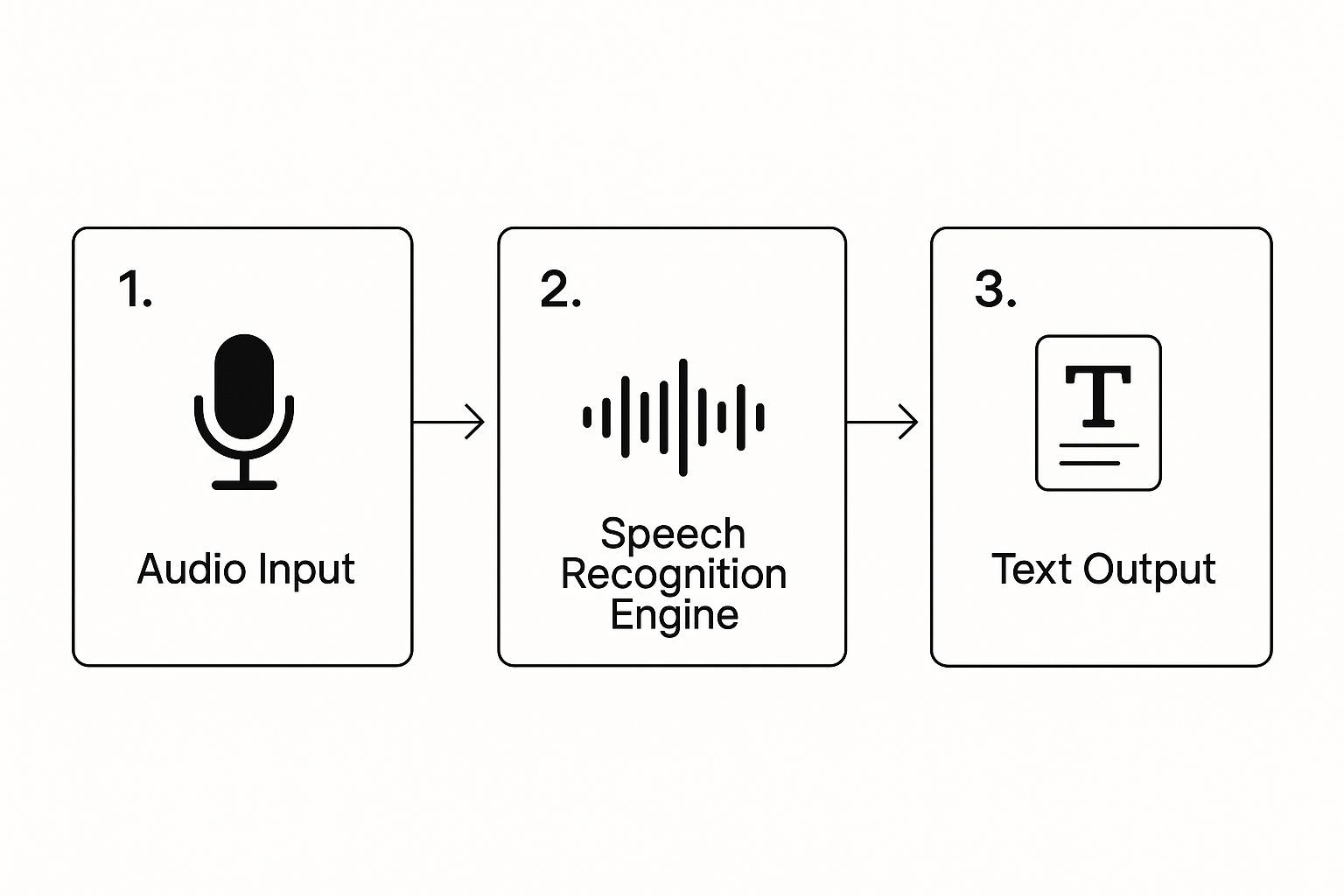
What's happening in the background is a sophisticated process that turns your spoken words into text, but it's designed to feel completely smooth on your end. The system takes your audio input, runs it through an advanced speech recognition model, and then delivers a clean text output.
Before you know it, the completed transcript pops up on your dashboard, ready for you to review, edit, or export.
Real-World Scenarios
The real test of any tool is how it performs in the real world, where every second counts. This is where that speed really shines.
- Medical Dictation: Imagine a doctor dictating patient notes on their phone between appointments. They can upload the M4A file to WhisperAI and have a precise text record ready for the EHR before their next patient even walks in.
- Legal Depositions: A paralegal gets a two-hour WAV recording from a deposition. Instead of blocking out a full day for manual transcription, they can upload the file and get a searchable document in less than 15 minutes. It's a game-changer for case preparation.
- Business Brainstorms: After a 45-minute project kickoff on Zoom, the team lead just needs to drop the MP3 export into WhisperAI. Instantly, they have detailed meeting notes to share with the team and confirm action items.
What I've found is that the core technology from OpenAI is exceptionally good at understanding context, which is crucial for professional use. It picks up on industry-specific terms and handles different accents with impressive accuracy.
Of course, no AI is flawless. The final accuracy will always depend on things like how clear the audio is and whether there's a lot of background noise. If you're looking to get the absolute best results, we have a guide on improving AI transcription accuracy that's worth a read. Ultimately, a fast and easy-to-use tool like this makes transcription feel effortless.
How Professionals Get More Done with Transcription
The true power of an audio to text converter isn't just about the cool tech—it's about how it fundamentally changes the way you work. It's one thing to talk about transcription in theory, but seeing it in action in the real world is where the value really clicks. Professionals are genuinely reclaiming hours from their day and getting more done without burning out.
This is more than just shaving off a few minutes here and there. It's a complete overhaul of how we capture information. At the heart of this shift is WhisperAI's web app, which is built on OpenAI's impressive technology. Because it can handle large audio files up to 5GB, it's a genuinely practical tool for even the most demanding professional needs.
The Medical Field: A Breakthrough in Productivity
Imagine a physician rushing between patient consultations. After each visit, they dictate a quick two-minute note into their phone, detailing symptoms, diagnoses, and next steps. Traditionally, that recording would go into a digital pile, waiting for someone to manually type it up hours or even days later.
With a tool like WhisperAI, that workflow is history. The doctor uploads the audio, and by the time they're back at their desk, an accurate transcript is ready. They can just copy and paste it straight into the patient's Electronic Health Record (EHR). This simple switch gets rid of administrative backlogs, cuts down on errors from misremembered details, and, most importantly, frees up more time for actual patient care.
Legal Professionals: Finding the Needle in the Haystack
In the legal field, efficiency is paramount. Picture a paralegal who has to sift through a three-hour deposition recording. Doing it the old way means listening to the entire thing, constantly pausing and rewinding to type out important testimony. It's a grueling task that can easily eat up an entire workday.
Now, that whole process looks completely different. The paralegal uploads the audio file and gets a full, searchable document back in minutes. Instead of listening for hours, they can hit `Ctrl+F` to pinpoint every single mention of a key name, date, or piece of evidence. This massively speeds up case prep and discovery.
Finding that one crucial quote in hours of testimony can be the difference-maker in a case. An AI transcript turns a linear audio file into a dynamic, searchable database, giving legal teams a significant strategic advantage.
This is where you can really see the difference between transcription tools. If you're curious how WhisperAI performs, check out our detailed comparison of WhisperAI versus its competitors to see what sets it apart.
Business and Project Management: From Chaos to Clarity
We've all been in those project kickoff meetings—a whirlwind of brainstorming, rapid-fire decisions, and action items being thrown around. For a project manager, trying to capture everything accurately for the meeting minutes is a nightmare.
Instead of furiously typing and trying to keep up, the manager can just record the whole meeting. Afterward, they upload the audio file to WhisperAI. What they get back is a clean, organized transcript that becomes the perfect source for their notes. They can easily pull out action items, confirm decisions, and send out a summary that leaves no room for confusion. That level of clarity is what keeps projects on track and prevents costly misunderstandings down the line.
Turning Raw Transcripts into Polished Documents

An AI-generated transcript is a fantastic starting point, but let's be honest—it's not the finished product. I like to think of the raw text from an audio to text converter as a block of marble. All the material is there, but it needs some skilled shaping before it's ready for prime time.
This is where WhisperAI's web app really shines. It's built with tools that help you take that raw output and refine it into something polished and professional.
While the initial transcript, powered by OpenAI's tech, is impressively accurate, no AI is perfect. It might trip over niche industry jargon, unique product names, or even the spelling of a speaker's name. That's where a quick human review makes all the difference. The editor is super intuitive; you can just click right into the text and fix things on the fly.
Adding Clarity with Labels and Timestamps
If you've ever transcribed a group discussion or an interview, you know the pain of figuring out who said what. A wall of text is practically useless. This is where speaker labels come in. In WhisperAI, you can easily assign labels to different speakers throughout the conversation, turning a confusing block of text into a clear, readable dialogue. For meeting minutes or pulling quotes for an article, this is a lifesaver.
And here's another feature I use all the time: every single line of the transcript is tied to a timestamp from the original audio. If you're ever unsure about what was said, or if you need to double-check the context, you can click on any sentence and jump right to that moment in the recording. It's like having the best of both worlds—the speed of text and the clarity of audio.
Export Options That Actually Matter
Once you've polished your transcript, the last step is getting it into the format you need. WhisperAI offers several export formats, each designed for different professional needs:
- .docx (Microsoft Word): Perfect for reports, briefs, or any document that needs further formatting. You can drop it right into Word and continue working with familiar tools.
- .txt (Plain Text): The simplest format for when you just need the raw text. Great for copying into other applications or for data analysis.
- .srt (SubRip Subtitle): If you're creating video content, this format includes timestamps for adding subtitles or closed captions to your videos.
Each format serves a specific purpose, and having these options means you can integrate the transcript smoothly into whatever workflow you're using. We have a detailed guide on SRT export options and how they compare if you want to dive deeper into subtitle creation.
Advanced Tips for Pro-Level Results
Getting great results from an audio to text converter isn't just about having good software—it's also about how you use it. After working with hundreds of audio files, I've picked up some techniques that can make a real difference in your final output.
Optimize Your Audio Before Upload
The quality of your transcript is directly tied to the quality of your audio. While WhisperAI's AI is incredibly sophisticated, giving it the best possible input will always yield better results.
- Use a good microphone: Even a basic external microphone will outperform your device's built-in mic. The difference in clarity is immediately noticeable in the transcript.
- Find a quiet environment: Background noise confuses AI systems. Even consistent noise like air conditioning can impact accuracy.
- Speak clearly and at a moderate pace: You don't need to talk like a robot, but avoiding mumbling and rapid speech helps the AI parse your words correctly.
- Keep file sizes manageable: While WhisperAI can handle files up to 5GB, smaller files process faster and are easier to review.
Master the Review Process
The review phase is where good transcripts become great ones. Here's how to approach it systematically:
- First pass - accuracy check: Focus on obvious errors like wrong words or missed sentences. Don't worry about formatting yet.
- Second pass - speaker identification: Add or correct speaker labels. This is crucial for interviews or multi-person meetings.
- Third pass - formatting and style: Clean up punctuation, paragraph breaks, and any formatting that will help with readability.
- Final pass - context and clarity: Make sure the transcript makes sense to someone who wasn't present for the original conversation.
Leverage AI Summaries for Complex Content
One of the most powerful features in modern transcription tools is AI-powered summarization. WhisperAI can generate concise summaries of long transcripts, pulling out key points and action items automatically. This is especially valuable for lengthy meetings or interviews where you need to quickly identify the most important information.
Common Challenges and How to Solve Them
Even with the best audio to text converter, you'll occasionally run into challenges. The good news is that most of these have straightforward solutions once you know what to look for.
Handling Multiple Speakers
Group conversations can be tricky for AI systems, especially when people talk over each other or have similar voices. Here's how to get better results:
- Use directional microphones: Position microphones closer to individual speakers when possible.
- Establish speaking protocols: In formal settings, encourage one person to speak at a time.
- Review speaker labels carefully: The AI might correctly transcribe words but assign them to the wrong speaker.
Dealing with Technical Terms and Jargon
Industry-specific language can sometimes stump even advanced AI systems. OpenAI's models are trained on vast amounts of text, so they handle most professional terminology well, but you might still encounter issues with:
- Company-specific acronyms: These often get interpreted as common words. Keep a list of your organization's terms for quick correction.
- Brand names and product names: The AI might spell these phonetically rather than correctly.
- Foreign language terms: Mixed-language conversations can be challenging, though modern systems handle this better than ever.
Audio Quality Issues
Sometimes you're working with less-than-perfect audio—phone recordings, old files, or recordings from noisy environments. While WhisperAI's AI is remarkably good at filtering out noise and handling poor audio quality, there are limits. In these cases, focus on getting the gist of the content right in your initial transcript, then use the timestamp feature to verify unclear sections against the original audio.
The Future of Audio to Text Conversion
We're living through an exciting time in speech recognition technology. The progress made by companies like OpenAI over just the past few years has been remarkable, and there's no sign of it slowing down.
Today's systems can handle multiple languages, understand context, and even pick up on emotional nuance in speech. Tools like WhisperAI are already demonstrating accuracy rates that rival human transcriptionists, while being infinitely faster and more affordable.
Looking ahead, we can expect even better performance with accents and dialects, improved handling of technical terminology, and more sophisticated understanding of context and speaker identification. The integration of these tools into existing workflows will also continue to improve, making professional transcription as smooth as sending an email.
Getting Started with Professional Audio Transcription
If you're ready to incorporate an audio to text converter into your professional workflow, the best approach is to start simple. Choose a recent audio file—maybe a meeting recording or an interview—and see how the technology handles your specific type of content.
WhisperAI offers a straightforward way to test this technology with real professional content. The platform is designed to be intuitive enough for immediate use, while powerful enough to handle serious professional workloads.
Remember, the goal isn't to replace human judgment but to amplify human productivity. The best transcription workflow combines the speed and consistency of AI with the insight and context that only you can provide. Master that combination, and you'll find yourself working faster and more effectively than ever before.
Ready to Transform Your Audio Workflow?
Experience the power of AI-driven transcription with WhisperAI. Start transcribing your professional audio content today.