How to Transcribe and Translate Audio: A 2026 Workflow
Learn the complete workflow to transcribe and translate audio and video. Our 2026 guide covers AI tools, editing, and exporting for pro results.
A producer gets the file dump on Friday afternoon. Twelve interviews, two webinar recordings, a board meeting, and a batch of phone calls. By Monday, the team wants quotes for a report, subtitles for social clips, translated copy for three markets, and a clean archive someone can search six months from now.
Raw audio doesn't usually lack words. It fails because the workflow is a mess. Files show up with random names, speakers overlap, terminology changes between teams, and no one decides early on who reviews what, where the approved transcript goes, or which version is safe to share. Delaying these decisions makes transcribing and translating expensive fast.
A professional workflow solves this. It treats transcription, translation, review, and export as a unified process with clear checkpoints for accuracy, terminology, access control, and final delivery.
tl;dr
- Transcribe and translate works best as a repeatable workflow, not a standalone feature.
- File quality, labeling, and capture conditions shape the result before any model processes the recording.
- Production time usually comes from prep, review, speaker correction, and final QA, not just the first transcript pass.
- AI should handle the first pass at scale. Human review should confirm meaning, names, domain terms, and edge cases.
- Accuracy has to be judged by usable output. A transcript that looks clean can still fail if timestamps drift, speakers are wrong, or translated phrasing changes the meaning.
- Export choices should be set by the job. Captions, research transcripts, compliance records, and multilingual publishing files need different formats and review standards.
- For regulated, sensitive, or client-facing work, the safer operating model is controlled automation plus human verification and clear handling rules for source files and outputs.
Table of Contents
- From Raw Audio to Global Reach
- Preparing Your Files for Peak Accuracy
- Your AI-Powered Transcription and Translation Engine
- Refining and Perfecting Your Transcript
- Exporting Your Content for Any Use Case
- Advanced Tips for Teams and Professionals
From Raw Audio to Global Reach
The usual starting point isn't elegant. It's a Zoom export with vague filenames, a podcast interview with two people talking over each other, a field recording with background noise, and a client asking for captions plus a translated version by the end of the week.
Once that material is transcribed and translated properly, it stops being a pile of media and becomes working content. Teams can search interviews for quotes, turn webinars into articles, create subtitles for international viewers, review legal or research conversations, and archive fragile material in a format that's easier to preserve.
That idea is much older than modern AI. A key historical milestone was the Rosetta Stone, dated to 196 BCE, whose Greek, Demotic, and Egyptian hieroglyphic inscriptions helped scholars decode hieroglyphs and created a foundational model for translation across languages and scripts, as described in this overview of transcription as a tool for historical research.
Practical rule: transcription isn't just documentation. It's conversion. It turns hard-to-use source material into something searchable, shareable, and reusable.
The main shift in recent years isn't that transcription suddenly became important. It's that the workflow changed. What used to require long manual passes can now start with automated speech recognition, speaker labeling, timestamps, and machine translation. That doesn't remove the need for editorial judgment. It moves human effort to the parts that need it.
A strong workflow does three things well:
- Captures the source cleanly so the transcript starts from usable audio
- Processes speech into structured text with speakers, timing, and language context intact
- Checks meaning before delivery so the translated version reads like intended speech, not machine debris
That's the difference between getting a rough draft and getting content a team can publish or trust.
Preparing Your Files for Peak Accuracy
A familiar failure point looks like this. The interview itself went well, but the file that reaches post is a low-bitrate export with room echo, clipped peaks, and two speakers piled onto one channel. At that point, transcription is no longer a straight production step. It becomes recovery work.
That is why preparation belongs in the workflow, not as an afterthought. A clean handoff shortens review time, reduces speaker-label errors, and gives the translation stage a better source to work from. Sloppy inputs create problems that carry through every later pass.
What to fix before upload
Start with the highest-quality source you have, not the version someone sent over chat after three rounds of compression. If you need help choosing containers and codecs, this guide to best audio format choices for transcription covers the practical differences that affect both recognition quality and editing time.
Then check the file like an editor, not just an uploader:
- Use the cleanest original file available. WAV or a high-quality video master usually holds detail that compressed exports throw away.
- Keep speakers separated when possible. Split channels make diarization and quote-checking much easier in interviews, hearings, and field research.
- Trim obvious waste. False starts, test recordings, and long dead sections add cost without adding value.
- Name files for handoff. Include project, date, language, speaker or session ID, and version so another editor can pick up the work without guessing.
- Flag language switching early. Code-switching, borrowed terms, and local names should be noted before the file enters the queue.
A good prep standard also includes security. Remove files that do not need to be processed, confirm who has access, and avoid uploading media with sensitive content to the wrong workspace. Teams that handle interviews, legal material, or research recordings should treat file prep and access control as the same operating procedure.
Preparation that actually saves time
A short preflight check catches the issues that create the slowest edits later.
| Check | Why it matters |
|---|---|
| Speaker overlap | Heavy overlap causes attribution errors and broken sentence boundaries |
| Background hum or music | Low-level noise masks names, consonants, and quiet speakers |
| Recording level | Audio that is too quiet or clipped gives the model less usable signal |
| Language mix | Mixed-language audio changes both review method and translation expectations |
One more practical point. Test the workflow on a difficult five-minute segment before you send the full batch. If the sample struggles with accents, crosstalk, or terminology, adjust the file, the settings, or the assignment first. That is faster than discovering the problem after an hour-long run through the Satura AI transcription tool.
Clean audio does not guarantee a publish-ready transcript. It does give your team a repeatable starting point, which is what a professional transcription and translation process needs.
Your AI-Powered Transcription and Translation Engine
A producer drops a 48-minute interview into the queue at 6 p.m. By 6:10, the team needs a readable transcript, speaker labels that are mostly right, timestamps for quote checks, and a translation draft that does not distort the source. That is the standard the engine has to meet. The goal is not speed alone. The goal is a repeatable first pass that gives editors a clean place to start.
What the engine should handle automatically
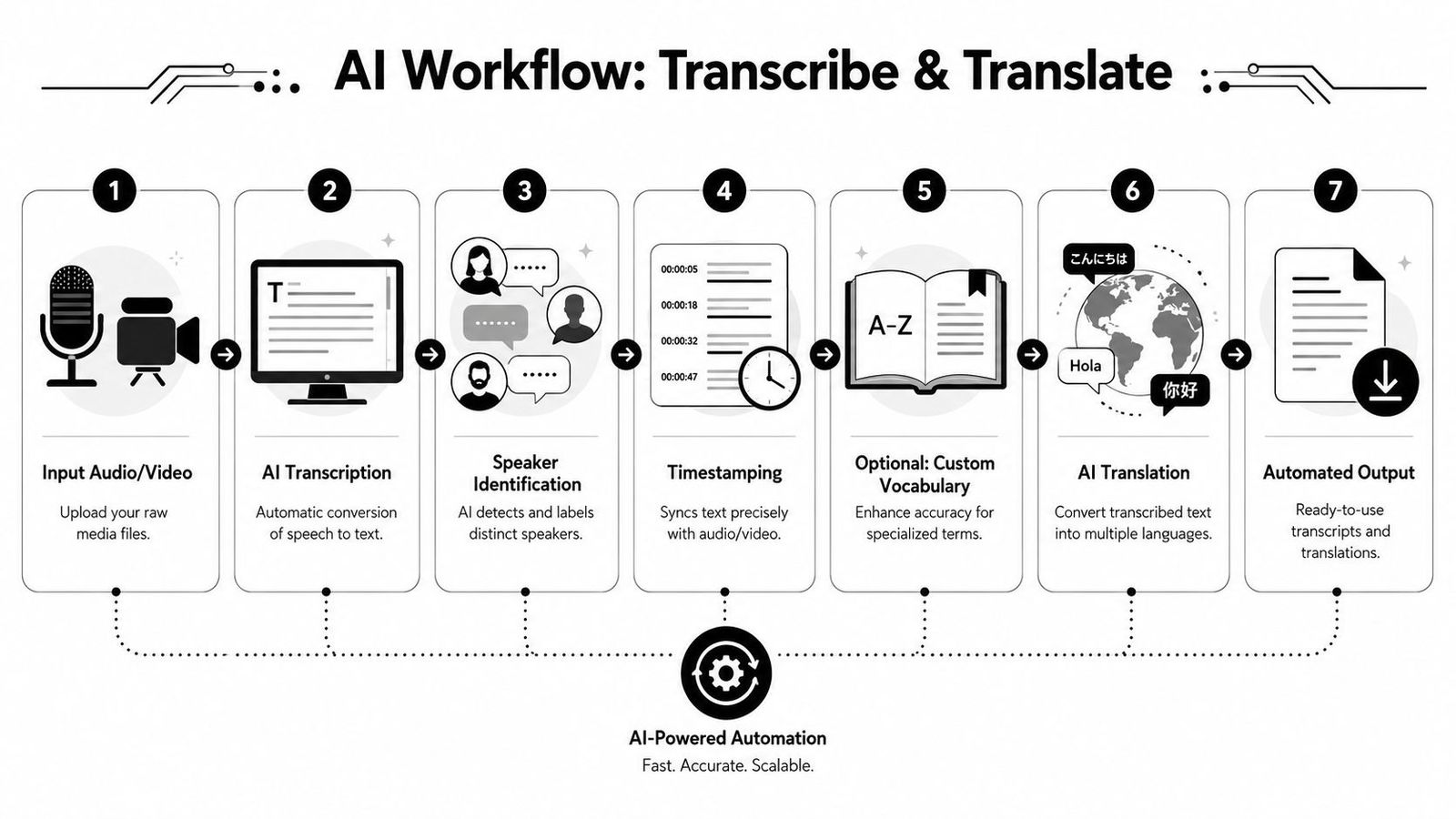
Good systems remove the routine work in the same order every time. They ingest the file, identify the working language, generate the source transcript, separate speakers, stamp the timeline, and produce a translation draft from the transcript rather than guessing directly from the audio.
That sequence matters in production. If the transcript is weak, the translation inherits the same mistakes and adds new ones. If speaker diarization slips, review takes longer because editors are fixing attribution and meaning at the same time.
A reliable workflow usually includes these stages:
- Upload or capture media
The platform should take common audio and video formats without forcing a manual conversion step before processing starts. - Detect the spoken language
Auto-detection saves time, but it should be checked on multilingual recordings, regional dialects, and interviews that switch languages mid-answer. - Generate the source-language transcript
This draft should include sentence boundaries and punctuation that an editor can work with, not a raw text dump. - Label speakers
Speaker separation is part of the transcript, not a nice extra. Interviews, focus groups, hearings, and team meetings fall apart fast when labels drift. - Apply timestamps
Timestamps support review, subtitling, quote checks, and downstream publishing. They also make bilingual verification much faster. - Translate from the transcript
This is the safer order for professional work. Teams get better control when they transcribe first, translate second, and verify uncertain passages against the original audio.
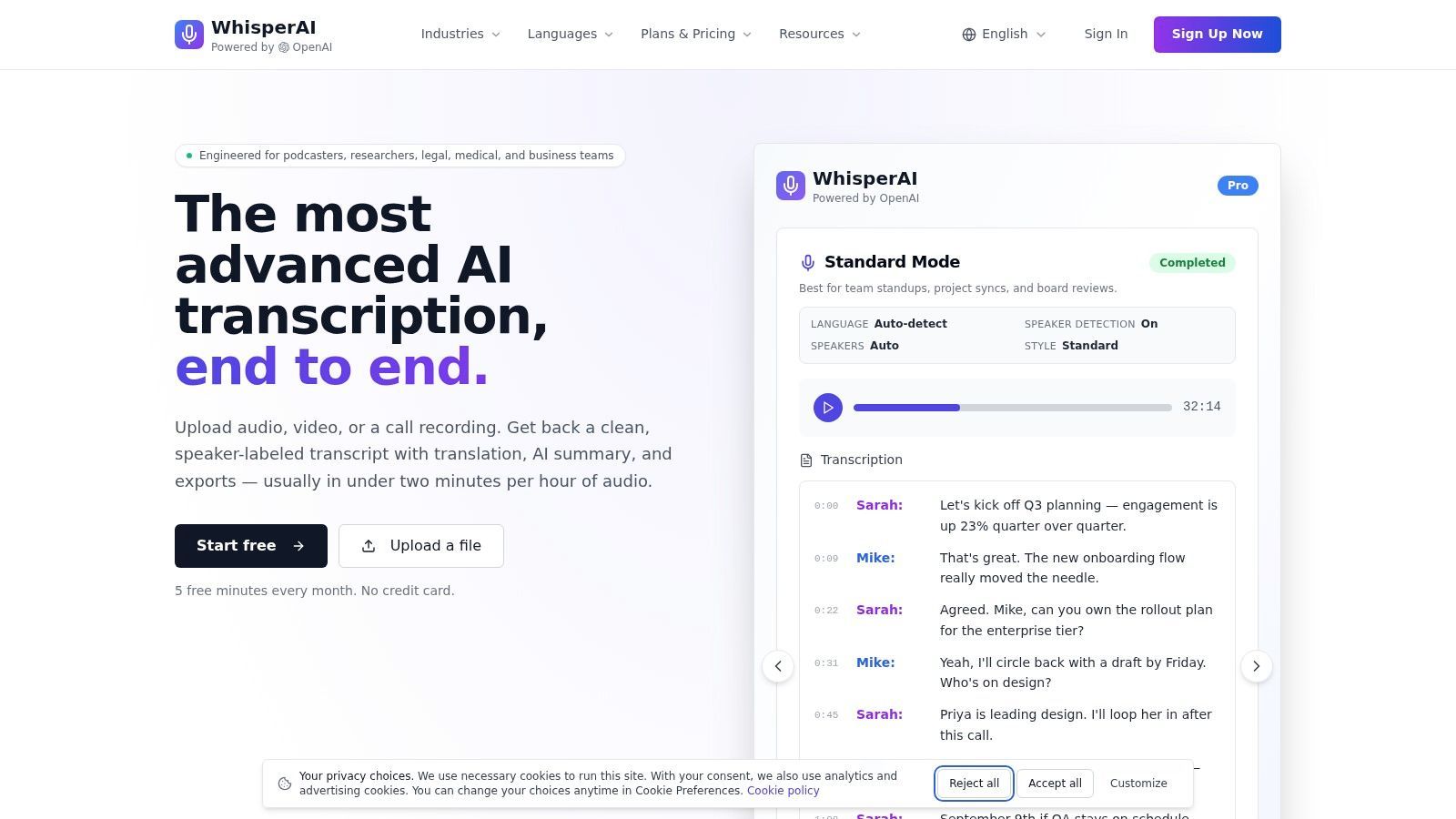
One useful reference is WhisperAI's guide on how to translate audio to text, which reflects the transcript-first approach many media and research teams now use. For teams comparing production interfaces, the Satura AI transcription tool is another example of a workflow built around transcript review before final export.
What good automation still will not solve
Even strong automation misses the same categories again and again. Names. Acronyms. Product terms. Cross-talk. Fast turn-taking. A translated sentence can read smoothly and still be wrong.
The practical standard is simple. Treat AI output as a draft that has already saved labor, but has not yet earned trust.
Common failure points include:
- Proper nouns and local references
- Domain-specific terms
- Interruptions and overlapping speech
- Accent-heavy or low-volume passages
- Mid-sentence speaker changes
- Meaning drift between source and translation
The engine should do the heavy lifting first. Your operating procedure should catch what it cannot. That is the difference between a quick demo and a workflow a team can run every week without quality slipping.
Refining and Perfecting Your Transcript
Review is where a transcript becomes publishable. It's also where translation becomes trustworthy instead of merely plausible.
At scale, this matters even more. UCL notes that Transkribus can transcribe millions of historical documents and that over 100,000 people had registered for the platform when the technology was highlighted in this UCL impact profile on large-scale transcription. Once transcription becomes a large workflow, editing discipline becomes part of production discipline.
Review for meaning, not just spelling
A polished transcript isn't just typo-free. It preserves who said what, what they meant, and where uncertainty remains.
Teams usually get better results when they check in this order:
- Speaker identity first. If speaker labels are wrong, every downstream use gets weaker.
- Terminology second. Fix product names, legal phrases, drug names, acronyms, and recurring jargon early.
- Meaning third. Compare questionable phrases against the audio, especially where the translation feels too literal.
- Consistency last. Apply search and replace for repeated corrections after the core review is done.
A faster edit pass for long files
For long recordings, line-by-line perfection from the start is inefficient. A better pass looks like this:
| Pass | Focus |
|---|---|
| First pass | Major transcript errors, speaker labels, missing sections |
| Second pass | Terminology, names, punctuation, readability |
| Third pass | Translation nuance and final formatting |
If a translated line reads smoothly but doesn't match the speaker's intent, it isn't finished.
This is also the stage to mark unclear audio instead of guessing. A visible uncertainty marker is better than a confident wrong word in legal, medical, research, or enterprise work.
Exporting Your Content for Any Use Case
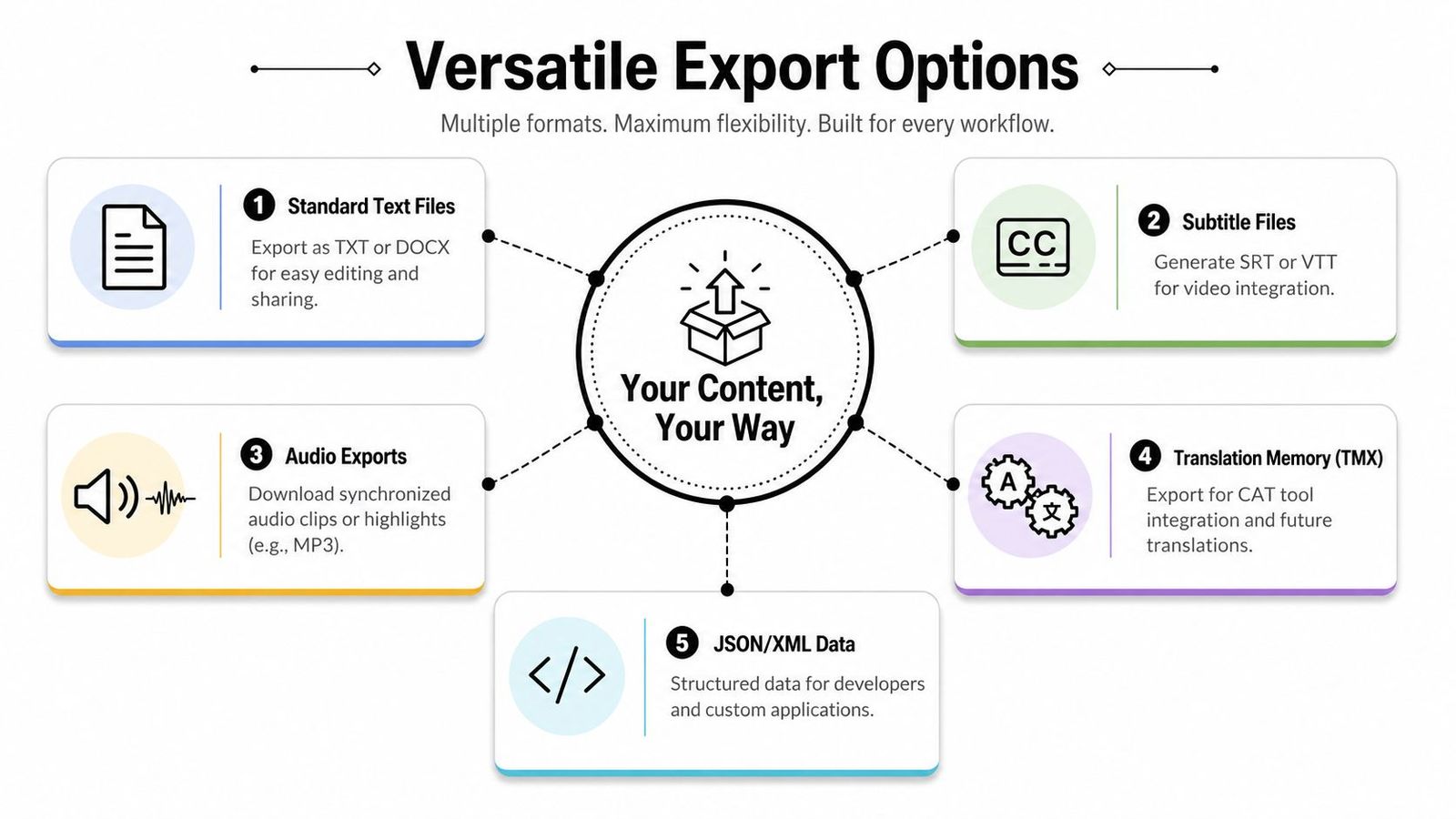
A transcript only becomes useful when it leaves the editor in the right format for the next job. A subtitle editor, a researcher, a legal reviewer, and a content team don't need the same file.
Choose the file by the job
- TXT or DOCX works for editing, meeting notes, internal review, and research analysis.
- PDF is useful when the transcript should be shared in a stable, non-editable format.
- SRT or VTT belongs in video workflows. Those formats carry timestamps and caption structure.
- JSON or XML helps developers and teams building custom workflows or archives.
- TMX or similar translation assets matter when language teams need reusable terminology and future consistency.
For caption production, this guide on creating an SRT file is a practical reference because subtitles fail fast when timing and formatting are off.
The export choice also changes what can be done with the content afterward. A clean transcript can feed articles, clips, social posts, training material, and multilingual documentation. Teams trying to transform existing content for ROI usually get more value once transcripts are treated as source material rather than an afterthought, which is the core idea behind this content repurposing strategy from PostOnce.
A good export process keeps the polished transcript, the translated version, and the subtitle file aligned. If those diverge, revision work multiplies later.
Advanced Tips for Teams and Professionals
A solo creator can fix mistakes on the fly. A team needs a process that survives handoffs.
Once audio moves through researchers, editors, translators, legal reviewers, clinicians, or operations staff, quality stops being a matter of preference. It becomes a matter of who approved what, which version was used, and whether anyone can trace a disputed phrase back to the source file. That is the difference between a useful draft and a workflow a professional team can repeat.
Build a workflow people can trust
In regulated or high-stakes settings, the primary question is not whether AI can produce text from speech. The question is whether the output can enter a formal review chain without creating risk. As noted earlier, current practice still favors hybrid workflows, where AI handles speed and scale, and people handle approval, exceptions, and judgment.
A workable standard operating procedure usually includes four controls:
- Assign review ownership. One person signs off on terminology. Another confirms that meaning, tone, and context survived transcription and translation.
- Keep an audit trail. Log inaudible sections, manual edits, terminology changes, and any point where a reviewer overruled the model output.
- Restrict file access. Set permissions, storage locations, and retention rules before the first upload, especially for interviews, health data, legal material, or internal meetings.
- Define escalation rules. Decide in advance which jobs can ship after light review and which ones require a specialist, bilingual reviewer, or legal check.
That structure prevents a common failure mode. Teams often spend time improving the transcript, then lose control of the process during review because no one owns the final decision.
In high-stakes work, speed is useful. Traceability is what makes the output safe to use.
Handle multilingual complexity before it causes rework
The difficult jobs are rarely clean recordings with one speaker and one language. Real production files include interruptions, code-switching, regional accents, jargon, and names the model has never seen before.
The fix is not more cleanup at the end. It is better setup at the start.
- Create a shared glossary early. Approved spellings, product names, legal terms, medical language, and recurring names should be locked before translation begins.
- Set speaker rules before review starts. Decide how to label speakers, how much diarization confidence is acceptable, and what happens when two voices overlap.
- Use bilingual review for meaning-sensitive content. A line can read fluently in the target language and still miss the original intent.
- Mark uncertainty explicitly. Brackets, comments, or reviewer flags are safer than implicit guessing.
Low-resource and endangered languages need extra caution. Coverage is uneven, dialect variation is often underrepresented, and cleanup usually depends more heavily on human review or community knowledge. Teams that plan for that from the beginning avoid expensive rework later.
If the goal is a repeatable operating process rather than a one-off draft, WhisperAI - #1 AI Transcription can be evaluated as one part of that stack. It supports transcription and translation, speaker labeling, live or uploaded media, and export formats used in research, media, legal, and business workflows.