Best Audio Format: Find Your Perfect Match
Find the best audio format. Compare WAV, FLAC, MP3 & more for quality, file size, and AI transcription on WhisperAI & other AI tools.
For the best balance of transcription quality and file size, FLAC is the top choice because it keeps full audio fidelity while shrinking files by 40 to 60% compared with WAV, and in optimized cases by up to 70%. If file size doesn't matter and you want the absolute maximum raw fidelity, WAV is the best audio format.
You’re probably here because you have a recording that matters. A client call. A board meeting. A deposition. A lecture. Maybe it’s long, maybe the speakers talk over each other, maybe one person mumbles and another sits too far from the mic. In those situations, the file format isn’t a minor export setting. It affects upload speed, storage use, and how much usable detail survives when an AI transcription system tries to turn speech into text.
That’s why “best audio format” has no one-word answer in the abstract. The right answer depends on what you need most: maximum fidelity, practical file size, broad compatibility, or smooth transcription workflow. For most professional use, the main decision comes down to WAV vs FLAC, with compressed formats like MP3 and AAC reserved for convenience, sharing, or public distribution.
If you need a quick primer on the basics, this short guide to what an audio file format is helps frame the terminology. The practical version is simpler: if the recording matters, avoid throwing away audio data too early.
Introduction What Is the Best Audio Format
The best audio format depends on what you’re doing with the recording after you hit stop.
If the goal is AI transcription, the format choice has a direct business consequence. Better source audio usually means cleaner recognition of names, jargon, accents, and speaker changes. Smaller files mean easier uploads, less storage pressure, and fewer workflow bottlenecks. The trick is finding the point where quality and efficiency meet.
Here’s the short answer most professionals can use:
| Format | Quality | File size | Compatibility | Best use |
|---|---|---|---|---|
| FLAC | Lossless | Smaller than WAV | Good on modern systems | Best overall for transcription |
| WAV | Uncompressed | Large | Excellent | Best for maximum fidelity |
| MP3 | Lossy | Small | Excellent | Distribution, not ideal for transcription |
| M4A/AAC | Lossy | Small | Strong, especially in Apple workflows | Sharing and playback |
| OGG | Usually lossy | Small | Mixed | Niche workflows |
| WEBM | Usually web-oriented compressed audio | Small | Strong for browser capture | Web recordings |
The practical decision
If you’re recording something important and you still have control over the format, choose FLAC by default. It keeps the original detail but avoids the bloated file sizes that make WAV cumbersome for everyday business use.
If the recording is evidence, a master archive, or a source file headed into editing and cleanup, use WAV.
Working rule: Record or export in the highest-quality format you can manage first. Compress later for sharing if you need to.
The mistake I see most often is using MP3 too early because it feels “good enough.” Sometimes it is. But if a transcript matters, “good enough” can become expensive when someone has to fix names, timestamps, or technical terminology by hand.
Uncompressed Lossless and Lossy Audio Explained
Format decisions get easier once you separate three ideas: uncompressed, lossless, and lossy. They describe how audio data is stored, and that has direct consequences for upload time, storage cost, editing flexibility, and how much detail an AI transcription system can hear.
Uncompressed means every sample is stored directly
WAV is the standard example. The file keeps the audio exactly as it was captured, with no compression step reducing the data. That makes WAV straightforward for recorders, editors, and transcription pipelines to process.
For speech work, that extra detail matters. Plosives, sibilants, speaker overlap, room reflections, and low-level consonants all affect whether a transcript engine hears "fifty" or "fifteen," or catches a product name correctly on the first pass.
The storage cost is real. At CD quality, uncompressed stereo audio works out to roughly 10.1 MB per minute, based on the PCM file size calculation explained by Jotform’s guide to WAV file size and quality. In practice, that means WAV is excellent as a master file and less convenient for long meetings, call archives, or teams pushing files through cloud workflows all day.
Lossless means smaller files without losing any audio information
FLAC compresses the file more efficiently, but the original audio can be reconstructed bit for bit. No information is discarded.
That distinction is why FLAC is so useful for transcription and archive workflows. You keep the speech detail that supports accurate recognition, but avoid much of the storage bloat that comes with WAV. If you want a practical comparison of MP3 vs WAV for speech and transcription workflows, the same logic usually explains why FLAC lands in the middle as the operational choice.
For many business users, FLAC is the format that balances quality and file handling best.
Lossy means the encoder removes data to shrink the file
MP3, AAC, and similar formats reach smaller sizes by permanently discarding parts of the signal. For listening, that can be acceptable. For transcription, the removed detail can matter more than people expect.
Speech recognition systems do not judge audio the way a person does during casual playback. A recording can sound fine in headphones and still create transcript errors because compression softened consonants, smeared transients, or blurred one speaker into another under background noise. Converting a lossy file into WAV later does not restore the missing information. It only puts a smaller-quality signal into a larger container.
If you want a broader primer on file categories beyond the formats discussed here, this list of 10 types of audio file formats is a useful reference.
Why this matters in real work
The category matters more than the file extension alone because it affects what happens after recording.
A clean uncompressed or lossless file gives you more room to edit, denoise, archive, and transcribe without fighting the format itself. A lossy file may still be usable, but the margin for error gets smaller fast, especially with weak microphones, speaker overlap, accents, legal terminology, or technical vocabulary.
Use this rule in practice:
- Choose uncompressed for source masters, legal recordings, and original files headed into editing.
- Choose lossless for day-to-day transcription, storage efficiency, and preserving the full signal.
- Choose lossy for delivery, sharing, and playback where small files matter more than transcript quality.
I use one simple test. If someone will make a decision based on the transcript, preserve as much speech detail as possible at the start. That usually saves more time than it costs in storage.
A Deep Dive into Common Audio Formats
A sales call runs 42 minutes. The account team needs a transcript by noon, legal wants the original stored, and the client success manager has to upload the file from a hotel connection. Format choice stops being academic pretty quickly.
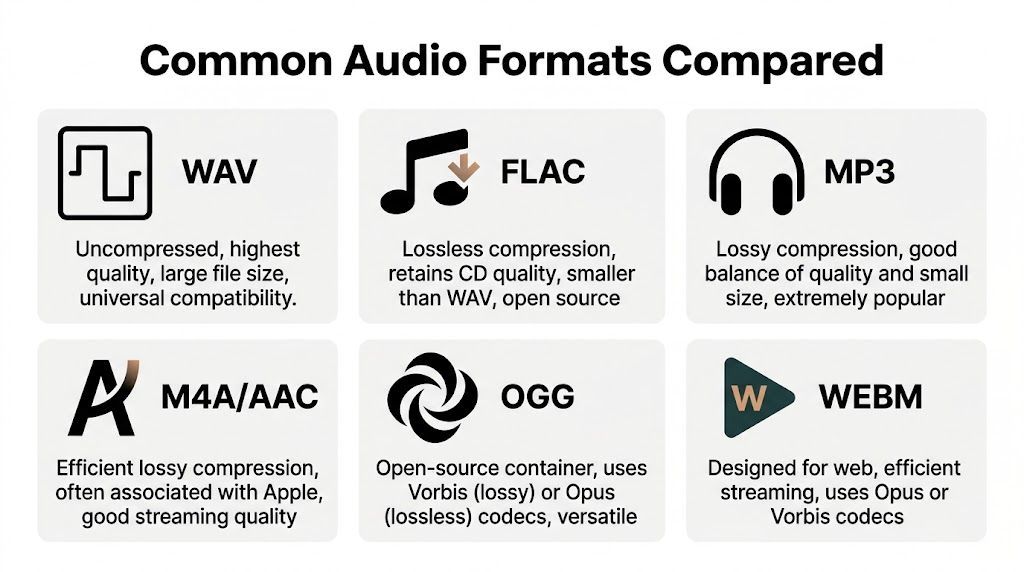
For broader context beyond the formats that show up most often in business workflows, this overview of 10 types of audio file formats is a useful reference.
WAV
WAV is the safest choice when the recording itself is the asset. It stores the full audio signal without compression, which is why studios, courts, and production teams still rely on it as a master format.
Quality: excellent.
File size: large.
Compatibility: near universal.
Transcription suitability: excellent.
Best takeaway for WAV: use it for original recordings, legal source files, and any audio you may need to edit, review, or defend later.
The advantage is predictability. WAV opens cleanly in almost every recorder, editor, and transcription workflow. If a file will move between field recorders, Adobe Audition, Pro Tools, Logic Pro, or review software, WAV usually creates the fewest surprises.
The cost is storage and transfer time. A long interview or board meeting in WAV gets heavy fast.
FLAC
FLAC is often the best operating format for professionals who want high transcript accuracy without carrying WAV-sized files through every step of the workflow. It keeps the full signal but compresses it losslessly.
According to Sage Audio’s format guide, FLAC can reduce file sizes by up to 70% compared to WAV, supports up to 32-bit depth and 192kHz, and is the preferred format for 65% of archival music libraries in Europe and North America.
Quality: lossless.
File size: much smaller than WAV.
Compatibility: strong on modern systems.
Transcription suitability: excellent.
Best takeaway for FLAC: start here if you need strong transcription results and easier storage, syncing, and uploading.
In practice, FLAC is the format I recommend most for AI transcription pipelines. You keep the speech detail that models need, but you remove a lot of the storage penalty that makes WAV annoying at scale.
MP3
MP3 survives because it solves a real business problem. Files are small, easy to send, and supported almost everywhere.
Quality: lossy.
File size: small.
Compatibility: excellent.
Transcription suitability: acceptable for clean speech, weaker for difficult audio.
MP3 works well for playback and distribution. It is a weaker source format for transcription, especially with crosstalk, room noise, accented speakers, or dense terminology.
If you want a practical side-by-side on the trade-off, this comparison of the difference between MP3 and WAV explains it clearly.
M4A and AAC
M4A usually contains AAC audio, which is a more efficient lossy codec than MP3 in many common recording and mobile workflows.
Quality: good for compressed audio.
File size: small.
Compatibility: strong, especially in Apple-heavy environments.
Transcription suitability: workable, but still compressed.
This format is common in phone recordings, voice notes, and internal sharing. It often sounds better than MP3 at similar bitrates, but it still throws away information. For high-stakes transcription, lossless still wins.
OGG
OGG shows up more often in technical environments, open-source tools, and certain app-based workflows than in standard business audio pipelines.
- Strength: open format with flexible use cases
- Weakness: inconsistent support in some office and legal review tools
- Transcription fit: usable if the recording is clean and your workflow already supports it
OGG is usually not the first format a business team chooses. It is more often something inherited from a platform or product.
WEBM
WEBM is common in browser-based capture, online meeting tools, and lightweight web recording systems.
- Best fit: browser recording and web delivery
- Common issue: convenient for capture, weaker as a long-term master or archive format
- Transcription fit: acceptable if the source audio is clear
WEBM is often a workflow artifact rather than a deliberate format decision. If the recording matters, it is usually worth converting and storing a more durable version for archive and review.
A practical ranking
For most professional users, the ranking is straightforward:
- FLAC for the best balance of transcript quality and file efficiency
- WAV for source masters and maximum editability
- M4A/AAC for mobile convenience when lossless is not available
- MP3 for distribution and lightweight sharing
- WEBM for browser-captured recordings
- OGG for specialized environments
If the file is headed into WhisperAI or any serious transcription workflow, I would keep one rule simple. Start with FLAC or WAV whenever you control the recording.
How Your Audio Format Impacts AI Transcription Accuracy
A sales team records a client call that sounds fine over laptop speakers. The transcript still comes back with product names mangled, speaker labels mixed up, and action items assigned to the wrong person. In practice, that usually starts with the source audio.
AI transcription models such as WhisperAI work from the acoustic detail in the file you upload. If the format keeps those details intact, the model has cleaner cues for word boundaries, consonants, pauses, and speaker changes. If the format throws details away, the model has to guess more often. That is where transcript quality starts to slip.
What uncompressed and lossless formats preserve
For transcription, speech clarity is not just about sounding pleasant to a listener. The model benefits from tiny details: the edge of a T, the difference between F and TH, the breath before a speaker cuts in, the room reflections that help separate voices.
WAV and FLAC preserve those details far better than lossy formats. In real workflows, that shows up in a few specific ways:
- Better recognition of accents and pronunciation
- Cleaner handling of quiet consonants
- Fewer mistakes on jargon, names, and acronyms
- Stronger speaker separation in interviews and meetings
- More reliable results when the room is noisy
I see this most often with internal meetings and podcast interviews. A file that sounds "good enough" for playback can still lose enough speech detail to hurt transcript accuracy.
What lossy compression removes
Lossy formats such as MP3 and low-bitrate AAC shrink files by discarding audio information. For casual listening, that trade-off is often fine. For transcription, a system may struggle with the removed information.
The damage usually shows up around the edges of speech. High-frequency consonants soften. Short pauses blur together. Background noise and voice can get smeared into the same texture. A human listener can often infer the missing word from context. A transcription model only gets the waveform in front of it.
That matters more in difficult recordings than in clean studio audio.
Common failure points include:
- Cross-talk in meetings
- Remote interviews with uneven mic quality
- Medical, legal, or technical vocabulary
- Rooms with HVAC, traffic, or keyboard noise
- Mixed accents or non-native speakers
If your team depends on transcripts for search, compliance, meeting summaries, or downstream AI analysis, those small errors are not cosmetic. They create real cleanup time and can distort the record.
Format affects accuracy before the model starts
A transcription model cannot recover detail that was stripped out during compression. Converting an MP3 to WAV after the fact does not restore the missing information. It only wraps the same degraded signal in a larger file.
That is why I treat format choice as an input-quality decision, not a storage decision. Record cleanly, keep the original signal intact, and only compress later if you need a lighter distribution copy. For teams building a repeatable workflow, this best Whisper transcription setup guide is a useful companion to your file format choices, and this practical guide to audio recording for podcasts covers the capture side well.
One limit is worth stating clearly. A pristine WAV made from a weak phone mic in a noisy cafe will still transcribe poorly. Format protects quality already present in the recording. It does not create clarity that was never captured.
Best Audio Settings for WhisperAI Transcription
A common failure point looks like this. The meeting was recorded, the speakers were understandable to everyone in the room, and WhisperAI still returns a transcript with too many name errors, jargon misses, and speaker confusion to trust without cleanup. In practice, the file settings are often part of that problem.
For most professional speech workflows, use FLAC as the default file you send to WhisperAI. Use WAV when the recording needs to remain in its original production form, or when legal, archival, or evidentiary requirements matter more than storage efficiency. That gives teams a clean balance between transcription accuracy, upload practicality, and record-keeping.
If you want the broader workflow around model choice, preprocessing, and prompt handling, this guide to the best Whisper transcription setup fills in the operational details around the file settings below.
Recommended settings for real work
These are the settings I would hand to a business team that wants better transcripts without turning audio prep into a side job.
| Use Case | Recommended Format | Sample Rate | Bit Depth | Channels |
|---|---|---|---|---|
| Meeting recording | FLAC | 44.1 kHz | 16-bit | Mono |
| Interview with one or two speakers | FLAC | 44.1 kHz | 16-bit | Mono |
| Noisy field recording | FLAC | 44.1 kHz | 24-bit | Mono |
| Legal or archival master | WAV | 44.1 kHz | 24-bit | Mono or split channels if available |
| Podcast raw master for transcript creation | FLAC | 44.1 kHz | 16-bit or 24-bit | Mono for speech, stereo only if needed |
Why these settings work well with WhisperAI
WhisperAI generally benefits more from a clean, lossless speech signal than from oversized files with unnecessary complexity. That is why FLAC at 44.1 kHz, 16-bit, mono is such a strong default. It preserves the speech detail the model needs while keeping files easier to store, transfer, and process than WAV.
The practical goal is simple. Keep the consonants, room cues, and speaker detail that help the model separate words, but avoid bloated exports that slow down handoffs and archiving.
Sample rate
For speech, 44.1 kHz is a safe working standard. It captures far more than the frequency range that carries intelligible voice content, and it stays compatible with nearly every recorder, editor, and upload workflow.
Higher sample rates are fine if that is what your gear records natively. They usually do not produce a meaningful gain in transcription accuracy for spoken-word audio.
Bit depth
16-bit is enough for clean meetings, webinars, interviews, and podcast dialogue. It covers the needs of normal spoken-word capture well.
Use 24-bit when levels are unpredictable, speakers drift on and off mic, or the environment is noisy. The extra headroom helps you preserve cleaner speech before normalization, noise reduction, or level adjustment. That matters more during preprocessing than at the model stage, but it still improves the odds of a better final transcript.
Channels
For straight transcription, mono is usually the right export. It cuts file size, avoids left-right imbalance problems, and keeps the speech signal consistent.
There is one important exception. If two speakers were recorded on separate channels, keep those channels isolated during editing as long as possible. That makes cleanup easier and can improve speaker attribution before you create the final transcription file.
Practical rule: optimize for clear speech, stable levels, and lossless export. Do not spend time chasing high-end music-production settings for a meeting transcript.
Simple ffmpeg commands
If your recorder, conferencing app, or client delivery gives you the wrong format, ffmpeg is the fastest fix.
Convert WAV to FLAC:
ffmpeg -i input.wav output.flac
Convert MP3 to a clean WAV working file for editing or upload preparation:
ffmpeg -i input.mp3 -ar 44100 -ac 1 -sample_fmt s16 output.wav
Convert stereo audio to mono FLAC for speech transcription:
ffmpeg -i input.wav -ar 44100 -ac 1 output.flac
Create a 24-bit FLAC from a source file:
ffmpeg -i input.wav -ar 44100 -ac 1 -sample_fmt s32 output.flac
That last conversion is useful for standardizing exports across a team. It does not improve a weak source recording.
If you also produce spoken-word content, this practical guide to audio recording for podcasts is a useful reference for getting the recording right before export settings ever become the issue.
Choosing the Best Format for Your Specific Use Case
A familiar problem: the recording is done, the transcript is due, and the file on hand is whatever the platform exported. The right choice is much easier upstream. Pick the format based on what the recording needs to do later, especially if WhisperAI transcription quality matters.
For the business team
For internal meetings, client calls, and training sessions, FLAC is usually the best operating choice. It preserves the same audio information as WAV while cutting file size. FLAC typically compresses audio by 40 to 60% compared with WAV, so a one-hour meeting that is 630 MB as WAV becomes roughly 252 to 378 MB as FLAC, according to MasteringBOX’s guide to audio formats.
That trade-off is hard to beat in business workflows. Smaller files upload faster, store more cleanly, and keep the source quality intact for better transcript review, search, and reprocessing later.
Use FLAC if your team needs:
- Long meeting archives
- Searchable transcripts
- Reliable speaker capture in group discussions
- A better master file than MP3 for future reuse
For podcasters and media teams
Use WAV or FLAC for the master. Export a compressed format only for distribution.
That split protects transcription quality. The file sent to Spotify, YouTube, or a client approval thread is often not the best file to send into WhisperAI. Transcribe from the pre-distribution master so captions, show notes, quotes, and content repurposing start from the cleanest source you still control.
I see this mistake often. Teams spend time polishing edits, then generate the transcript from the final MP3 because it is convenient. That usually means more dropped words, more mistakes on names, and more cleanup by hand.
For legal and compliance teams
Choose WAV if the recording may serve as evidence, an official record, or a file with strict retention requirements.
The reason is practical. WAV is simple, widely accepted, and easy to defend in conservative review environments. FLAC can still make sense in some legal workflows, but if the question is which format raises the fewest objections later, WAV is usually the safer default.
For researchers and academics
Use FLAC for lectures, interviews, oral histories, and seminar recordings that run long and need to stay usable for years.
Research audio often gets reused. One team may want a transcript now, another may revisit the file later for coding, quote verification, or secondary analysis. FLAC keeps that door open without the storage cost of WAV. It also gives AI transcription tools a better source when recordings include multiple speakers, accented speech, or technical terminology.
For healthcare and clinical documentation
Use the cleanest format your system supports consistently. In many workflows, that means FLAC for routine recordings and WAV for higher-risk source material.
Clinical audio is rarely pristine. Speech may be quiet, masked, interrupted, or mixed with device noise. Those are the conditions where lossy compression causes real problems for transcription accuracy, especially on medication names, symptoms, and short low-volume phrases.
For people stuck with whatever the platform gave them
Sometimes the file arrives as MP3, M4A, or WEBM, and that is the starting point.
Use the file carefully:
- Do not expect conversion to improve lost quality
- Avoid exporting the same audio through multiple lossy formats
- Create one clean working copy if your workflow requires it
- Change the capture settings before the next recording, not after
That last point saves the most time. The cheapest way to improve WhisperAI output is to record in a better format before anyone hits upload.
Frequently Asked Questions About Audio Formats
Can I convert an MP3 to FLAC to improve its quality
No. Converting MP3 to FLAC only creates a larger file containing the same already-compressed audio. It can make workflow sense if a tool wants FLAC or WAV, but it does not restore missing detail.
Is WAV always better than FLAC
For raw fidelity, WAV is the purest and simplest option because it’s uncompressed. But for most real transcription workflows, FLAC is the better operating choice because it preserves the same audio information in a much smaller file.
So the answer is: WAV is technically the maximum-quality source, but FLAC is usually the better format to work with.
What if my audio is inside an MP4 video file
Extract the audio first. Don’t transcribe the video container just because that’s what you received. Pull the audio into a clean format, ideally lossless if the source allows it, then work from that file.
Is MP3 ever acceptable for transcription
Yes. If the recording is clean, the speech is clear, and the stakes are low, MP3 can be good enough. It’s common in podcast distribution and lightweight sharing for a reason.
But if the recording includes poor mic technique, room noise, crosstalk, or technical vocabulary, MP3 is usually not the best audio format for transcription.
Should I record in stereo or mono
For speech transcription, mono is usually the smarter default. It keeps files smaller and reduces avoidable complexity. Stereo is useful only when channel separation serves a purpose, such as isolating speakers in a controlled interview setup.
What's the biggest mistake people make with audio format
They compress too early.
They record or export to a lossy format for convenience, then discover later that they need editing, captions, legal review, or high-confidence transcription. By then, some of the audio detail is already gone. That’s why the safest workflow is simple: capture cleanly, preserve quality, compress later only when distribution requires it.
If you want to turn long meetings, interviews, lectures, and podcasts into accurate text without wrestling with manual cleanup, try WhisperAI - #1 AI Transcription. It supports professional transcription workflows and helps teams process audio into searchable transcripts fast.