What Is Voice to Text? a Guide to How It Works in 2026
Curious about what is voice to text? Learn how speech recognition technology works, why accuracy matters, and how to choose the best AI tools for your needs.
Voice to text technology uses AI to turn spoken language into written text. Today's systems can hit over 90% accuracy when conditions are right. The voice recognition market was nearly $12 billion USD in 2022 and could reach about $50 billion USD by 2029.
Professionals often discover voice to text when they need it most. Meetings move fast, client calls overflow with important details, or a doctor, lawyer, or manager needs a written record without juggling listening and typing.
That's why what is voice to text is a crucial question now. It's not just about convenience. It's about changing how we capture ideas, document decisions, and make spoken information searchable and shareable.
The big question is why one tool works like magic while another churns out errors. It boils down to accuracy, audio quality, language handling, and whether the tool fits your workflow.
Table of Contents
- From Spoken Words to Digital Text
- How Your Voice Becomes Text
- What Determines Voice to Text Accuracy
- Practical Use Cases Across Industries
- Choosing the Right Voice to Text Solution
- Best Practices for Clean Transcripts
From Spoken Words to Digital Text
Manual note-taking crumbles when conversations get critical. Listening, responding, and capturing details at once usually means missing something.
Voice to text fixes that by automatically turning speech into text. It's like a digital listener that hears and writes speech fast enough to keep up.
This simple concept has grown into a major business. The global voice recognition market hit nearly $12 billion USD in 2022 and could skyrocket to almost $50 billion USD by 2029, driven by uses like call center analytics, real-time translation, and dictation apps, according to Statista's market data.
Why it matters in daily work
For a manager, it means capturing action items in a meeting. For a researcher, it's turning recorded interviews into text for analysis. For content teams, it's transforming a webinar or podcast into an editable draft.
Main takeaway: Voice to text matters because people need more than transcripts. They need a dependable way to keep spoken info from vanishing.
Think of it like this: typing is text from hands, while voice to text is text from conversation. This shift is crucial because so much work happens through speaking, not formal writing.
How Your Voice Becomes Text
When voice to text is good, it feels effortless. But underneath, it's doing a lot of quick, technical work.
It starts with sound, not words
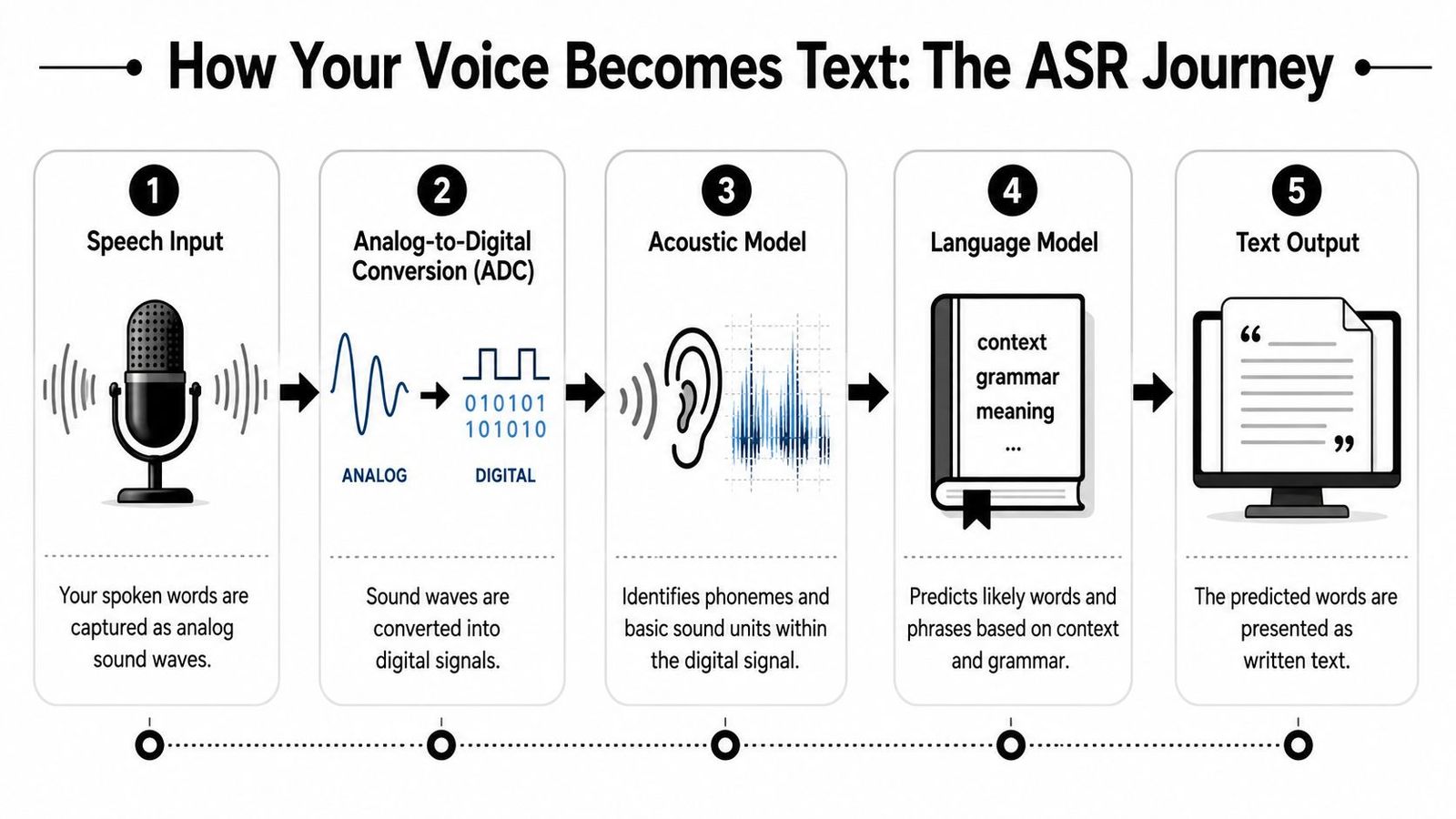
First, a voice-to-text system captures sound via a microphone. This analog sound gets converted into digital data before it's useful. The software doesn't "hear" sentences like a person does. It receives a stream of audio data needing interpretation.
Think of it as a digital translator for sound. Before writing text, it has to break the stream into patterns. For a broader look at how machines interpret audio, check out understanding music audio analysis.
Two models do the heavy lifting
Modern Automatic Speech Recognition (ASR) systems rely on two main components. An acoustic model analyzes audio signals, mapping patterns to phonemes, the sound units forming words. A language model predicts likely words based on context and grammar, helping distinguish between words like "their" and "there."
That's why voice to text is more than simple sound matching. It figures out both what was said and what makes sense in the sentence.
Good voice to text doesn't just hear syllables. It uses context to decide what the speaker probably meant.
The underlying mechanics often go like this: ASR uses acoustic models to map audio spectrograms to phonemes and language models to predict likely word sequences. Streaming ASR, for live dictation, works with latency under 500 milliseconds so speech becomes text quickly enough for natural dictation.
Real-time dictation and uploaded recordings
Not every voice-to-text workflow is identical. Some tools are for streaming, where text appears as someone speaks. Others handle batch processing, transcribing uploaded audio or video files.
This difference affects the user experience.
| Workflow | Best for | What it feels like |
|---|---|---|
| Streaming dictation | Notes, live captions, speaking drafts aloud | Text appears almost immediately |
| Uploaded transcription | Meetings, interviews, webinars, recorded calls | A finished transcript arrives after processing |
Professional dictation often needs punctuation, speaker handling, and uninterrupted thought. If you want a tool built for that, our list of the best AI dictation software compares six tools, from Wispr Flow to Dragon, plus the free dictation already in your operating system.
What Determines Voice to Text Accuracy
The gap between a usable transcript and one needing more cleanup than it's worth.
What Word Error Rate means
The key metric is Word Error Rate or WER. Lower is better. A low WER means fewer mistakes in substitutions, omissions, or insertions.
Today’s systems can reach over 90% accuracy, with 5-10% WER considered high quality. But results can vary, especially with accents, noise, crosstalk, and specialized vocabulary. A 2020 survey showed 73% of users citing accuracy as a main issue, and 66% had problems with accents or dialects, according to this review of WER challenges.
Why transcripts go wrong
Transcripts usually suffer due to a few common issues:
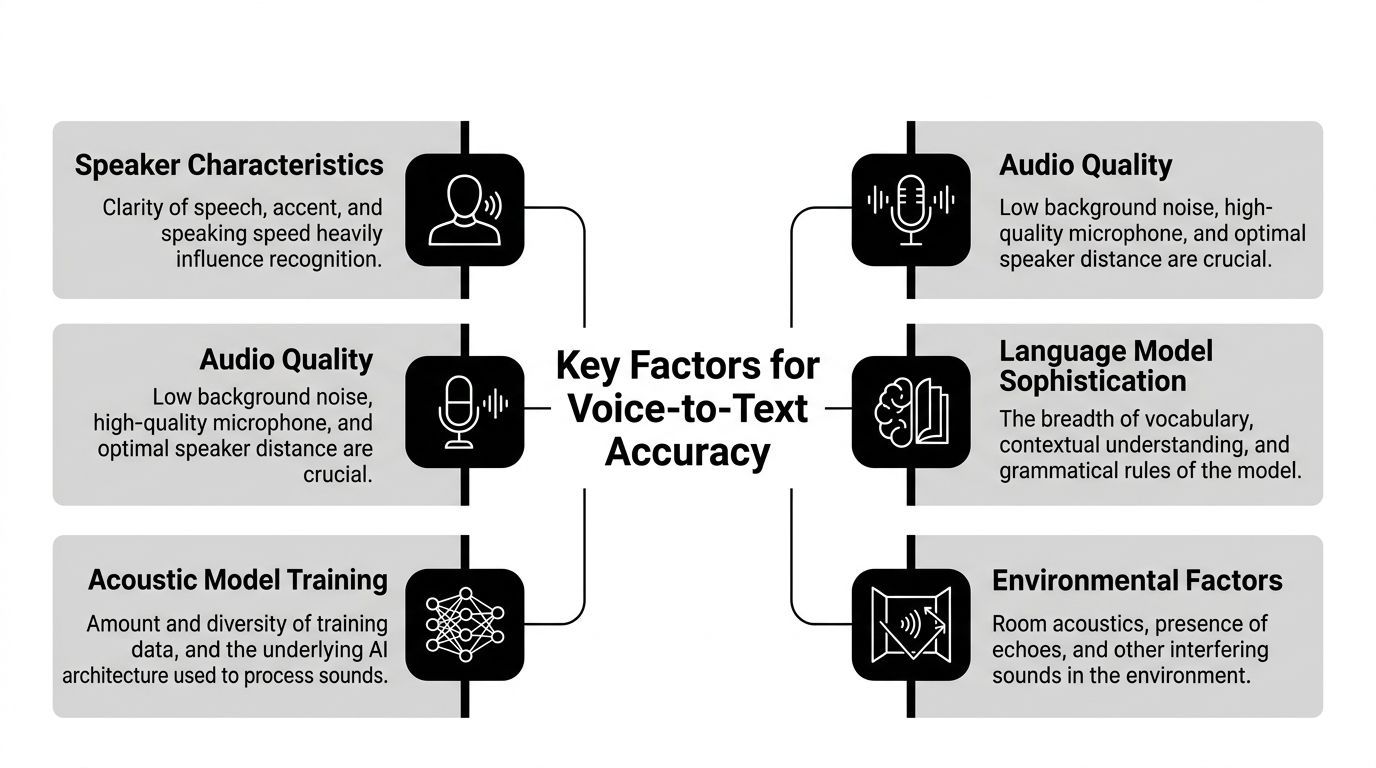
- Weak audio input: Built-in laptop mics capture room noise and distance from the speaker.
- Background noise: Office chatter, traffic, or echo complicates interpretation.
- Accent and dialect variation: Words can sound different by region or style.
- Fast or overlapping speech: Group meetings are tougher than solo dictation.
- Specialized terminology: Industry terms don't follow everyday language rules.
Here's the reality. Even top-tier software struggles when the speaker is far from the mic in a noisy room with interruptions.
Practical rule: If the audio is hard for a human to follow, it will usually be hard for speech recognition too.
That's why some tools feel smart and others don't. The model matters, but recording conditions are just as crucial.
Practical Use Cases Across Industries
Voice to text makes more sense when it's linked to real work rather than technical jargon.

Where it helps most
A marketing team records a brainstorm session. Instead of partial notes, they get a full transcript to search for ideas, quotes, and decisions.
A lawyer dictates case notes after calls or hearings. A physician speaks clinical observations instead of typing every detail. A researcher uploads interviews, converting hours of speech into text for coding, reviewing, and citing.
In contact centers, the value extends beyond transcription. Teams connecting transcripts with operational review should look into speech analytics for compliance and efficiency.
Why speed changes the workflow
Speed is why adoption is spreading. Voice-to-text is about 3x faster than typing, making it ideal for meetings, lectures, legal notes, and spoken drafts, as highlighted in this overview of speech recognition speed and productivity.
It doesn't just save time. It changes behavior. People are more likely to capture ideas when speaking is easier than typing, and they won't skip documentation when it integrates smoothly into their workflow.
Some examples show the pattern:
- Business teams: Meeting transcripts simplify decision reviews.
- Healthcare staff: Dictation cuts keyboard time and speeds up note-taking.
- Academics: Lectures, seminars, and interviews become searchable text.
- Media producers: Turns recorded speech into captions, subtitles, and drafts.
- Operations teams: Calls are documented and reviewed without relying on memory.
The best use cases share one trait: spoken information is valuable and needs to be preserved accurately.
Choosing the Right Voice to Text Solution
Choosing a voice-to-text tool seems easy until the transcript is for legal documents, clinical notes, research data, or client records. Then, "good enough" just doesn't cut it.
Consumer convenience and professional demands
Built-in dictation on phones and laptops works for quick notes. But professional tasks often need more than basic transcription. They might need better jargon handling, speaker identification, multilingual audio, privacy controls, export formats, and reliable formatting.
This distinction is critical in high-stakes fields. Over 60% of legal and medical professionals discard auto-transcribed notes due to missing crucial terms. Standard models can misclassify 18–22% of domain-specific terms, while enterprise-grade systems fine-tuned for specific datasets can reduce error rates to below 2%, according to this analysis of ASR performance in legal and medical settings.
In specialized work, the transcript is often part of the record. That changes the standard from "helpful" to "dependable."
What to look for before choosing
Smart evaluations usually include these questions:
- Does it handle specialized language well? Medical, legal, technical, and compliance-heavy teams need more than general dictation.
- Can it support real-world conversations? Meetings have interruptions, accents, and uneven audio.
- Does it fit privacy requirements? Teams need clear security and data-handling standards.
- What happens after transcription? Search, speaker labeling, summaries, and exports matter as much as raw text.
- Can it support multiple languages? Global teams rarely stick to one accent or vocabulary set.
For professional-grade needs, teams often compare tools like built-in OS dictation, Dragon, and dedicated platforms. One option is WhisperAI's AI Transcription, supporting uploaded audio and video transcription, live recording, translation, and structured transcript features for business workflows.
The right choice hinges less on flashy demos and more on the consequences of transcript errors. If mistakes are risky, treat the tool like infrastructure, not a convenience app.
Best Practices for Clean Transcripts
Even the best software can't fix messy audio completely. Clean transcripts start before hitting record.
A short recording checklist
A few habits make a big difference:
- Use a dedicated microphone: An external mic captures speech more clearly than a laptop across the room.
- Choose a quiet space: Less background noise gives the model a cleaner signal.
- Speak clearly at a natural pace: Too much enunciation sounds unnatural, but rushing causes errors too.
- Run a short test first: A quick sample reveals echo, clipping, and volume issues before the meeting starts.
Teams also see better results by using formats that keep audio quality intact during upload and processing. Check out this guide on best audio formats for transcription for recording prep.
The takeaway is simple. The right tool turns voice to text from a novelty into a productivity system, but the recording setup still shapes the outcome.
Teams needing dependable transcripts, live dictation, translation, and searchable records should check out WhisperAI - #1 AI Transcription for meetings, interviews, lectures, legal prep, and documentation workflows.