WhisperAIPowered by OpenAI
TranscribeMeetingsDictationAPI
Pricing

More products

AI TranscriptionConvert audio and video into accurate textAudio TranslationTranslate recordings and subtitles into 89 languagesWhisper MCPNewUse WhisperAI in ChatGPT and ClaudeCloud SyncAutomatically transcribe files from cloud storageAdvanced PromptingCustomize transcripts with instructions and templatesiPhone AppRecord and transcribe on the go, even with the screen locked

Use cases

EducationTranscribe lectures, research interviews and seminarsLegalAccurate transcripts for depositions, hearings and callsHealthcareTranscription with HIPAA compliance mode and a signed BAAContent CreatorsCaptions, subtitles and show notes for podcasts and videoSales & MarketingTurn calls and interviews into insights and contentPersonal ProductivityCapture notes, ideas and voice memos as textEnterpriseTeam workspaces, security and volume pricing

Resources

Learn

LanguagesTranscribe in 100+ languages, auto-detectedCompareSee how WhisperAI stacks up against alternativesFree ToolsMic test, audio trimmer, TXT to SRT and moreGuidesStep-by-step transcription guides by use caseBlogTips, product news and transcription insights

Company

Help CenterAnswers, setup help and supportSecurityHow we protect your files and dataAboutWho we are and why we built WhisperAI
NewWhisper MCP for Claude & ChatGPTUse WhisperAI in ChatGPT and ClaudeConnect your assistant
  • English
  • Español
  • Français
  • Deutsch
  • Português
  • Italiano
  • 日本語
  • 한국어
  • Nederlands
  • हिन्दी
  • Русский

Products

  • TranscribeConvert audio and video into accurate text
  • MeetingsLive transcription, translation and AI recaps
  • DictationDictate anywhere and record browser meetings
  • APIWhisper API for developers
Pricing
More products
AI TranscriptionConvert audio and video into accurate textAudio TranslationTranslate recordings and subtitles into 89 languagesWhisper MCPNewUse WhisperAI in ChatGPT and ClaudeCloud SyncAutomatically transcribe files from cloud storageAdvanced PromptingCustomize transcripts with instructions and templatesiPhone AppRecord and transcribe on the go, even with the screen locked
Use cases
EducationTranscribe lectures, research interviews and seminarsLegalAccurate transcripts for depositions, hearings and callsHealthcareTranscription with HIPAA compliance mode and a signed BAAContent CreatorsCaptions, subtitles and show notes for podcasts and videoSales & MarketingTurn calls and interviews into insights and contentPersonal ProductivityCapture notes, ideas and voice memos as textEnterpriseTeam workspaces, security and volume pricing
Resources

Learn

LanguagesTranscribe in 100+ languages, auto-detectedCompareSee how WhisperAI stacks up against alternativesFree ToolsMic test, audio trimmer, TXT to SRT and moreGuidesStep-by-step transcription guides by use caseBlogTips, product news and transcription insights

Company

Help CenterAnswers, setup help and supportSecurityHow we protect your files and dataAboutWho we are and why we built WhisperAI
LanguageEnglish
  • English
  • Español
  • Français
  • Deutsch
  • Português
  • Italiano
  • 日本語
  • 한국어
  • Nederlands
  • हिन्दी
  • Русский
Home›Free tools›Audio joiner

Audio Joiner

A recording that came out in pieces gives you a transcript in pieces. Join the pieces into one file first, in the order you recorded them, and keep the list of where each one starts. Then you get one transcript, and any line in it leads back to the piece it came from.

By Eman Khoubian, Founder & CEO

WAV setting
Gap between files

or drop them here · up to 20 files, 1 GB each

Your files are joined right here in this browser tab and never uploaded. The joined file can be up to 30 minutes long, or 2 hours at 16 kHz mono.

Put the pieces in order, then pick a gap

Before you join, check the list: the pieces should run in the order you recorded them, and each length should match what you remember. Put one in the wrong place and the transcript jumps back and forth in time, and you won't notice until you're reading the text.

Then pick the gap. Choose no gap when a recording stopped mid-sentence and the next piece picks it up, so the words meet the way they were said. Choose one or two seconds of silence for clips recorded at different times, so you can hear where one ends.

The pieces don't have to match. A phone's M4A, an MP3 and the sound from an MP4 video join into one WAV at the setting you pick. At 44.1 or 48 kHz the joined file is stereo when any piece is stereo, and a mono piece plays on both sides.

interview-notes.txtPasted from Copy start times
  1. 0:00.0interview-1.m4a
  2. 52:10.0interview-2.m4a
  3. 1:31:45.0interview-3.m4a
Three pieces of one interview, joined with no gap: 1:52:57 in all.

One joined file, or each piece on its own

Upload those three pieces to WhisperAI one by one and you get three recordings, each with its own transcript. With speaker labels on, each transcript numbers its speakers from scratch, and nothing ties Speaker 2 in one to Speaker 2 in the next. You'd work out who's who yourself, then search, rename and export three times.

Join first and it's one recording: one transcript to read and search, one export, one set of speakers. Rename Speaker 2 once and the name changes on every line. Speaker labels come with every plan, Free included: switch them on when you upload. For a file you'll transcribe, pick 16 kHz mono. The WAV converter explains what the other two settings are for.
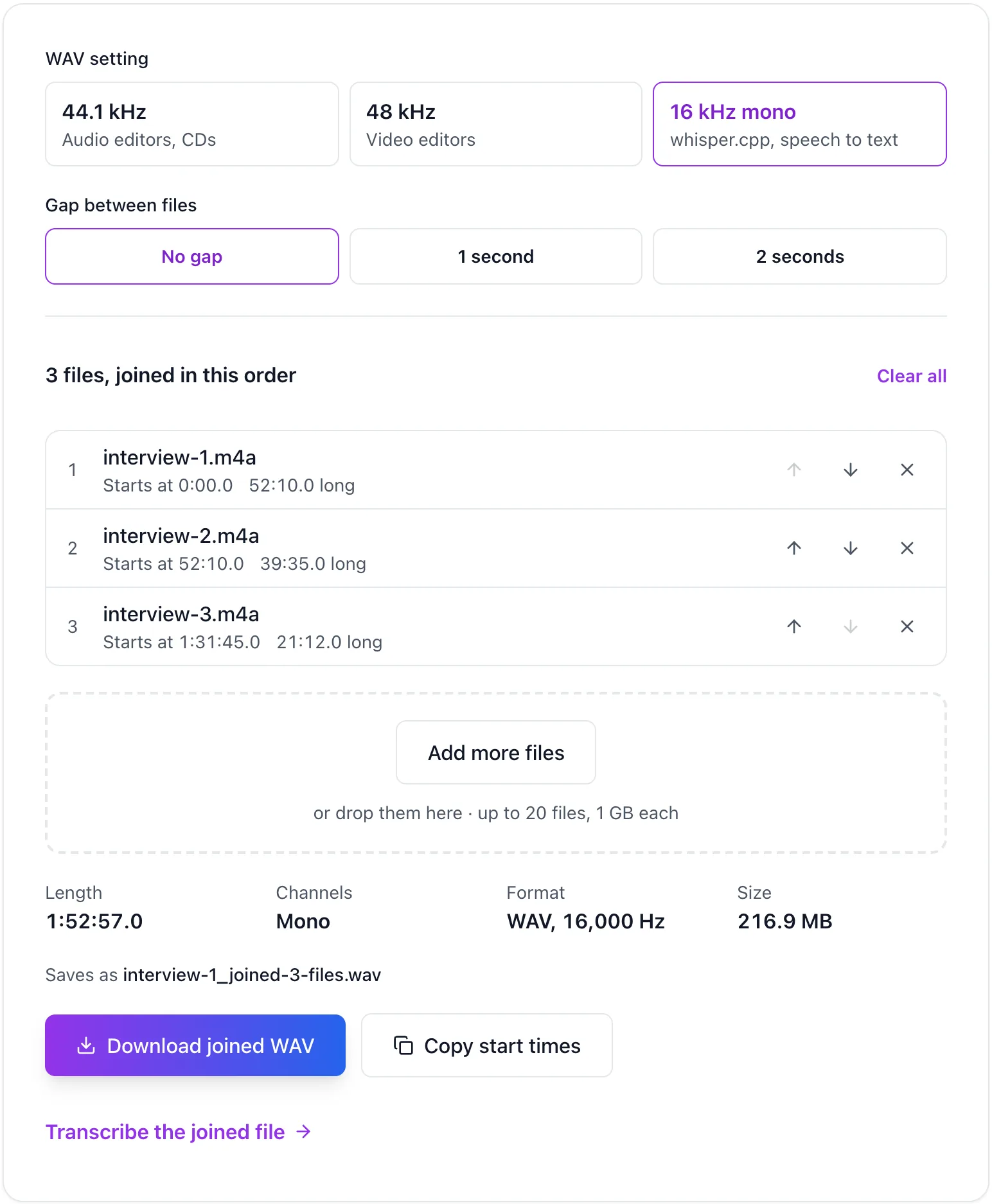
The audio joiner with three interview pieces at 16 kHz mono and no gap: starts at 0:00.0, 52:10.0 and 1:31:45.0, joined length 1:52:57.0, 216.9 MB.
The same three pieces in the joiner: one file, ready to upload.

Which piece is this line from?

The start list is what you keep once the pieces are gone from your desktop. A transcript line belongs to the last piece that starts before its timestamp. Subtract that piece's start, and you're at the same spot in the original file.

The start list already counts any gap you add. With one second between pieces, interview-2.m4a in the figure below would start at 52:11.0 instead of 52:10.0, and the list would say so.

You'll need the list whenever you go back to the source: to send a client the original clip, check a quote against the recorder's own file, or cut one passage out with the audio trimmer. So click Copy start times and paste the list into your notes before you upload.

Transcript

01:02:30Speaker 2: We signed the lease in March, not April.

  1. 0:00.0interview-1.m4a
  2. 52:10.0interview-2.m4a
  3. 1:31:45.0interview-3.m4a

1:02:30 is after 52:10.0 and before 1:31:45.0, so it's in interview-2.m4a, 10:20 in.

A line at 1:02:30 in the joined transcript, found in its original piece.

Already one file? Upload it as it is

If your recording is one long file, there's nothing to join and nothing to convert: WhisperAI takes uploads up to 5 GB and 10 hours long, so you can transcribe it as it is. More than 500,000 people already use it.

Free tools
  • Mic test

    Talk for five seconds and find out if your mic is good enough to record with.
  • Online voice recorder

    Record your voice, pause, play it back and download it.
  • Meeting minutes template

    Meeting minutes with decisions, owners and due dates, as a Word file.
  • Audio trimmer

    Cut the part you need. The file name keeps where the clip started in the original.
  • TXT to SRT converter

    Turn a text file into SRT subtitles. Lines that start with a time keep it.
  • WAV converter

    Turn audio or video into a WAV at 16, 44.1 or 48 kHz. See the size first.
WhisperAIPowered by OpenAI

Professional AI-powered voice transcription and meeting assistant platform.

Transcribe freeDownload on the App Store

Product

  • Features
  • Plans & Pricing
  • Premium Plan
  • Business Pro Plan
  • Enterprise Plan
  • Whisper API
  • Speech to Text API
  • Cloud Sync
  • Meeting Assistant
  • WhisperAI MCP
  • WhisperAI for Claude
  • WhisperAI for ChatGPT
  • WhisperAI for Grok
  • For Enterprise
  • AI Transcription
  • Whisper Transcription
  • Speech to Text
  • Chrome Extension

Resources

  • Blog
  • All Guides
  • Help Center
  • Audio to Text
  • Meeting Transcription
  • MP3 to Text
  • Translate Audio
  • Video to Text
  • How-to Tutorials
  • Free Mic Test
  • Online Voice Recorder
  • Meeting Minutes Template
  • Audio Trimmer
  • TXT to SRT Converter
  • WAV Converter
  • Audio Joiner
  • For Education
  • For Content Creators
  • For Sales & Marketing
  • For Legal Teams
  • For Personal Productivity
  • API Documentation

Compare

  • Compare transcription tools
  • vs Otter.ai
  • vs TurboScribe
  • vs Rev
  • vs Fireflies
  • vs Descript
  • vs Deepgram
  • vs OpenAI Whisper

Popular Guides

  • Podcast Transcription
  • Video Subtitles
  • Legal Transcription
  • Medical Transcription
  • How to Transcribe Audio
  • Transcribe M4A Files

Languages

  • English
  • Spanish
  • French
  • German
  • Portuguese
  • Japanese
  • Chinese
  • Arabic
  • Hindi
  • Russian
  • All supported languages

Company

  • About Us
  • WhisperAI Security
  • Contact Us

Legal

  • Privacy Policy
  • Terms of Service
  • Cookie & Privacy Setting

WhisperAI in your language

  • English
  • Español
  • Français
  • Deutsch
  • Português
  • Italiano
  • 日本語
  • 한국어
  • Nederlands
  • हिन्दी
  • Русский

WhisperAI

© 2026 WhisperAI Technology Inc. All rights reserved. WhisperAI is a trademark of WhisperAI Technology Inc.

Follow us on

  • X
  • Instagram
  • LinkedIn